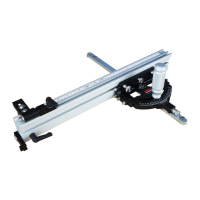
Using a combination or machine square, position it up against the front face of the Fence
Extrusion. To square the fence to the table, make sure the square is flush with the table and flush
against the extrusion and the gauge is sitting flat on your table. Rotate the fence until you see no
light between the square and the fence, re-tighten screws 9.1 & 9.2 on the left and right side of
the gauge. (See Figure 14)
c.
Slide your Fence Extrusion (Part #33) back onto the Mite-R-Excel II™
(See Figure 1
4
) and
tighten it in position using the Fence Knobs (Part # 45)
a.
Loosen off screws 9.1 & 9.2 on both sides of the fence using the 5/32” Hex Key (Part # 59)
provided.
b.
Figure 14
Vertically Squaring the Mite-R-Excel II™
12
Remove the Fence Extrusion (Part #33) from the Mite-R-Excel II™
and
remove the
Mite-R-Excel
II
™ from the table saw.
b.
Loosen the Fence Knobs (Part #45) and disengage the Fence Locating Pin Knob (Part #40).
a.
Squaring the Mite-R-Excel II™
C
45
9.1
33
9.2


 To Next Page
 Loading...