Note: The MAP Gateway serves as a replacement for the BTCVT, which is no longer available
for purchase, but continues to be supported.
Troubleshooting FX-PCG Controllers
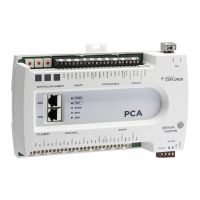
Observe the Status LEDs on the front of the FX-PCG and see Table 9 to troubleshoot the controller.
Note: To troubleshoot an integral or local controller display, refer to the FX-DIS1710 Local
Controller Display Technical Bulletin (LIT-12011666).
LED status and description table
Table 9: Status LEDs and descriptions of LED states
LED label LED
color
Normal LED
state
Description of LED states
POWER Green On Steady Off Steady = No Supply Power or the controller’s
polyswitch/resettable fuse is open. Check Output wiring for
short circuits and cycle power to controller.
On Steady = Power Connected
FAULT Red Off Steady Off Steady = No Faults
On Steady = Device Fault; no application loaded; Main
Code download required, if controller is in Boot mode, or a
firmware mismatch exists between the FX-PCG and the FX-
ZFR1811 Wireless Field Bus Router.
Blink - 2 Hz = Download or Startup in progress, not ready
for normal operation
SA BUS Green Blink - 2 Hz Blink - 2 Hz = Data Transmission (normal communication)
Off Steady = No Data Transmission (N/A - auto baud not
supported)
On Steady = Communication lost, waiting to join
communication ring
FC BUS Green Blink - 2 Hz Blink - 2 Hz = Data Transmission (normal communication)
Off Steady = No Data Transmission (auto baud in progress)
On Steady = Communication lost, waiting to join
communication ring
EOL Amber Off
(Except on
terminating
devices)
On Steady = EOL switch in ON position
Off Steady = EOL switch in Off position
Repair information
If a controller fails to operate within its specifications, replace the controller. For a replacement
controller, contact your Johnson Controls representative.
31FX-PCG26 General Purpose Programmable Controller Installation Instructions









 To Next Page