17
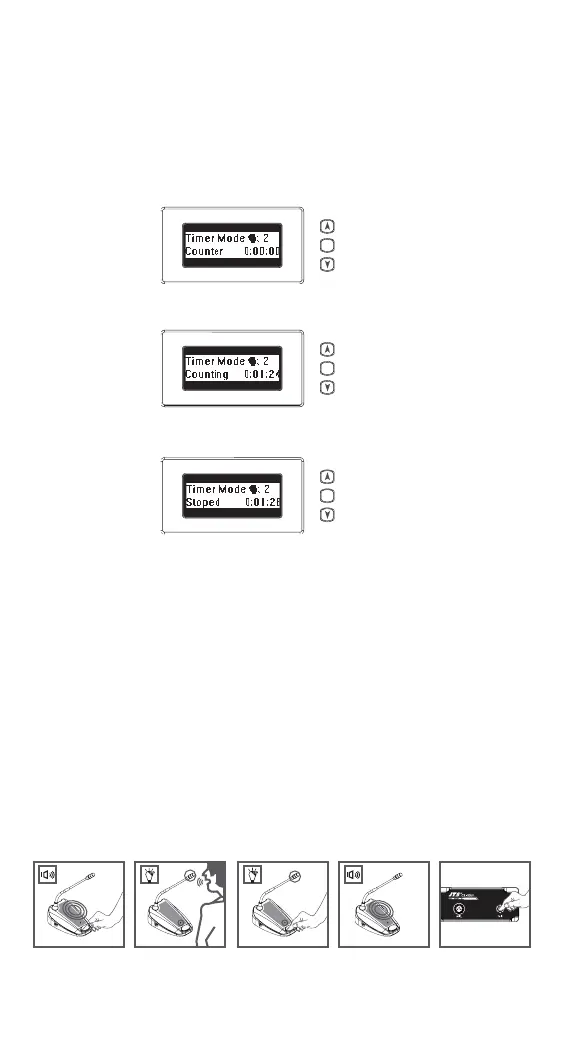
5.4 Counter Operation
1) Pressing the “Set” button, the Date | Set area on the
LEDDisplay will show“Counter”
2) Pressing “Up” to start counting.
3) Pressing “Up” again to stop.
4) Pressing “Down” to clear data after stopping.
5) Pressing the “Set” button again to jump back the
original display. Notice that you can operate any
other functions of the control unit when the counter
is used.
5.5 Delegate unit operation
1) Depending on the setting of the microphone mode
on the
CU, pressing the microphone ON/OFF (CS-
1DUF:Talk) push-button will
activate the gooseneck microphone.
2) Pressing again turns the microphone off
SET
SET
SET
CS-1DUF
1..4 1..4



 To Next Page