20
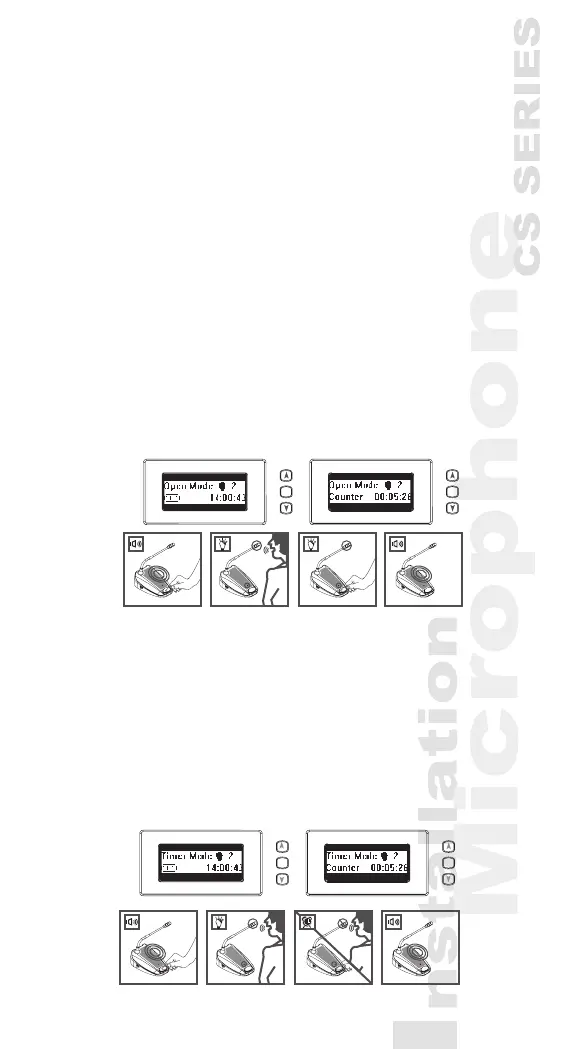
5.10 Open mode
1) Pressing the “Set” button over 1.5 seconds, the
Date | Set area on the LCD Display will ash and
show “Set”.
2) Press “Up” or “Down” button to choose “Open
Mode” on the Mode Status area of the LCD Display.
3) Press “Set” button again, the number on simultane-
ously user number will ash.
4) Press “Up” or “Down” button to choose the simulta-
neously user number (1,2,3,4).
5) Press “Set” button to save the changes.
Under “Open mode”, press the microphone ON/
OFF push-button on chairman and delegate units
will activate the microphone.
Press again will deactivate it.
5.11 Time mode
1) Selecting the “Time mode” and simultaneously
maximum user number as the 5.10 procedures.
Under “Time mode”, press the microphone ON/
OFF push-button on delegate units will activate the
microphone for 30 seconds.
If the number of active delegate units is smaller
than the maximum user number, press again will
activate it for another 30 seconds.
1..4 1..4
SET SET
1..4 1..4
SET SET



 To Next Page