22
5.14 Built-in recording
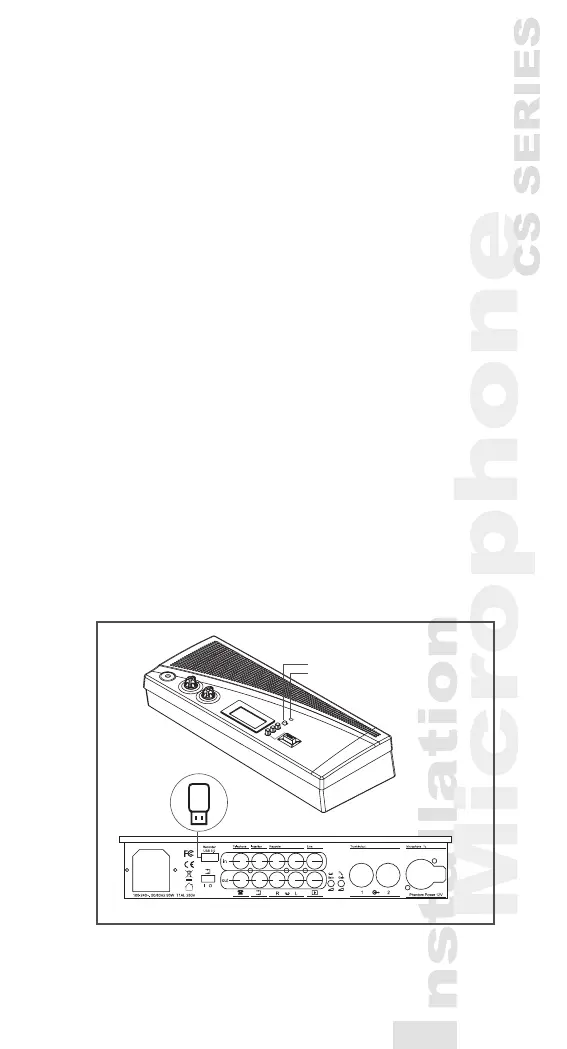
1) Insert USB drive on the back panel
2) The recording pilot light on the panel showing cross-
ashing between red light and green light repre-
sents USB drive is under the status of preparation.
3) The recording pilot light will show green light when
USB preparation is completed and press recording
button to start recording.
4) When press the recording button and the recording
pilot light shows red light, it enters recording mode.
5) To end recording, press and hold the recording but-
ton and wait the light signal showing cross-ashing
between red light and green light before releas-
ing the releasing button and the recording will be
terminated.
PS: When the red light ashes slowly during the
recording process, it represents the USB capacity is
lower than 20MB to remind the user to replace USB
drive. When the red light turns into rapid ashing,
it represents the USB capacity is lower than 10MB,
and the recording will be terminated at any time. If
the recording pilot light is not on, it represents USB
is not inserted or unable to be detected.
*CS-1CUR
*CS-1CUR
Recording button
Recording pilot light



 To Next Page