18
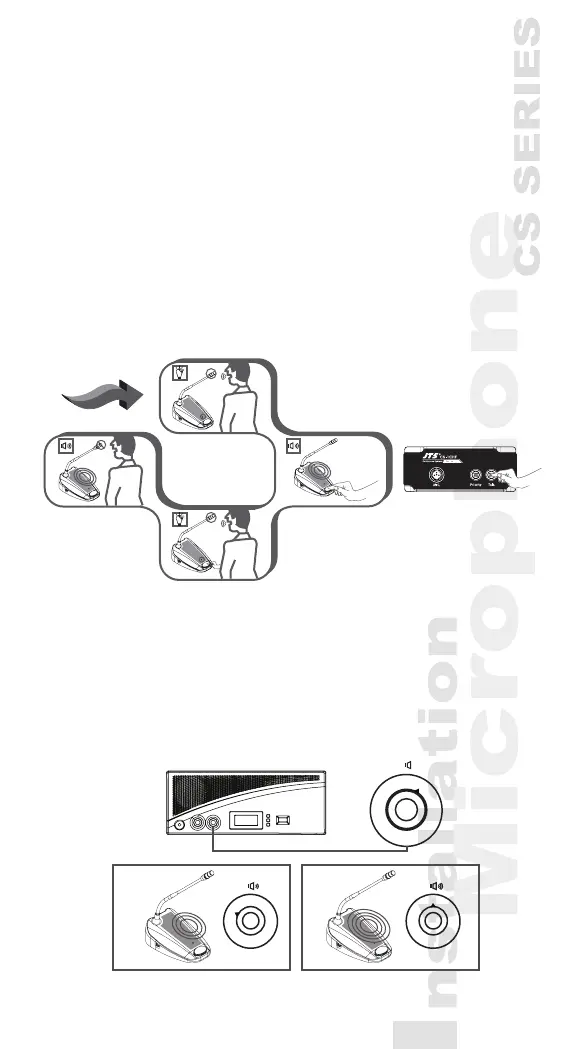
5.6 Chairman unit operation
1) Independent of the setting of the microphone mode
on the CU, pressing the microphone ON/OFF(CS-
1CHF:Talk)” push-button will activate the goose-
neck microphone on the chairman unit.
2) Pressing again turns the microphone off.
3) Pressing and holding the chairman priority button
will deactivate all active delegate units and activate
the chairman microphone.
4) Releasing the button will activate them again.
5.7 Volume control of the delegate and
chairman units (CS-1CH/DU)
1) Turning the speaker volume control to adjust the
volume of the loudspeakers of the delegate and
chairman units.
2) In the fully counterclockwise position, all loud-
speakers will be muted.
1
2
3
4
5
6
7
8
9
100
1
2
3
4
5
6
7
8
9
100
1
2
3
4
5
6
7
8
9
100
*CS-1CU
CS-1CHF
Delegate
Priority
button
Delegate
Chairman
Chairman



 To Next Page