Recirculating coolers
39
10. Menu functions
Set the parameters for the recirculating cooler via
the configuration or calibration level.
10.1. Selecting/exiting the configuration level
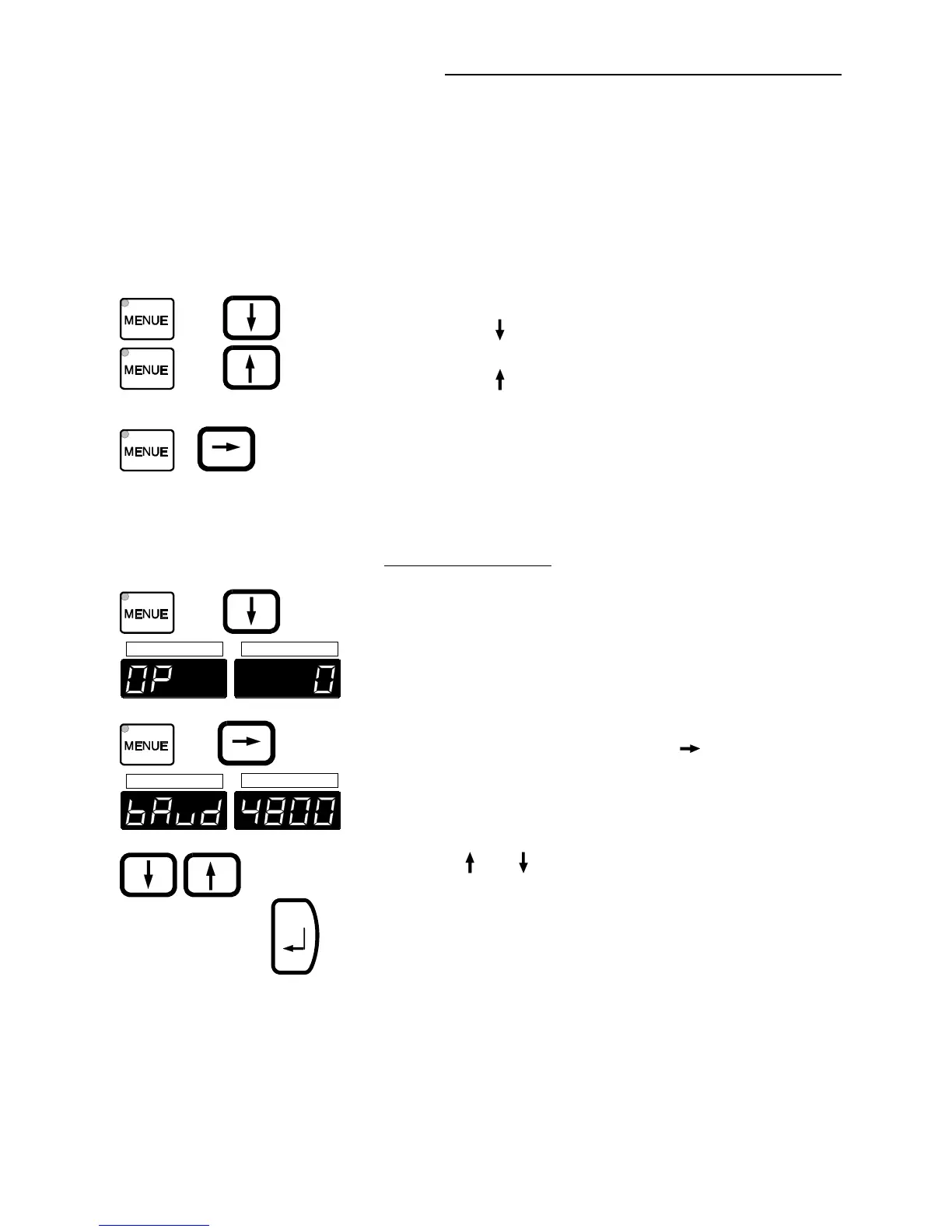
+ 1x
+ 1x
Simultaneously press the "MENUE" key (4.2)
and
the edit key "
" to select the configuration level
or
the edit key "
" to exit the configuration level.
+
Select the menu items of the configuration level
one by one by pressing simultaneously the menu
key and one of the cursors.
10.2. Setting the parameters
+ 1x
ACTUAL
SET
+3x
ACTUAL
SET
Example: Baud rate
c Select the configuration level by pressing the
keys simultaneously.
d Select the menu item by pressing
simultaneously the menu key and one of the
cursors.
(example: press the cursor key "
" 3 times).
e Set the baud rate (4800 Bauds) with the edit
keys ("
" or " ").
f Press the enter key to store the new
parameter.


 To Next Page