Recirculating coolers
41
Attention:
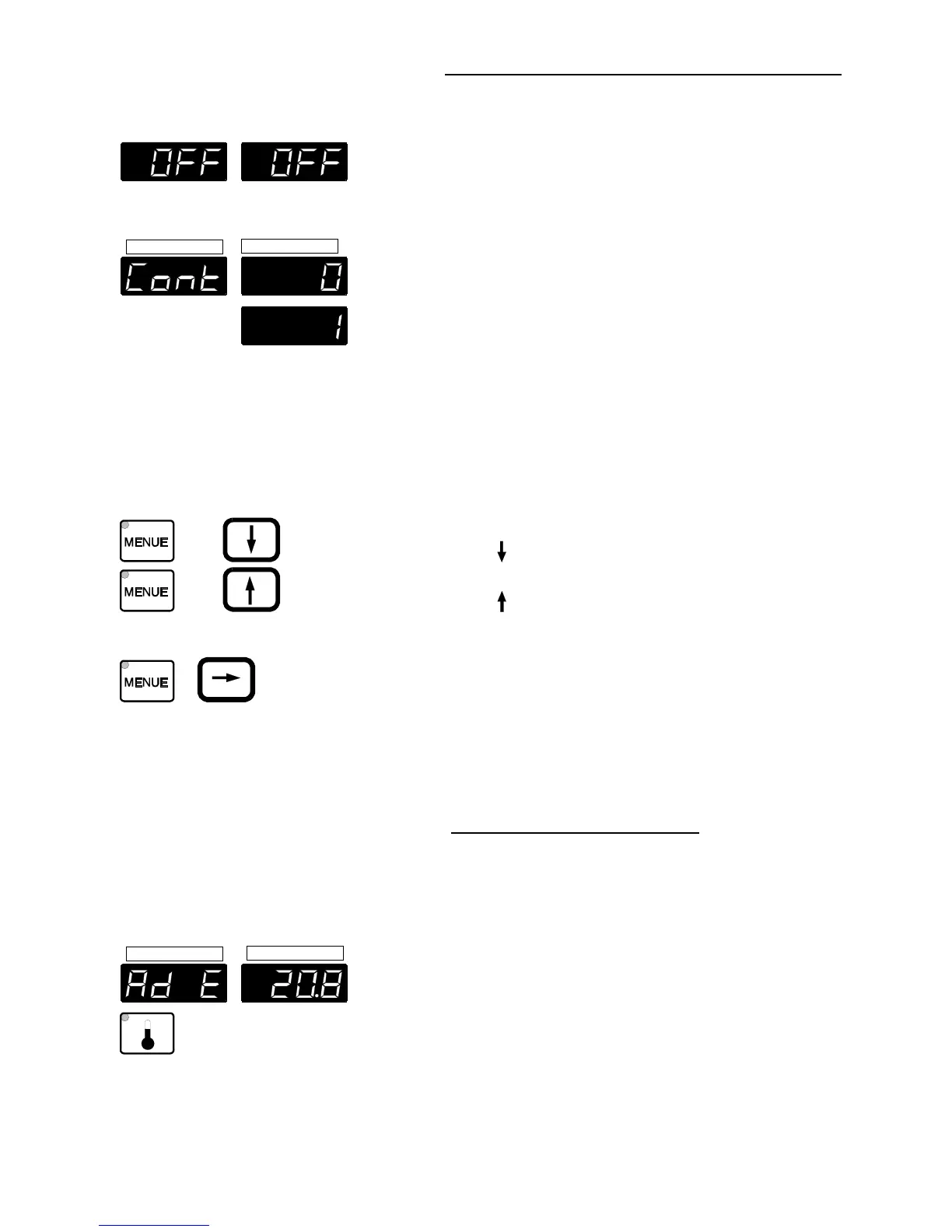
The following menu point Cont is only adjustable via
the configuration level if the status is „OFF“.
On a unit which is switched on this status is reached
by switching on/off at the mains switch (1).
ACTUAL
SET
Cont - Control mode
0 = internal control
1 = external control (with an external
sensor connected to "N")
10.4. Selecting/exiting the calibration level
+ 2x
+ 2x
Simultaneously press the
"MENUE" key (4.2) and twice
the edit key "
" to select the calibration level
or
the edit key "
" to exit the calibration level.
+
Select the menu items of the calibration level one by
one by pressing simultaneously the menu key and
one of the cursors.
10.5. Calibration
ACTUAL
SET
Ad E - Calibration of external sensor
m Connect a Pt100 sensor to the connector (N),
immerse into the calibration bath. Use a calibration
thermometer and measure the bath temperature.
Adjust the external sensor to this value (example: 20.8
°C).
n Press the setpoint key (E).
Follow the instructions under section 6.3.1. page 26
o
p
q


 To Next Page