Connecting a Device to a Network 23
Connecting a Device to a Network
An SSG 20 device provides firewall and general security for networks when it is
placed between internal networks and the untrusted network. This section
describes the following:
Connecting a Device to an Untrusted Network
Connecting a Device to an Internal Network or a Workstation
Connecting a Device to an Untrusted Network
You can connect your SSG 20 device to an untrusted network in one of the following
ways:
Ethernet Ports
Serial (AUX/Console) Ports
Connecting Mini PIMs to an Untrusted Network
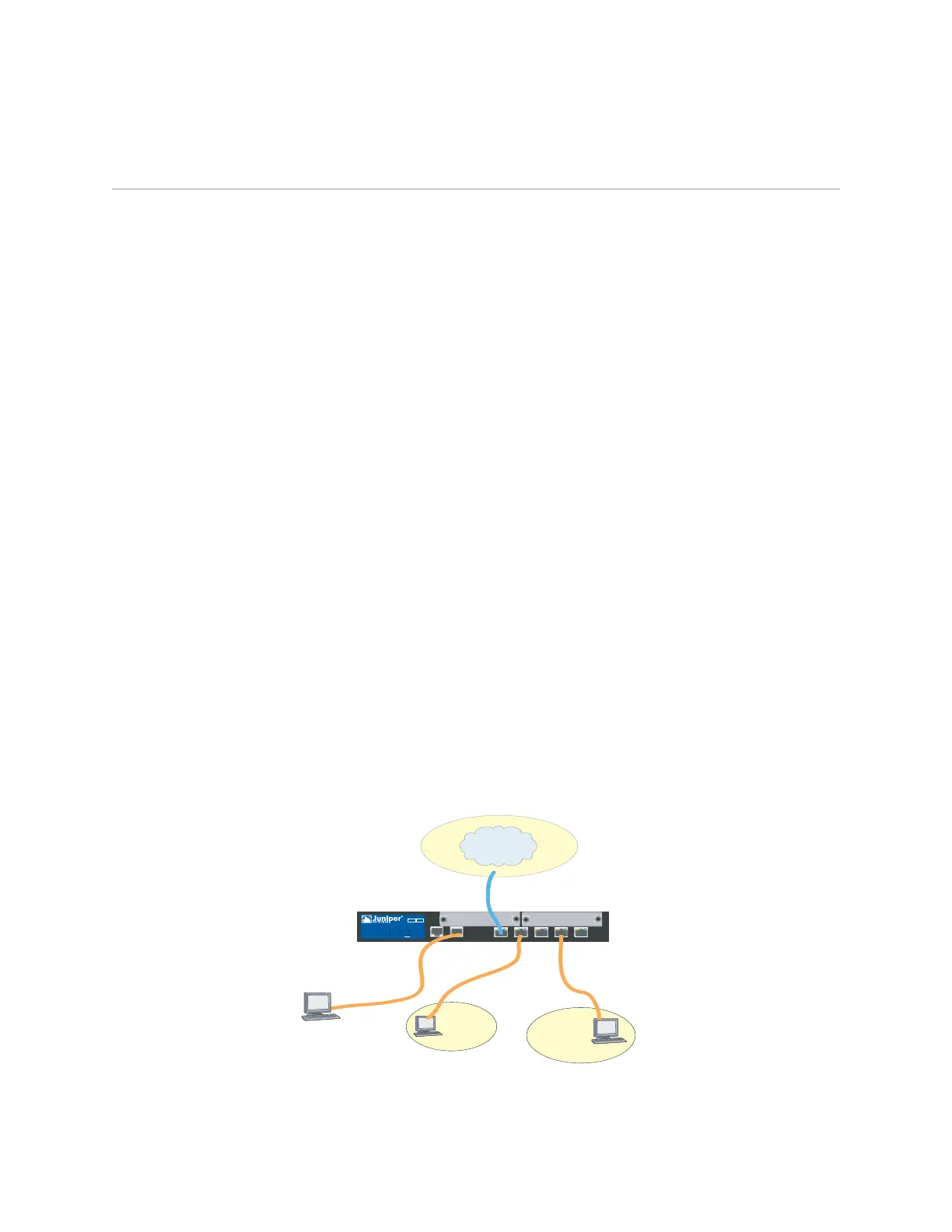
Figure 10 shows the SSG 20 with basic network cabling connections with two blank
mini-PIMs and the 10/100 Ethernet ports cabled as follows:
The port labeled 0/0 (ethernet0/0 interface) is connected to the untrust
network.
The port labeled 0/1 (ethernet0/1 interface) is connected to a workstation in the
DMZ security zone.
The port labeled 0/3 (brgoup0 interface) is connected to a workstation in the
Trust security zone.
The Console port is connected to a serial terminal for management access.
Figure 10: Basic Networking Example
AUX
0/0
10/100
AUX
0/0
10/100
0/0
10/100
0/0
10/100
0/0
10/100
LINK
STATUS
POWER
PIM 2
PIM 1
b/g
802.11a
WLAN
SSG 20
12
Untrust
Zone
Trust
Zone
DMZ
Console



 To Next Page