13
1 Preparing and using for the first time
T Empty the drip tray and put it back into the machine.
T Place a receptacle under the coffee spout.
‘Machine is heating’
‘Machine is rinsing’, the system is rinsed. The rinse stops
automatically. The start screen is displayed. Your E8 is ready
for use.
E The start screen shows the products you can prepare. Press
the ‘>’ button to display more products.
E If the filter is active, this is indicated by a blue filter symbol at
the bottom of the display.
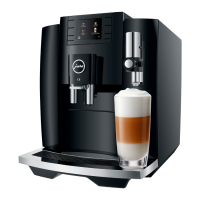
Your E8 creates fine, creamy, feather-light milk foam with a perfect
consistency. The most important requirement for frothing milk is a
milk temperature of 39–46 °F (4–8 °C). We would therefore
recommend using a milk cooler or a vacuum milk container.
T Remove the protective cover from the fine foam frother.
T Connect the milk pipe to the fine foam frother.
T Connect the other end of the milk pipe to a milk container
or immerse it in a milk carton.
You have the option of connecting your E8 wirelessly to a
compatible accessory (e.g. the Cool Control Wireless milk cooler).
To do this, the receiver of the Cool Control or the JURA Smart
Connect must be plugged into the service socket.
E The Smart Connect can be protected against unauthorized
access using a PIN. Activate the PIN function via the JURA
app. You will find more information at
www.jura.com/smartconnect.
E Please note that you can only connect either the Cool Control
or only one JURA app to the coffee machine via Smart
Connect.
Precondition:The start screen is displayed.
Connecting milk
Connect accessory (with
wireless connection)



 To Next Page
 Loading...