(No.52114)1-33
WHITE
BALANCE
(High Light)
Signal
generator
Remote
control unit
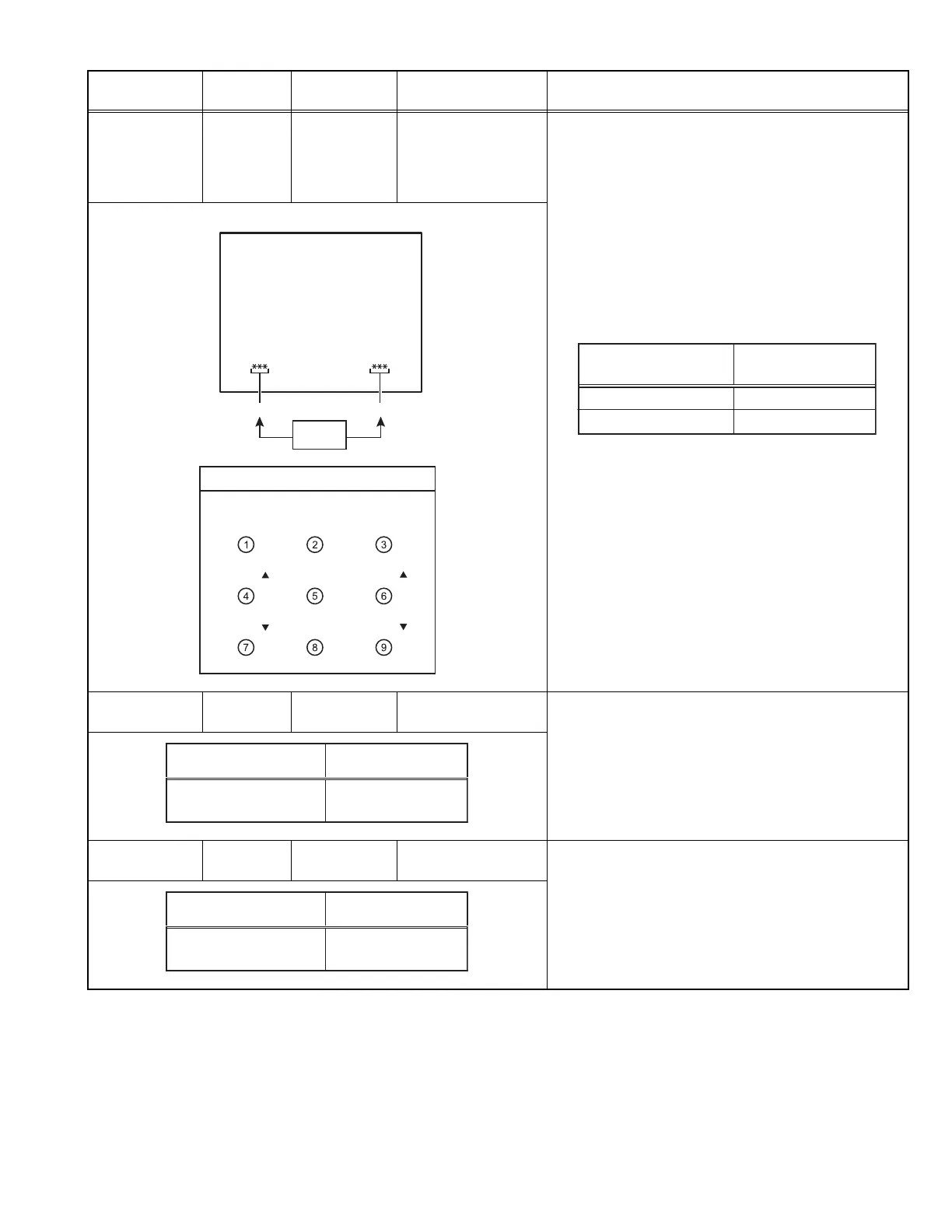
[1.V/C (S)]
S14: R DRIVE
S15: B DRIVE
[8.HIGH LIHGT]
(1) Receive the black-and-white signal (color off).
(2) Enter the SERVICE MENU.
(3) Select the 1.V/C (S).
(4) Set the initial setting value of < S14 > (R DRIVE) and
< S15 > (B DRIVE).
(5) Return the SERVICE MENU and select the 8.HIGH
LIGHT.
(6) Adjust the screen until it becomes white using the
[4], [6], [7] and [9] keys.
• The [3] (EXIT) key is the cancel key for the WHITE
BALANCE.
SUB BRIGHT Remote
control unit
[1.V/C (S)]
S01: BRIGHT
(1) Receive the broadcast and set the STANDARD
mode.
(2) Enter the SERVICE MENU.
(3) Select < S01 > (BRIGHT) of the 1.V/C(S).
(4) Set the initial setting value of the < S01 >.
(5) If the brightness is not the best with the initial setting
value, make fine adjustment of the < S01 > until you
get the optimum brightness.
SUB
CONTRAST
Remote
control unit
[1.V/C (S)]
S02: PICTURE
(1) Receive the broadcast and set the STANDARD
mode.
(2) Enter the SERVICE MENU.
(3) Select < S02 > (PICTURE) of the 1.V/C(S).
(4) Set the initial setting value of the < S02 >.
(5) If the contrast is not the best with the initial setting
value, make fine adjustment of the < S02 > until you
get the optimum contrast.
Item
Measuring
instrument
Test point Adjustment part Description
Adjustment item
S14: R DRIVE
Initial setting value
64
S15: G DRIVE 64
HIGH LIGHT adjustment mode
D DRIVE
D DRIVE
B DRIVE
B DRIVE
REMOTE CONTROL UNIT
EXIT
R DRIVE B DRIVE
SETTING
VALUE
Adjustment item Initial setting value
S01:
BRIGHT
64
Adjustment item Initial setting value
S02:
PICTURE
60


 To Next Page