EasyManua.ls Logo

JVC CA-S200 - Connecting the Speakers.0; Connecting Auxiliary Equipment

JVC CA-S200
27 pages
Print Icon
To Next Page IconTo Next Page
To Previous Page IconTo Previous Page
Loading...
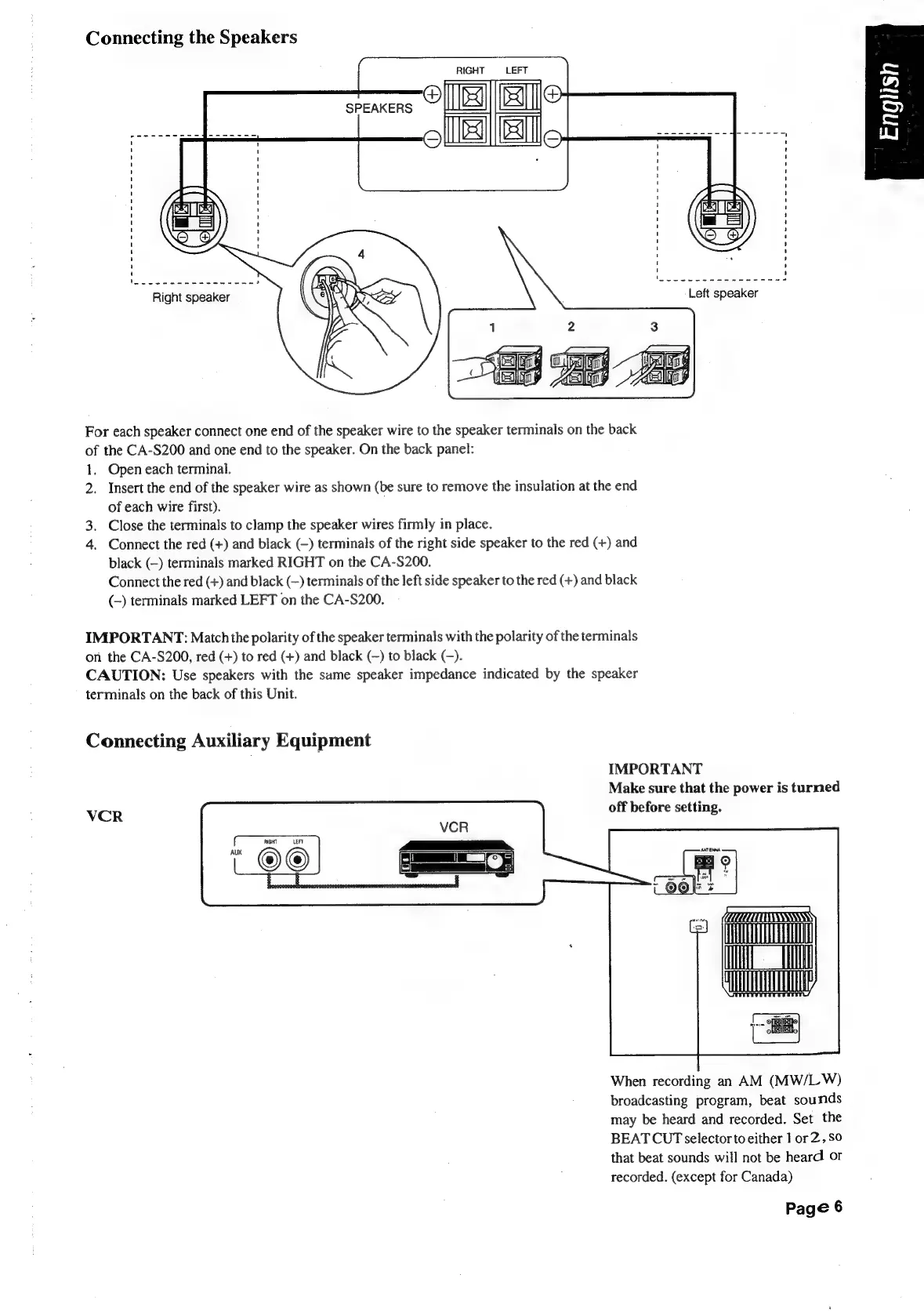
Connecting
the
Speakers
LEFT
SPEAKERS
(eiaiet
oie
fe
a
eee
eo ae
8
Right
speaker
For
each
speaker
connect
one
end
of
the
speaker
wire
to
the
speaker
terminals
on
the
back
of
the
CA-S200
and
one
end
to
the
speaker.
On
the
back
panel:
1.
2.
od
Open
each
terminal.
Insert
the
end
of
the
speaker
wire
as
shown
(be
sure
to
remove
the
insulation
at
the
end
of
each
wire
first).
Close
the
terminals
to
clamp
the
speaker
wires
firmly
in
place.
Connect
the
red
(+)
and
black
(—)
terminals
of
the
right
side
speaker
to
the
red
(+)
and
black
(—)
terminals
marked
RIGHT
on
the
CA-S200.
Connect
the
red
(+)
and
black
(—)
terminals
of
the
left
side
speaker
to
the
red
(+)
and
black
(-)
terminals
marked
LEFT
on
the
CA-S200.
IMPORTANT:
Match
the
polarity
of
the
speaker
terminals
with
the
polarity
of
the
terminals
on
the
CA-S200,
red
(+)
to
red
(+)
and
black
(—)
to
black
(-).
CAUTION:
Use
speakers
with
the
same
speaker
impedance
indicated
by
the
speaker
terminals
on
the
back
of
this
Unit.
Connecting
Auxiliary
Equipment
IMPORTANT
Make
sure
that
the
power
is
turned
VCR
off
before
setting.
When
recording
an
AM
(MW/LW)
broadcasting
program,
beat
sounds
may
be
heard
and
recorded.
Set
the
BEAT
CUT
selector
to
either
1
or
2,50
that
beat
sounds
will
not
be
heard
or
recorded.
(except
for
Canada)
Page
6

Table of Contents

Related product manuals