EasyManua.ls Logo

JVC CA-S200 - Using the FM Mode;Mute Key Pad U; Using the SLEEP Key Pad

JVC CA-S200
27 pages
Print Icon
To Next Page IconTo Next Page
To Previous Page IconTo Previous Page
Loading...
How
to
Use
the
Remote
Control
The
Remote
Control
makes
it
easy
to
control
many
of
the
functions
of
the
CA-S200
froma
distance
of
up
to
6
m
away.
You
need
to
point
the
remote
sensor
at
the
CA-$200
front
panel.
Q
Most
of
the
buttons
on
the
Remote
Control
do
just
what
the
ones
on
the
CA-S200
do.
Q)
A
few
functions
are
available
only
by
using
the
Remote
Control,
and
those
are
described
below.
Q_
The
buttons
whose
names
or
marks
are
printed
in
blue
can
be
used
for
the
One
Touch
Operation.
Using
the
10
Key
Pad
The
10
key
pad
is
used
to
specify
a
CD
track
or
the
number
you
have
assigned
to
a
preset
radio
station.
To
enter
a
number
using
the
10
key
pad
follow
these
steps:
E
Q)
Before
using
the
10
key
pad,
make
sure
which
the
10
key
pad
functions
for,
the
CD
player
or
tuner.
This
is
depends
on
which
button
on
the
Remote
you
have
pressed
before
the
10
key
pad.
For
example,
if
you
press
TUNER
before
10
key
pad,
it
can
select
a
preset
station.
For
numbers
between
1
and
10,
just
press
the
button
with
the
number
you
want.
For
numbers
from
11
to
20,
first
press
the
+10
key,
then
the
single
digit
numbers
you
want
on
the
key
pad
to
get
15,
first
press
+10,
then
5.
For
20
press
+10
and
10.
For
numbers
from
21
to
30,
press
the
+10
key
twice;
then
press
the
single
digit
numbers
on
the
key pad
to
get
25,
press
+10
+10
and
5.
For
30,
press
+10
+10
and
10.
For
numbers
from
31
to
40,
follow
the
same
procedure,
only
press
the
+10
key
three
times,
then
press
the
single
digit
numbers
on
the
key
pad
to
get
32,
press
+10
+10
+10
and
2.
O
oO
oa
Using
the
FM
MODE/MUTE
Key
Pad
When
an
FM
stereo
broadcast
is
difficult
to
receive
or
noisy.
Functions/steps
are
available
on
page
9.
Using
the
SLEEP
Key
Pad
The
SLEEP
function
will
turn
the
unit
off
after
a
certain
time,
while
you
are
asleep.
With
the
unit
on,
press
SLEEP.
SLEEP
will
blink.
Select
the
appropriate
minutes
10,
20,
30,
60,
90,
120
to
turn
the
unit
off.
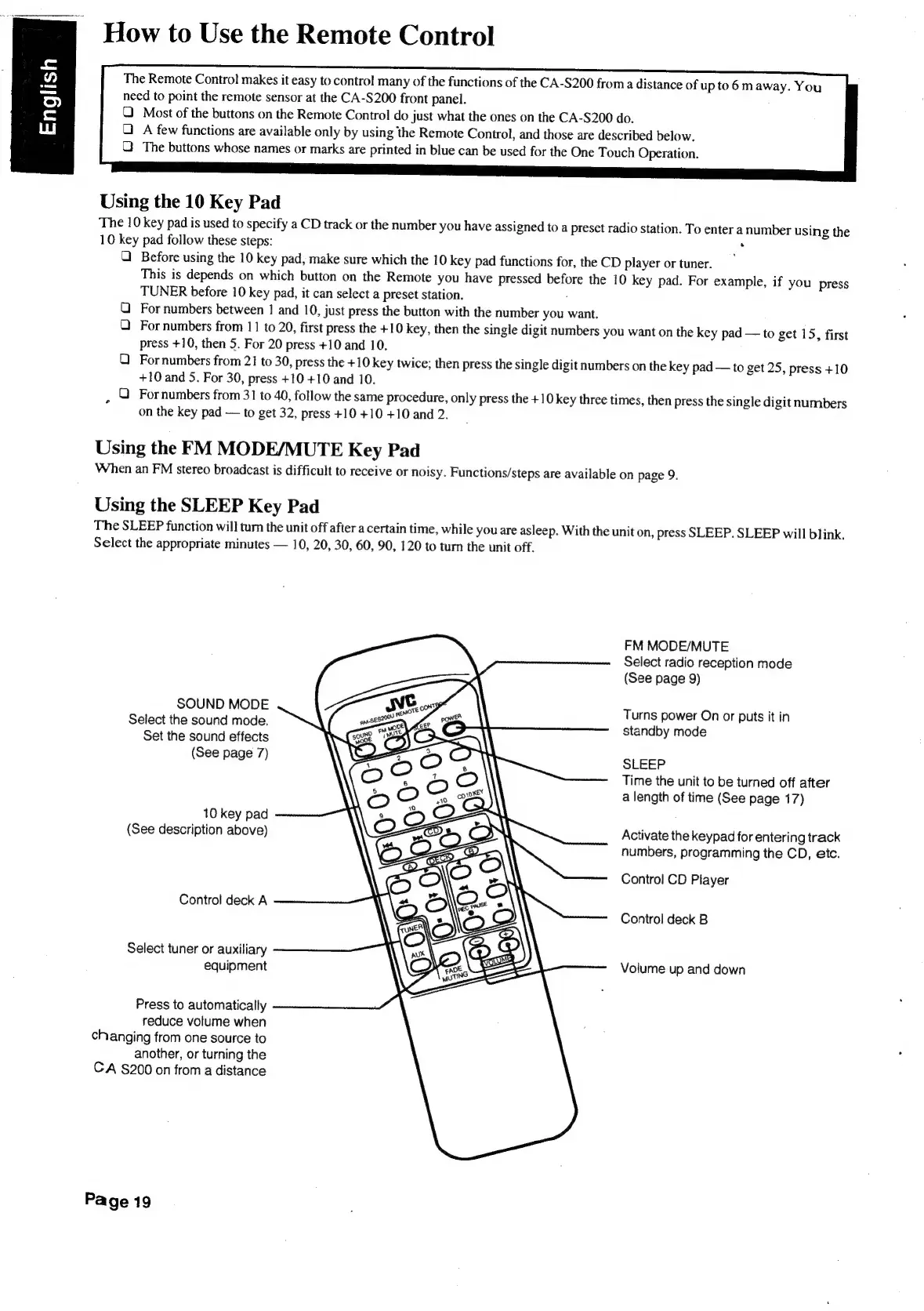
FM
MODE/MUTE
Select
radio
reception
mode
(See
page
9)
SOUND
MODE
Select
the
sound
mode.
Set
the
sound
effects
(See
page
7)
Turns
power
On
or
puts
it
in
standby
mode
SLEEP
Time
the
unit
to
be
turned
off
after
a
length
of
time
(See
page
17)
10
key
pad
(See
description
above)
Activate
the
keypad
for
entering
track
numbers,
programming
the
CD,
etc.
Control
CD
Player
Control
deck
A
Control
deck
B
Select
tuner
or
auxiliary
equipment
Volume
up
and
down
Press
to
automatically
reduce
volume
when
changing
from
one
source
to
another,
or
turning
the
CA
§200
on
from
a
distance
Page
19

Table of Contents

Related product manuals