EasyManua.ls Logo

JVC CA-S200 - Getting Started Right; Unpacking Cece Jesesvcces Tease Lacs Hccsdeseseedesseteventiesesdevesscnsen; TOC AION Cise es Bet Pte Endeadeckcc Ee Eccee Toed Ess Socedea Pa Misses; SOO up Scrrregeiie Ftetec Sie CCC Titehs Chasstberisclins Eee Lateness

JVC CA-S200
27 pages
Print Icon
To Next Page IconTo Next Page
To Previous Page IconTo Previous Page
Loading...
Inside
the
packing
box....
Where
can
you
put
it?
Very
little
assembly
required
Please
look
at
the
diagrams
on
pages
5
and
6
to
do
these
things.
Getting
Started
Right
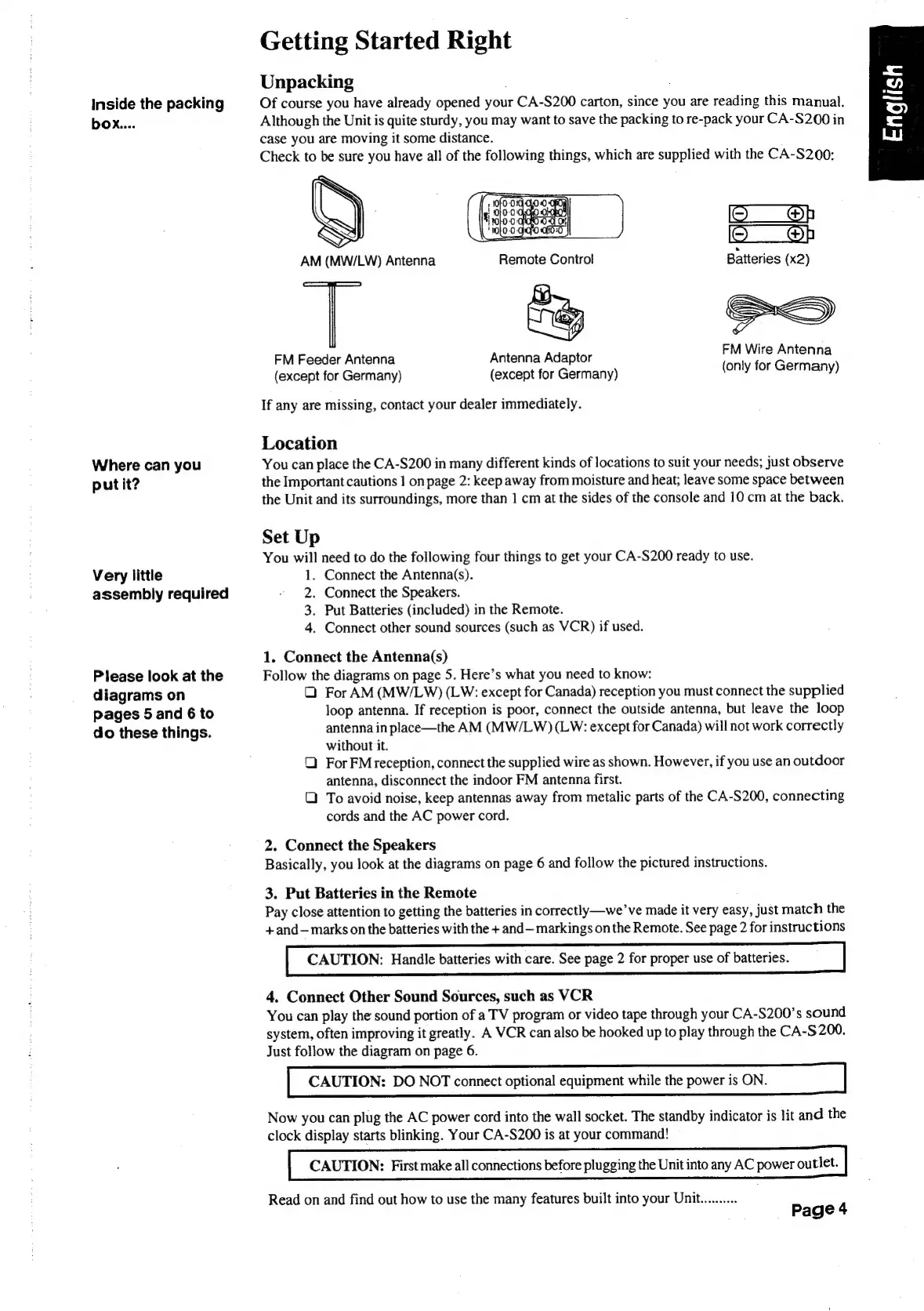
Unpacking
Of
course
you
have
already
opened
your
ren
S200
carton,
since
you
are
reading
this
manual.
Although
the
Unit
is
quite
sturdy,
you
may
want
to
save
the
packing
to
re-pack
your
CA-S200
in
case
you
are
moving
it
some
distance.
Check
to
be
sure
you
have
all
of
the
following
things,
which
are
supplied
with
the
CA-S200:
Op
CMS):
Batteries
(x2)
e]|>
FM
Wire
Antenna
(only
for
Germany)
FM
Feeder
Antenna
Antenna
Adaptor
(except
for
Germany)
(except
for
Germany)
If
any
are
missing,
contact
your
dealer
immediately.
Location
You
can
place
the
CA-S200
in
many
different
kinds
of
locations
to
suit
your
needs;
just
observe
the
Important
cautions
1
on
page
2:
keep
away
from
moisture
and
heat;
leave
some
space
between
the
Unit
and
its
surroundings,
more
than
1
cm
at
the
sides
of
the
console
and
10
cm
at
the
back.
Set
Up
You
will
need
to
do
the
following
four
things
to
get
your
CA-S200
ready
to
use.
1.
Connect
the
Antenna(s).
2.
Connect
the
Speakers.
3.
Put
Batteries
(included)
in
the
Remote.
4.
Connect
other
sound
sources
(such
as
VCR)
if
used.
1.
Connect
the
Antenna(s)
Follow
the
diagrams
on
page
5.
Here’s
what
you
need
to
know:
Q
For
AM
(MW/LW)
(LW:
except
for
Canada)
reception
you
must
connect
the
supplied
loop
antenna.
If
reception
is
poor,
connect
the
outside
antenna,
but
leave
the
loop
antenna
in
place—the
AM
(MW/LW)
(LW:
except
for
Canada)
will
not
work
correctly
without
it.
Q
ForFM
reception,
connect
the
supplied
wire
as
shown.
However,
if
you
use
an
outdoor
antenna,
disconnect
the
indoor
FM
antenna
first.
Q
To
avoid
noise,
keep
antennas
away
from
metalic
parts
of
the
CA-S200,
connecting
cords
and
the
AC
power
cord.
2.
Connect
the
Speakers
Basically,
you
look
at
the
diagrams
on
page
6
and
follow
the
pictured
instructions,
3.
Put
Batteries
in
the
Remote
Pay
close
attention
to
getting
the
batteries
in
correctly—we’
ve
made
it
very
easy,
just
match
the
+and—marks
on
the
batteries
with
the
+
and—
markings
on
the
Remote.
See
page
2
for
instructions
CAUTION:
Handle
batteries
with
care.
See
page
2
for
proper
use
of
batteries
4.
Connect
Other
Sound
Sources,
such
as
VCR
You
can
play
the
sound
portion
of
a
TV
program
or
video
tape
through
your
CA-S200’s
sound
system,
often
improving
it
greatly.
A
VCR
can
also
be
hooked
up
to
play
through
the
CA-
$200.
Just
follow
the
diagram
on
page
6.
CAUTION:
DO
NOT
connect
optional
equipment
while
the
power
is
ON
Now
you
can
plug
the
AC
power
cord
into
the
wall
socket.
The
standby
indicator
is
lit
and
the
clock
display
starts
blinking.
Your
CA-S200
is
at
your
command!
CAUTION:
First
make
all
connections
before
plugging
the
Unit
into
any
AC
power
outlet.
Read
on
and
find
out
how
to
use the
many
features
built
into
your
Unit..........
Page
4

Table of Contents

Related product manuals