EasyManua.ls Logo

JVC CA-S200 - Important Cautions; Featulls; How to Put Batteries in the Remote Control

JVC CA-S200
27 pages
Print Icon
To Next Page IconTo Next Page
To Previous Page IconTo Previous Page
Loading...
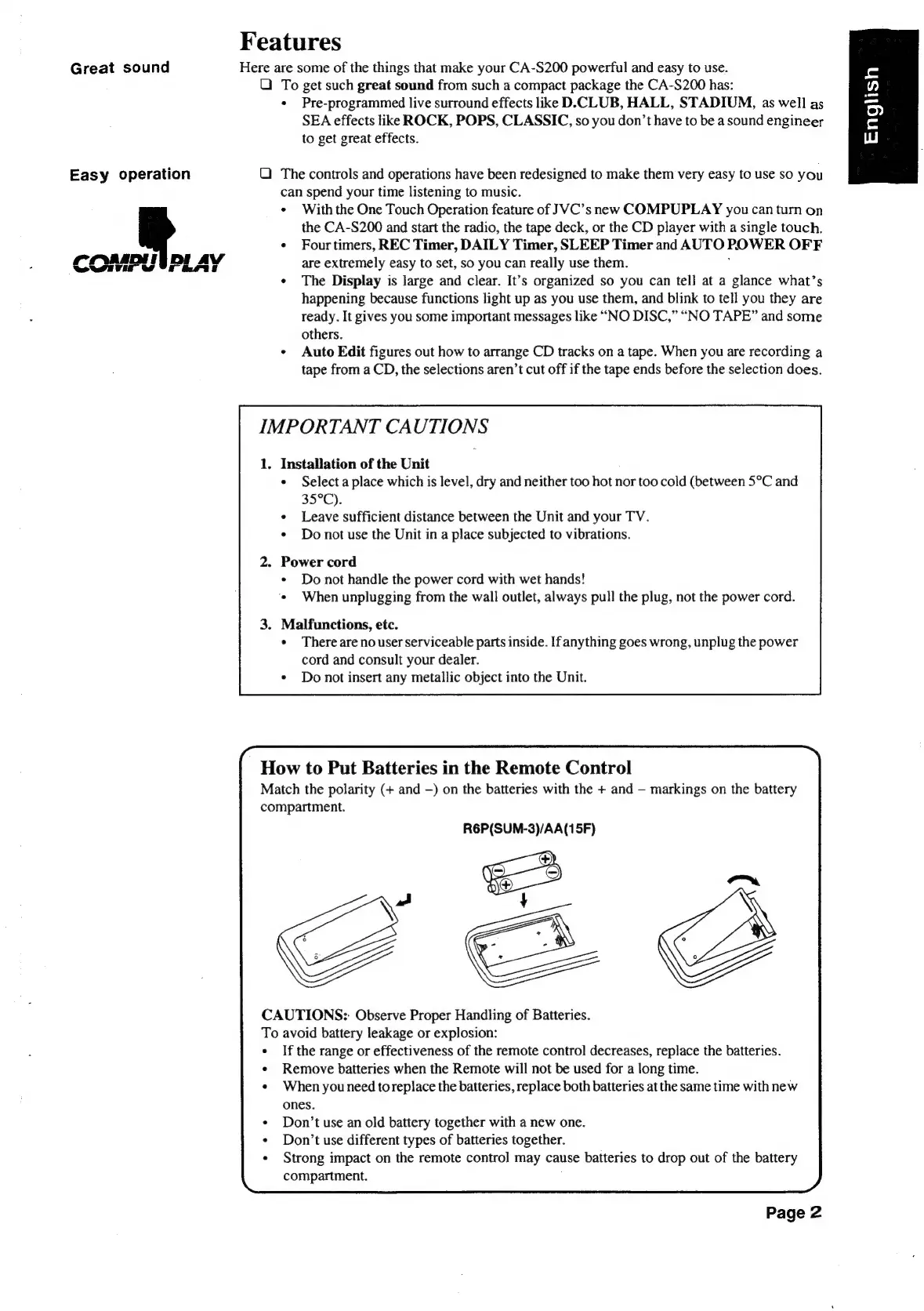
Features
Great
sound
Here
are
some
of
the
things
that
make
your
CA-S200
powerful
and
easy
to
use.
QO
To
get
such
great
sound
from
such
a
compact
package
the
CA-S200
has:
¢
Pre-programmed
live
surround
effects
like
D.CLUB,
HALL,
STADIUM,
as
well
as
SEA
effects
like
ROCK,
POPS,
CLASSIC,
so
you
don’t
have
to
be
a
sound
engineer
to
get
great
effects.
Easy
operation
QO)
The
controls
and
operations
have been
redesigned
to
make
them
very easy
to
use
so
you
can
spend
your
time
listening
to
music.
*
With
the
One
Touch
Operation
feature
of
JVC’s
new
COMPUPLAY
you
can
turn
on
the
CA-S200
and
start
the
radio,
the
tape
deck,
or
the
CD
player
with
a
single
touch.
¢
Fourtimers,
REC
Timer,
DAILY
Timer,
SLEEP
Timer
and
AUTO
POWER
OFF
COM
WIG
DI
are
extremely
easy
to
set,
so
you
can
really
use
them.
¢
The
Display
is
large
and
clear.
It’s
organized
so
you
can
tell
at
a
glance
what’s
happening
because
functions
light
up
as
you
use
them,
and
blink
to
tell
you
they
are
ready.
It
gives
you
some
important
messages
like
“NO
DISC,”
“NO
TAPE”
and
some
others.
¢
Auto
Edit
figures
out
how
to
arrange
CD
tracks
on
a
tape.
When
you
are
recording
a
tape
from
a
CD,
the
selections
aren’t
cut
off
if
the
tape
ends
before
the
selection
does.
IMPORTANT
CAUTIONS
1.
Installation
of
the
Unit
Select
a
place
which
is
level,
dry
and
neither
too
hot
nor
too
cold
(between
5°C
and
35°C).
Leave
sufficient
distance
between
the
Unit
and
your
TV.
Do
not
use
the
Unit
in
a
place
subjected
to
vibrations.
2.
Power
cord
*
Do
not
handle
the
power
cord
with
wet
hands!
‘©
When
unplugging
from
the
wall
outlet,
always
pull
the
plug,
not
the
power
cord.
3.
Malfunctions,
etc.
¢
There
are
no
user
serviceable
parts
inside.
If
anything
goes
wrong,
unplug
the
power
cord
and
consult
your
dealer.
¢
Do
not
insert
any
metallic
object
into
the
Unit.
How
to
Put
Batteries
in
the
Remote
Control
Match
the
polarity
(+
and
—)
on
the
batteries
with
the
+
and
markings
on
the
battery
compartment.
R6P(SUM-3)/AA(15F)
CAUTIONS:
Observe
Proper
Handling
of
Batteries.
To
avoid
battery
leakage
or
explosion:
If
the
range
or
effectiveness
of
the
remote
control
decreases,
replace
the
batteries.
Remove
batteries
when
the
Remote
will
not
be
used
for
a
long
time.
When
you
need
to
replace
the
batteries,
replace
both
batteries
at
the
same
time
with
new
ones.
Don’t
use
an
old
battery
together
with
a
new
one.
Don’t
use
different
types
of
batteries
together.
Strong impact
on
the
remote
contro]
may
cause
batteries
to
drop
out
of
the
battery
compartment.
Page
2

Table of Contents

Related product manuals