EasyManua.ls Logo

JVC CA-S200 - Setting the Sleep Timer; Timer Priority

JVC CA-S200
27 pages
Print Icon
To Next Page IconTo Next Page
To Previous Page IconTo Previous Page
Loading...
Sleep
Timer:
turns
the
Unit
off
automatically
after
a
set
time
SLEEP
TIMER
Auto
Power
Off:
turns
off
your
CA-S200
automatically
AUTO
POWER
OFF
Setting
the
SLEEP
Timer
Use
the
SLEEP
timer
on
the
remote
to
tum
the
Unit
off
after
a
certain
number
of
minutes
when
it
is
playing.
Using
this
timer,
you
can
fall
asleep
to
music.
Q
You
can
only
set
the
SLEEP
Timer
when
the
CA-S200
is
on
and
a
source
is
playing.
Follow
this
procedure
to
set
the
SLEEP
Timer
(or
press
SLEEP
on
the
remote)
With
the
CA-S200
on
and
a
source
playing,
press
SLEEP
TIMER
on
the
remote.
“SLEEP”
starts
blinking
on
the
display.
Q
Each
time
you
press
SLEEP
TIMER
while
“SLEEP”
is
blinking,
it
changes
the
number
of
minutes
shown
on
the
display
in
this
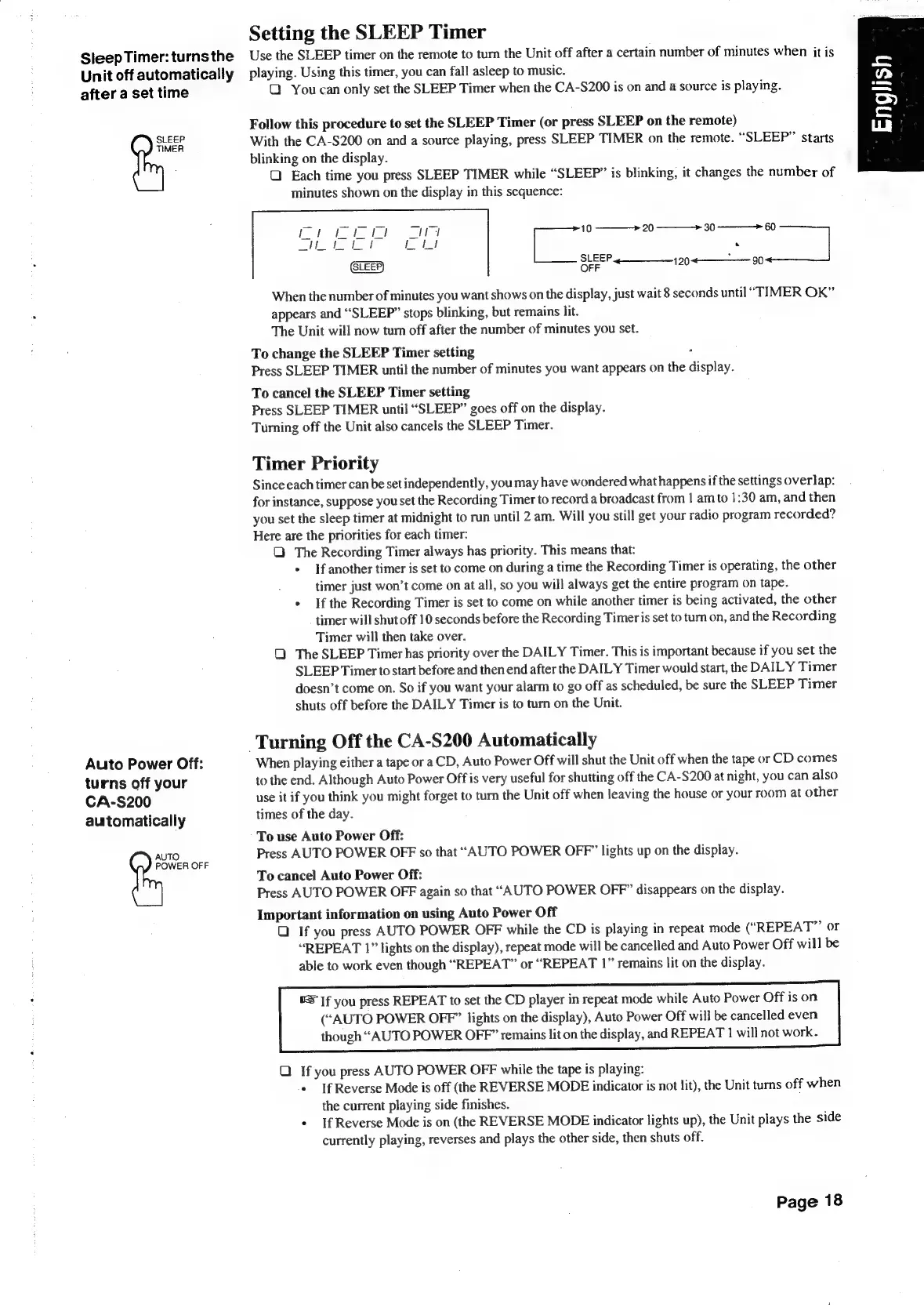
sequence:
=
ae
od
SLEEP
¢—___
199
«90
OFF
When
the
number
of
minutes
you
want
shows
on
the
display,
just
wait
8
seconds
until
“TIMER
OK”
appears
and
“SLEEP”
stops
blinking,
but
remains
lit.
The
Unit
will
now
tum
off
after
the
number
of
minutes
you
set.
To
change
the
SLEEP
Timer
setting
-
Press
SLEEP
TIMER
until
the
number
of
minutes
you
want
appears
on
the
display.
To
cancel
the
SLEEP
Timer
setting
Press
SLEEP
TIMER
until
“SLEEP”
goes
off
on
the
display.
Turning
off
the
Unit
also
cancels
the
SLEEP
Timer.
Timer
Priority
Since
each
timer
can
be
set
independently,
you
may
have
wondered
what
happens
if
the
settings
overlap:
for
instance,
suppose
you
set
the
Recording
Timer
to
record
a
broadcast
from
|
am
to
1:30
am,
and
then
you
set
the
sleep
timer
at
midnight
to
run
until
2.
am.
Will
you
still
get
your
radio
program
recorded?
Here
are
the
priorities
for
each
timer:
Q
The
Recording
Timer
always
has
priority.
This
means
that:
*
Ifanother
timer
is
set
to
come
on
during
a
time
the
Recording
Timer
is
operating,
the
other
timer
just
won’t
come
on
at
all,
so
you
will
always
get
the
entire
program
on
tape.
+
If
the
Recording
Timer
is
set
to
come
on
while
another
timer
is
being
activated,
the
other
timer
will
shut
off
10
seconds
before
the
Recording
Timeris
set
to
turn
on,
and
the
Recording
Timer
will
then
take
over.
Q
The
SLEEP
Timer
has
priority
over
the
DAILY
Timer.
This
is
important
because
if
you
set
the
SLEEP
Timer
to
start
before
and
then
end
after
the
DAILY
Timer
would
start,
the
DAILY
Timer
doesn’t
come
on.
So
if
you
want
your
alarm
to
go
off
as
scheduled,
be
sure
the
SLEEP
Timer
shuts
off
before
the
DAILY
Timer
is
to
turn
on
the
Unit.
Turning
Off
the
CA-S200
Automatically
When
playing
either
a
tape
or
a
CD,
Auto
Power
Off
will
shut
the
Unit
off
when
the
tape
or
CD
comes
to
the
end.
Although
Auto
Power
Off
is
very
useful
for
shutting
off
the
CA-S200
at
night,
you
can
also
use
it
if
you
think
you
might
forget
to
turn
the
Unit
off
when
leaving
the
house
or
your
room
at
other
times
of
the
day.
To
use
Auto
Power
Off:
Press
AUTO
POWER
OFF
so
that
“AUTO
POWER
OFF”
lights
up
on
the
display.
To
cancel
Auto
Power
Off:
Press
AUTO
POWER
OFF
again
so
that
“AUTO
POWER
OFF”
disappears
on
the
display.
Important
information
on
using
Auto
Power
Off
Q
If
you
press
AUTO
POWER
OFF
while
the
CD
is
playing
in
repeat
mode
(“REPEAT”’
or
“REPEAT
1”
lights
on
the
display),
repeat
mode
will
be
cancelled
and
Auto
Power
Off
will
be
able
to
work
even
though
“REPEAT”
or
“REPEAT
1”
remains
lit
on
the
display.
©S
If
you
press
REPEAT
to
set
the
CD
player
in
repeat
mode
while
Auto
Power
Off
is
on
(“AUTO
POWER
OFF”
lights
on
the
display),
Auto
Power
Off
will
be
cancelled
even
though
“AUTO
POWER
OFF”
remains
lit
on
the
display,
and
REPEAT
1
will
not
work.
Q
If
you
press
AUTO
POWER
OFF
while
the
tape
is
playing:
¢
If
Reverse
Mode
is
off
(the
REVERSE
MODE
indicator
is
not
lit),
the
Unit
turns
off
when
the
current
playing
side
finishes.
+
If
Reverse
Mode
is
on
(the
REVERSE
MODE
indicator
lights
up),
the
Unit
plays
the
side
currently
playing,
reverses
and
plays
the
other
side,
then
shuts
off.
Page
18

Table of Contents

Related product manuals