EasyManua.ls Logo

JVC CA-S200 - Common Operations; Compu Play; Turning the CA-S200 on Oo; Turning the CA-S200 off

JVC CA-S200
27 pages
Print Icon
To Next Page IconTo Next Page
To Previous Page IconTo Previous Page
Loading...
English
The
Magic
of
COMPULPLAY
POWER
o)
ON/STANDBY
Ee
Making
it
sound
the
way
You
want
it
to:
“Volume
-D.CLUB
*HALL
“STADIUM
Page
7
Common
Operations
-Here
are
the
things
that
apply
to
all
the
functions
of
your
CA-S200.
If
something
in
a
procedure
is
unclear
to
you,
check
back
here.
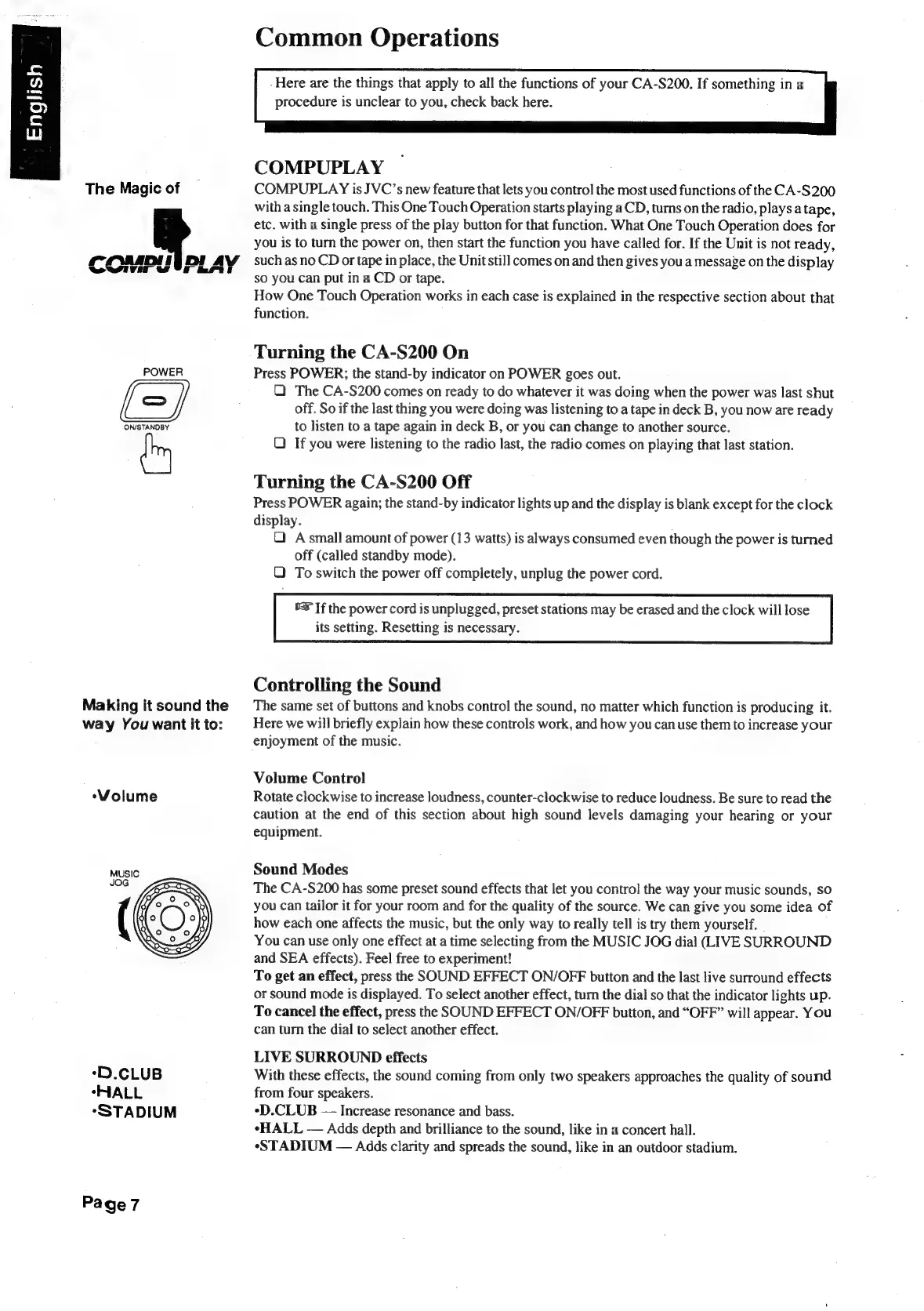
COMPUPLAY
COMPUPLAY
is
JVC’s
new
feature
that
lets
you
control
the
most
used
functions
of
the
CA-S200
with
a
single
touch.
This
One
Touch
Operation
starts
playing
a
CD,
turns
on
the
radio,
plays
atape,
etc.
with
a
single
press
of
the
play
button
for
that
function.
What
One
Touch
Operation
does
for
you
is
to
turn
the
power
on,
then
start
the
function
you
have
called
for.
If
the
Unit
is
not
ready,
such
as
no
CD
or
tape
in
place,
the
Unit
still
comes
on
and
then
gives
you
a
message
on
the
display
so
you
can
put
in
a
CD
or
tape.
How
One
Touch
Operation
works
in
each
case
is
explained
in
the
respective
section
about
that
function.
Turning
the
CA-S200
On
Press
POWER;
the
stand-by
indicator
on
POWER
goes
out.
QO)
The
CA-S200
comes
on
ready
to
do
whatever
it
was
doing
when
the
power
was
last
shut
off.
So
if
the
last
thing
you
were
doing
was
listening
to
a
tape
in
deck
B,
you
now
are
ready
to
listen
to
a
tape
again
in
deck
B,
or
you
can
change
to
another
source.
Q
If
you
were
listening
to
the
radio
last,
the
radio
comes
on
playing
that
last
station.
Turning
the
CA-S200
Off
Press
POWER
again;
the
stand-by
indicator
lights
up
and
the
display
is
blank
except
for
the
clock
display.
Q
Asmall
amount
of
power
(13
watts)
is
always
consumed
even
though
the
power
is
turned
off
(called
standby
mode).
€)
To
switch
the
power
off
completely,
unplug
the
power
cord.
«=
If
the
power
cord
is
unplugged,
preset
stations
may
be
erased
and
the
clock
will
lose
its
setting.
Resetting
is
necessary.
Controlling
the
Sound
The
same
set
of
buttons
and
knobs
control
the
sound,
no
matter
which
function
is
producing
it.
Here
we
will
briefly
explain
how
these
controls
work,
and
how
you
can
use
them
to
increase
your
enjoyment
of
the
music.
Volume
Control
Rotate
clockwise
to
increase
loudness,
counter-clockwise
to
reduce
loudness.
Be
sure
to
read
the
caution
at
the
end
of
this
section
about
high
sound
levels
damaging
your
hearing
or
your
equipment.
Sound
Modes
The
CA-S200
has
some
preset
sound
effects
that
let
you
control
the
way
your
music
sounds,
so
you
can
tailor
it
for
your
room
and
for
the
quality
of
the
source.
We
can
give
you
some
idea
of
how
each
one
affects
the
music,
but
the
only
way
to
really
tell
is
try
them
yourself.
You
can
use
only
one
effect
at
a
time
selecting
from
the
MUSIC
JOG
dial
(LIVE
SURROUND
and
SEA
effects).
Feel
free
to
experiment!
To
get
an
effect,
press
the
SOUND
EFFECT
ON/OFF
button
and
the
last
live
surround
effects
or
sound
mode
is
displayed.
To
select
another
effect,
turn
the
dial
so
that
the
indicator
lights
up.
To
cancel
the
effect,
press
the
SOUND
EFFECT
ON/OFF
button,
and
“OFF”
will
appear.
You
can
turn
the
dial
to
select
another
effect.
LIVE
SURROUND
effects
With
these
effects,
the
sound
coming
from
only
two
speakers
approaches
the
quality
of
sound
from
four
speakers.
*D.CLUB
Increase
resonance
and
bass.
*HALL
Adds
depth
and
brilliance
to
the
sound,
like
in
a
concert
hall.
«STADIUM
Adds
clarity
and
spreads
the
sound,
like
in
an
outdoor
stadium.

Table of Contents

Related product manuals