Bottom
.
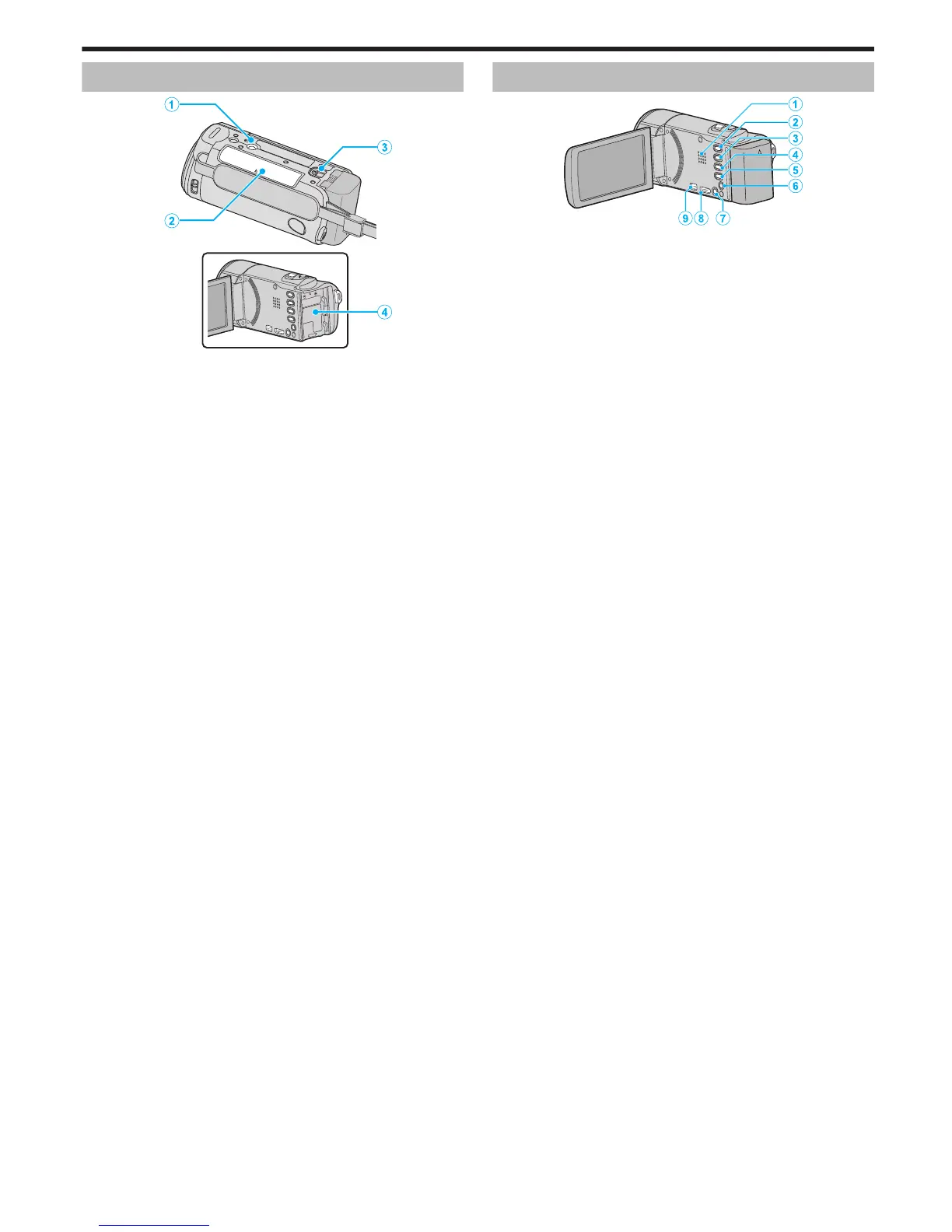
1
Tripod Mounting Hole
“Tripod Mounting” (A p. 70
)
2
SD Card Slot
0
Insert an optional SD card.
“Inserting an SD Card” (A p. 64)
3
Battery Release Lever
“Charging the Battery Pack” (A p. 63)
4
Battery Mount
Interior
.
1
Speaker
0
Outputs audio sound during video playback.
2
A
/ B (Video/Still Image) Button
0
Switches between video and still image modes.
3
SILENT Button
0
Press and hold the SILENT button to turn on the Silent mode. To turn
it off, press and hold the button again.
“Using the Silent Mode” (A p. 76)
4
a Button
0
The setting of image stabilizer changes with every press during video
recording.
“Reducing Camera Shake” (A p. 104)
5
INFO (Information) Button
0
Recording: Displays the remaining time (for video only) and battery
power.
0
Playback: Displays file information such as recording date.
6
AV Connector
0
Connects to the AV connector of a TV, etc.
7
M (Power) Button
0
Press and hold to turn the power on/off while the LCD monitor is
opened.
8
HDMI Mini Connector
0
Connects to TV using an HDMI mini cable.
9
USB Connector
0
Connects to computer using a USB cable.
Names of Parts
201


 To Next Page
 Loading...