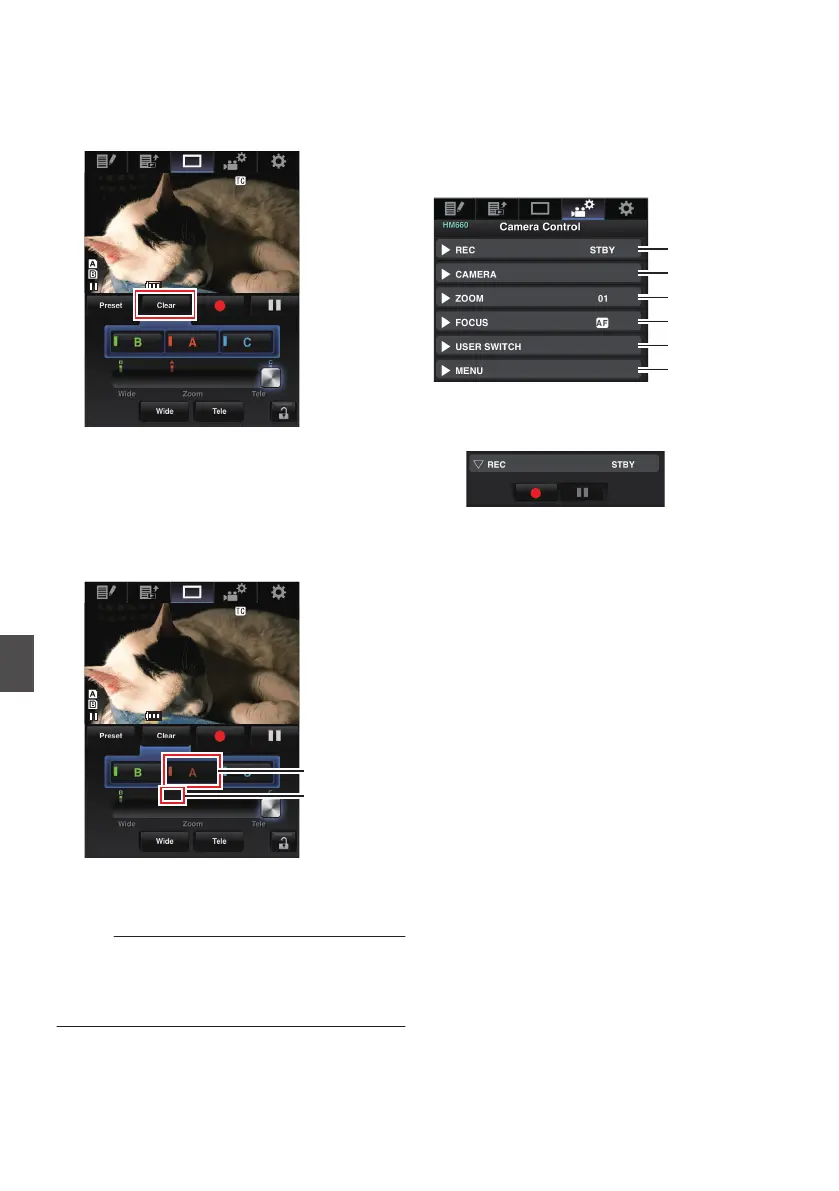
Deleting a Preset Zoom
1
Set to the Delete Preset Zoom mode.
When any of positions [A], [B], and [C] are
registered, tapping (clicking) the [Clear
]
button
switches to the Delete Preset Zoom mode.
.
2
Tap (click) the [A], [B], or [C] button that
corresponds to the position you want to
delete.
0
The position is deleted, and the button is
grayed out.
0
The corresponding zoom position mark on
the sliding bar also disappears.
.
Position mark
disappears
Grayed out
3
Exit the Delete Preset Zoom mode.
Tap (click) the [Clear] button to exit the Delete
Preset Zoom mode.
Memo :
0
The Clip
Review function of the camera recorder
is unavailable during View Remote operation.
(A P74 [Viewing Recorded Videos Immediately
(Clip Review)] )
Camera Control Function
a
You can
control the camera by accessing via a web
browser on devices such as a smartphone, tablet
terminal, or PC.
You can perform the following operations for each
of the items.
.
A
REC
For performing recording start or recording
pause operation.
.
B
CAMERA
Enables operations related to the camera
functions.
168
Connecting to the Network
a


 To Next Page
 Loading...