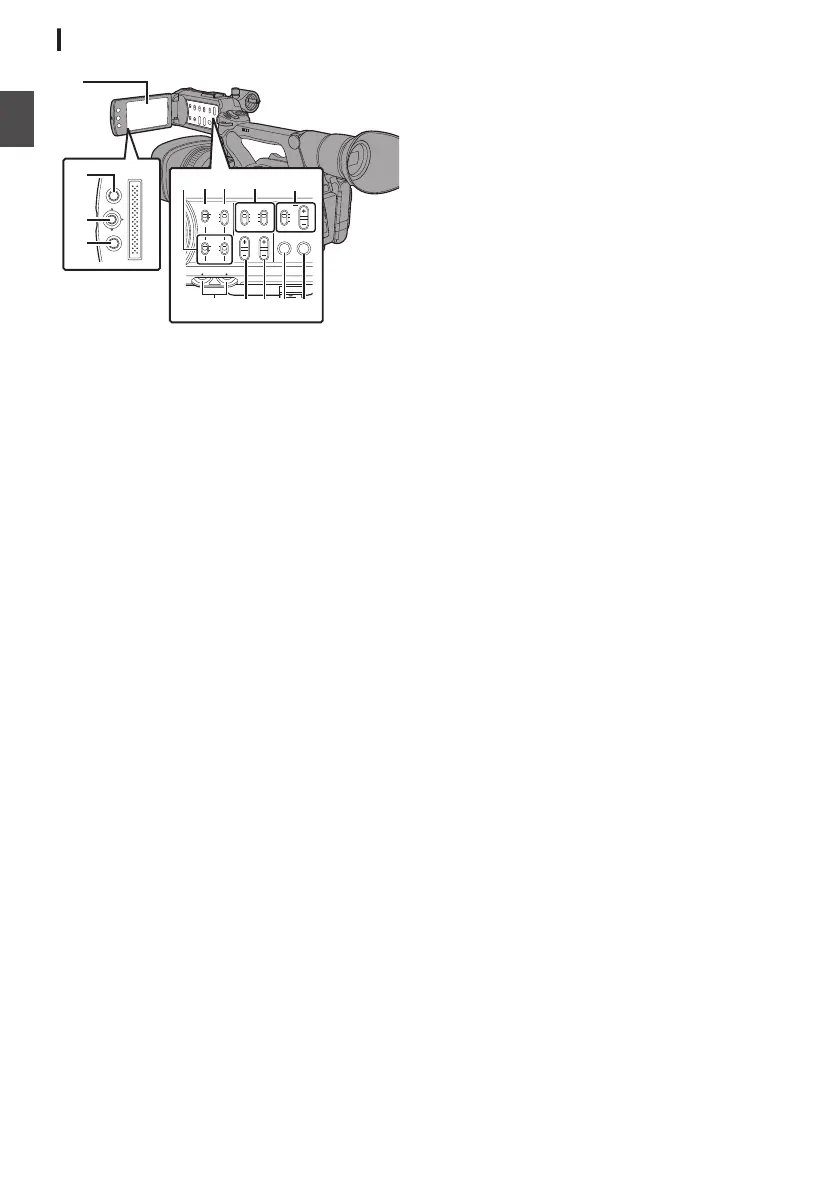
LCD Monitor
.
MENU/THUMB
CANCEL
CH1
INT
INPUT1
INPUT2
AUTO
MANUAL
CH2
INPUT2
MONITOR
DISPLAY STATUS
INPUT1
PEAKINGLCD BRIGHT
CH2CH1
LINE
MIC
MIC
+48V
CH1
BOTH
CH2
B
C
H I
A
D
FG
E
JKL
N
M
A
LCD Monitor
(A P36 [Adjusting the LCD Monitor and
Viewfinder] )
B
[MENU/THUMB]
Menu/Thumbnail Button
0
Displays the menu screen during Camera
mode.
0
Switches between [Main Menu] and
[Favorites Menu] when the [MENU/
THUMB] button is pressed and held down
while the menu screen is displayed.
(A P
94 [Basic Operations in Menu Screen] )
0
Displays the menu screen when the button
is pressed during thumbnail display in the
Media mode.
0
Stops playback and displays the thumbnail
screen when the button is pressed during
playback screen
display in the Media mode.
C
LCD Cross-Shaped
Button (JKHI)/Set Button
(R)
The function changes according to the
operation status of the camera recorder.
0
During menu operation (all modes)
(A P94 [Basic Operations in Menu Screen] )
Set Button (R) : Confirms menu
items and setting
values
Cross-shaped Button
(JK)
: Selects menu
items and setting
values
0
During Camera mode
You can also use it as a user button by assigning
a specific feature in the menu setting to this
button.
(A P38 [Assignment of Functions to User
Buttons] )
D
[CANCEL
] Cancel Button
Cancels various settings and stops playback.
E
[CH1/CH2] CH1/CH2 Recording Level
Adjustment Knob
(A P63 [Audio Recording] )
F
[LCD BRIGHT +/-] LCD Display Brightness
Adjustment Button
(
A P36 [Adjusting the Brightness] )
G
[PEAKING +/-] LCD/VF Contour Adjustment
Button
(A P37 [Adjusting the Contour (LCD)] )
(A P37 [Adjusting the Contour (Viewfinder)] )
H
[DISPLAY] Display Button
0
Press the [DISPLAY] button to switch to the
display
screen during normal screen display
(when the menu screen is not displayed).
(A P34 [Display Screen] )
0
Switches between [
Main Menu] and
[Favorites Menu] when the [DISPLAY]
button is pressed while the menu screen is
displayed.
(A P
94 [Basic Operations in Menu Screen] )
I
[STATUS
] Status Screen Display Button
Press the [STATUS] button to display the status
screen on the viewfinder and LCD monitor
during normal screen display (when the menu
screen is not displayed).
(A P35 [Status Screen] )
J
[MONITOR]/[+/-] Audio Monitor Selection
Switch/Volume Adjustment Button
Switches the audio monitor and adjusts the
monitor speaker/headphone.
(A P65 [Monitoring Audio Sound During
Recording Using a Headphone] )
K
[INPUT1/INPUT2] Audio Input Signal Selection
Switch
(A P63 [Audio Recording] )
L
[CH2] CH2 Audio Input Signal Selection Switch
Select the audio input terminal to record to CH2.
(A P63 [Audio Recording] )
M
[CH1] CH1 Audio Input Signal Selection Switch
(A P63 [Audio Recording] )
N
[CH1/CH2 AUTO/MANUAL] CH1/CH2 Audio
Recording Mode Switch
(A P64 [Adjusting Audio Recording Level] )
24
Introduction


 To Next Page
 Loading...