Memo :
0
GPS function (recording of GPS information) is
only available on GY-HM660U/GY-HM660E.
GY-HM660RE/GY-HM620U/GY-HM620E can
only provide
the information display of the video
with the recorded GPS information.
0
When [System] B [Record Set] B [Record
Format] B System is set to “HD+SD” or “HD
+Web”, only SD or web files can be played back
from slot B.
In this case, files up-converted into the HD size
are played back in the simple mode. a
0
Trimming information is displayed while
trimming is in progress. You cannot switch the
display
using
the [AE LOCK/4] button during this
process.
Deleting Clips
Delete clip.
.
OIS / 2 LOLUX / 3
AE LEVEL
MENU/THUMB
CANCEL
MENU/THUMB
CANCEL
Memo :
0
Clips appended with OK marks cannot be
deleted on the camera recorder.
0
Read-only clips can be deleted on a PC.
Deleting One Clip
Delete the clip (one clip) pointed by the cursor in
[Delete Clips] B [This Clip] in the menu.
Memo :
0
Clips with OK mark cannot be deleted.
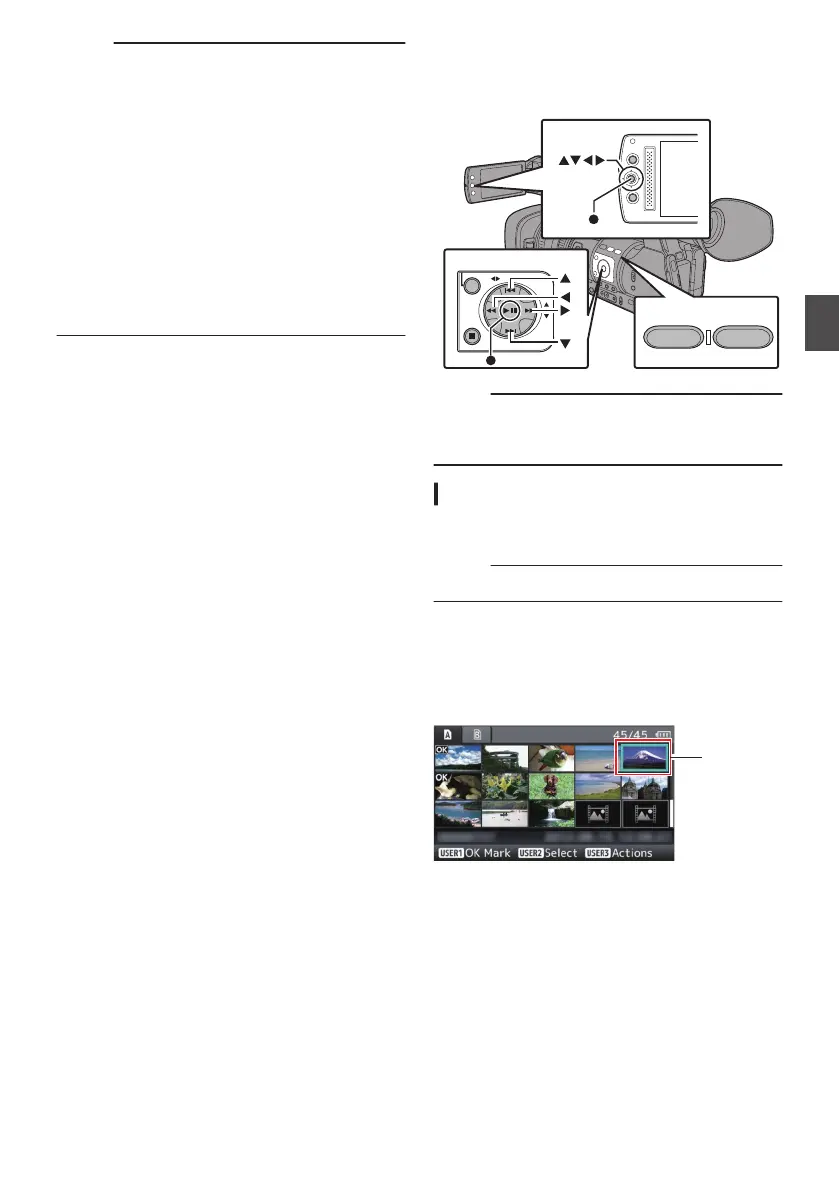
During Thumbnail Screen
1
Move the cursor to the clip to be deleted.
Move the cursor to the clip to be deleted using
the cross-shaped button (JKH I).
.
2
Press the [LOLUX/3] button.
The action selection screen is displayed.
89
Playback


 To Next Page
 Loading...