Backup Rec
0
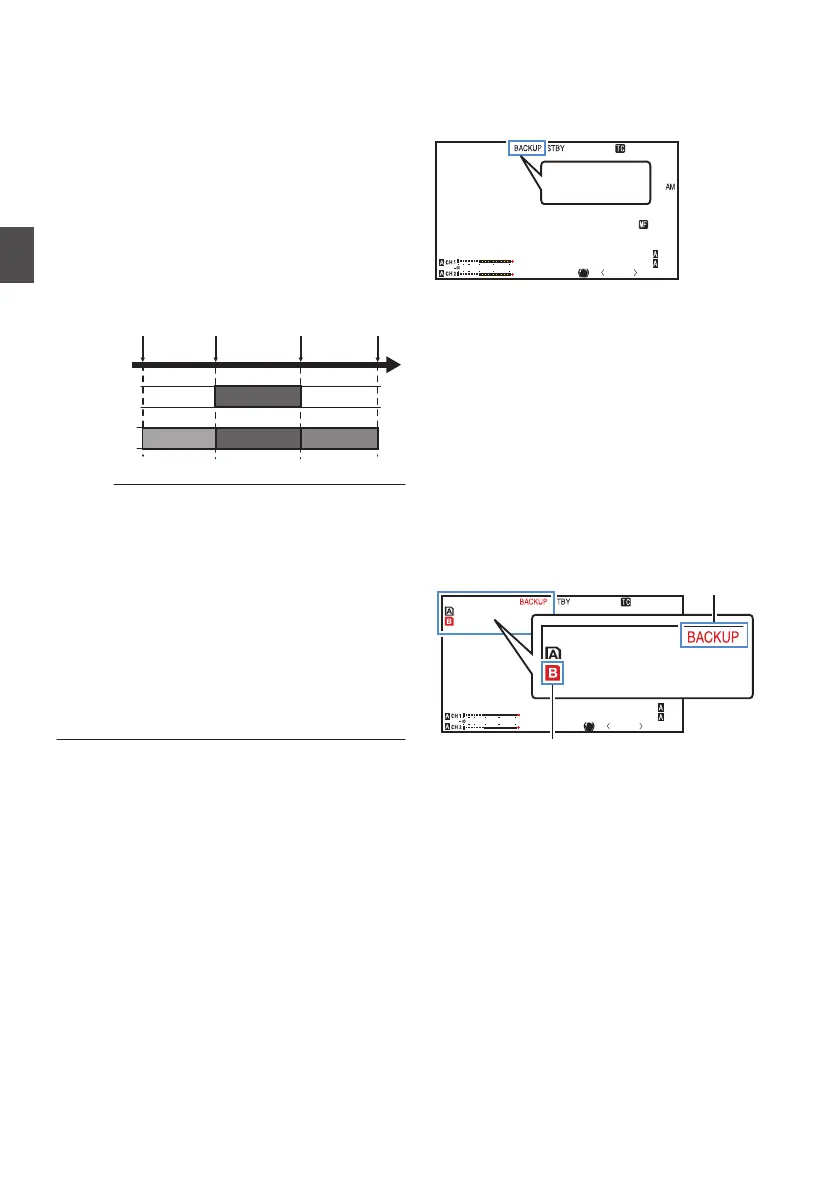
The Backup Rec mode allows you to make use
of the media in slot B for backup recording by
controlling
the
starting and stopping of recording
in slot B without using the [REC] button.
0
Start or
stop the recording using [Main Menu] B
[System] B [Record Set] B [Slot Mode] B
[Backup Rec] or press the user button that is
assigned with “Backup Trig”.
(A P
120 [ Slot Mode ] )
(
A P100 [User Switch Set Item] )
.
Slot B
Slot A
Clip 3
Clip 2
Clip 1
Clip 2
Slot B stops
recording
Slot A stops
recording
Slot A starts
recording
Slot B starts
recording
Memo :
0
During the Backup Rec mode (when [Slot
Mode] is set to “Backup”), you can control
recording to the 2 slots at different timings, and
backup
recording can only be performed on this
camera recorder.
(A P
120 [ Slot Mode ] )
0
You can record without worrying about missing
the important scenes by setting slot B to be
always recording (backup recording) and using
the [REC] button to start/stop recording of only
the required scenes in slot A.
0
It is recommended to use a media with high
capacity in slot B.
1
Set [System] B [Record Set] B [Slot Mode]
to “
Backup”.
(A P
120 [ Slot Mode ] )
“BACKUP” appears on the display screen.
.
P13000K
1/100
F1. 6
0
dB
AE+6
ND 1 /6 4
12 :34 :56
Jan 12, 2016
00:00: 00.00
5 . 6 f t
4030 20 10 0
BACKUP
2
Start backup recording. (Backup recording
into slot B)
0
Select “REC” in [System] B [Record Set] B
[Slot Mode
] B [Backup Rec] and press the
Set button (R).
(A P120
[ Slot Mode ] )
0
You can also press the user button that is
assigned with “Backup Trig”.
(
A P100 [User Switch Set Item] )
0
Backup recording into slot B starts. (The
characters “BACKUP” appear in red.)
0
The card slot mark of slot B turns red
(selected state), and the status indicator of
slot B also blinks in red.
.
P13000K
1/100
F1. 6
0
dB
AE+6
ND 1 /6 4
12 :34 :56
Jan 24,2012
00:00: 00.00
4030 20 10 0
5 . 6 f t
100min
50min
100min
50min
Red (selected)
Red
78
Shooting


 To Next Page
 Loading...