Copying Selected Playlists
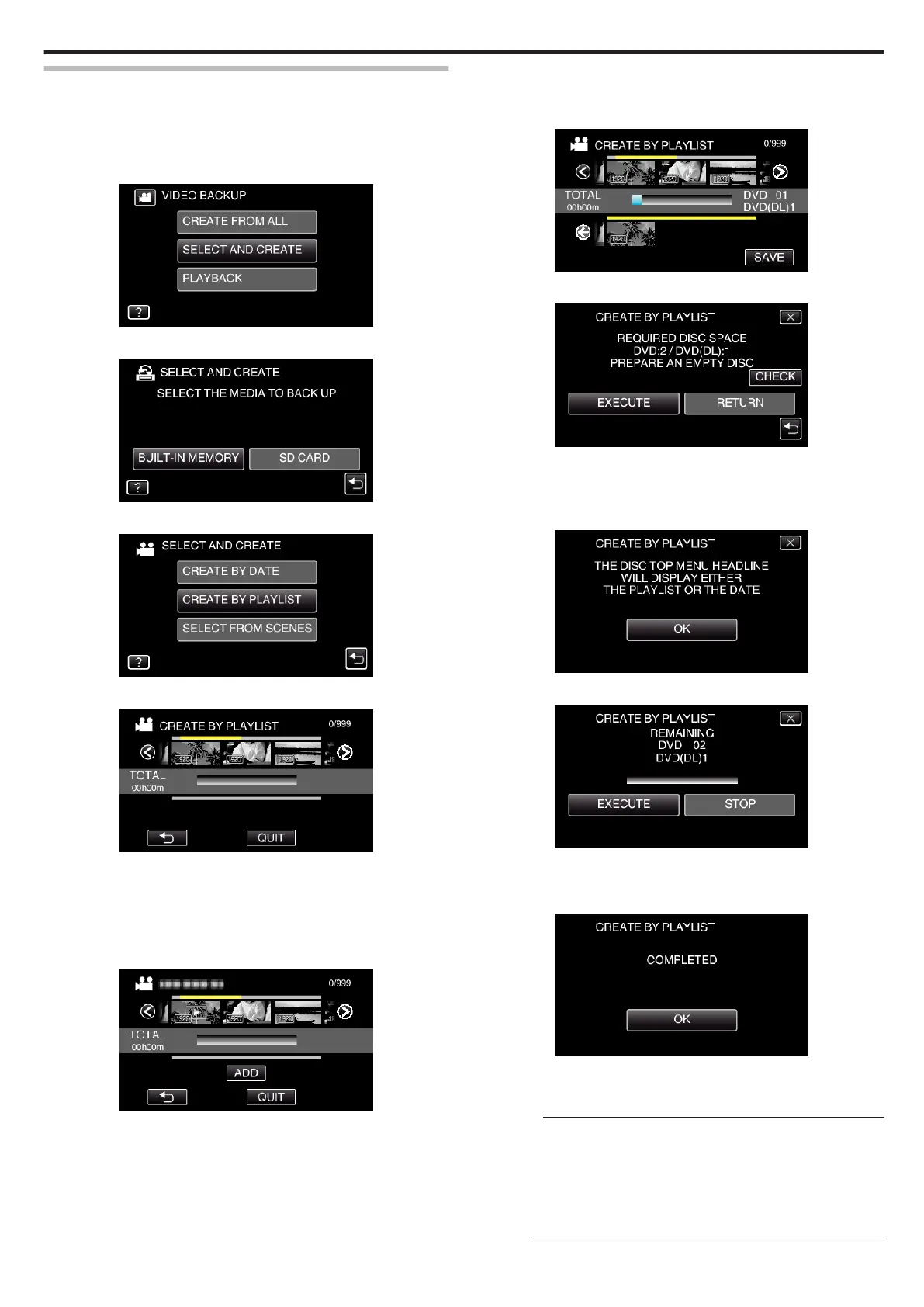
Arrange and copy the created playlists in the order you like.
0
*The following is a screen of the model with the built-in memory.
1
Select video mode.
2
Tap “SELECT AND CREATE”.
.
3
Tap the media you would like to make a backup.
.
4
Tap “CREATE BY PLAYLIST”.
.
5
Tap on the playlist to copy to disc.
.
0
d appears on the selected playlist (upper row).
Tap J to deselect.
0
Tap on the selected playlist again to check the content of the playlist.
After checking, tap J.
0
Tap 0/1 or move the zoom lever to display the previous/next playlist.
6
Tap “ADD” to insert a playlist.
.
0
Repeat steps 5-6 and arrange the playlists.
0
To change the position of a playlist (lower row), select the insertion
point with E/F after step 5 and tap “ADD”.
0
d appears when the inserted playlist is selected.
Tap J to deselect.
0
Tap on the selected playlist again to check the content of the playlist.
After checking, tap J.
0
To delete of a video in the playlist (lower row), tap the video, then tap
“CANCEL”.
7
After arranging, tap “SAVE”.
.
8
Tap “EXECUTE”.
.
0
The number of discs required to copy the files is displayed.
Prepare the discs accordingly.
0
Tap “CHECK” to check the content. After checking, tap J.
9
Tap “OK”.
.
10
Tap “EXECUTE”.
.
0
When “INSERT THE NEXT DISC TO CREATE OR PRESS STOP TO
EXIT” appears, change the disc.
11
Tap “OK” when “COMPLETED” is displayed.
.
12
Press and hold the M button for 2 seconds or more to turn off this unit
and disconnect the USB cable.
Caution :
0
Do not turn off the power or remove the USB cable until copying is
complete.
0
Files that are not on the index screen during playback cannot be copied.
Special files cannot be copied either.
0
All DVDs will be finalized automatically.
Files cannot be added to the DVD-R/DVD-RW later.
Memo :
Copying
107


 To Next Page