EasyManua.ls Logo

JVC KD·A60S - Listening to the CD Changer; Selecting the Playback Modes

JVC KD·A60S
57 pages
Print Icon
To Next Page IconTo Next Page
To Previous Page IconTo Previous Page
Loading...
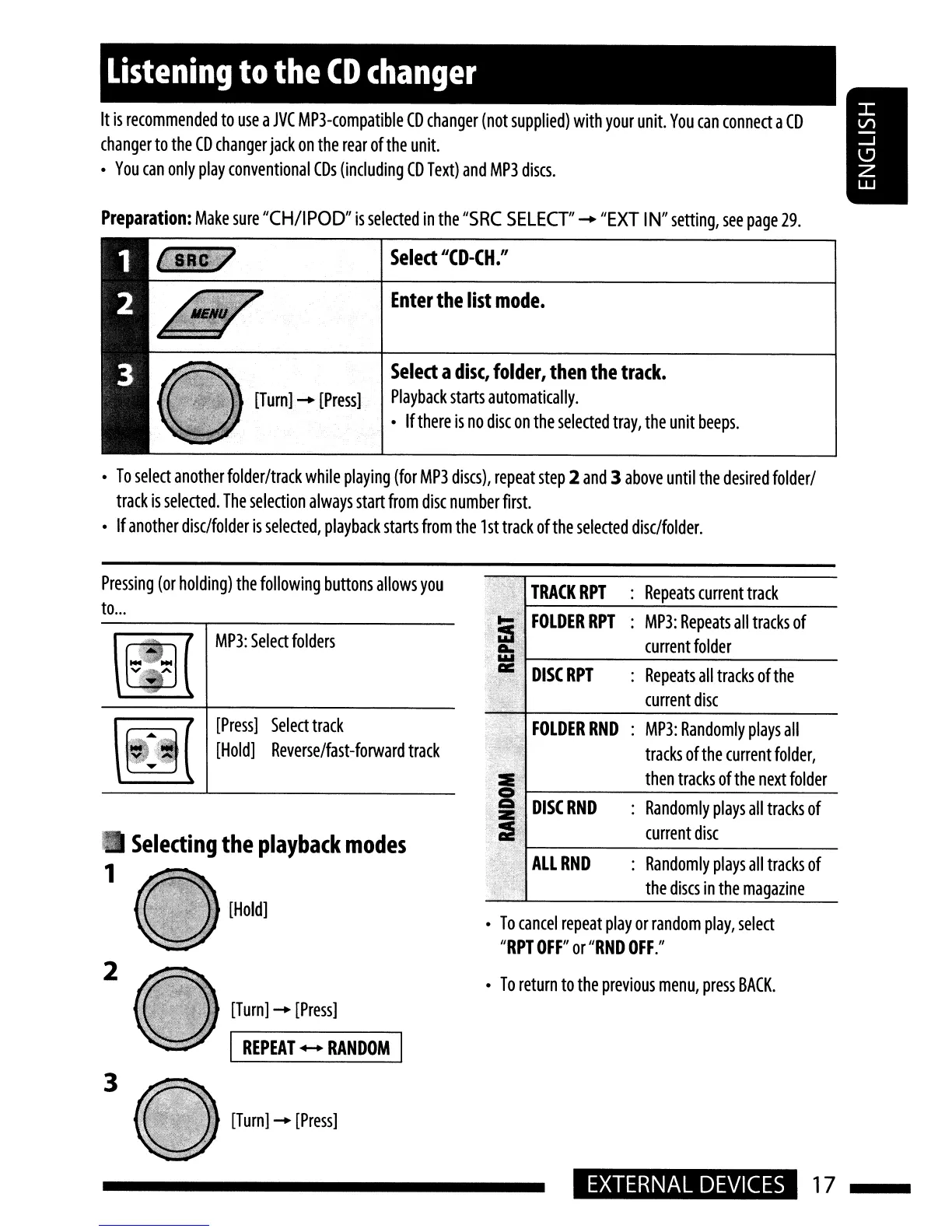
Listening
to
the
CD
changer
It
is
recommended
to
use
a
JVC
MP3-compatible
CD
changer
(not
supplied)
with
your
unit.
You
can
connect
a
CD
changer
to
the
CD
changer
jack
on
the
rear
of
the
unit.
You
can
only
play
conventional
CDs
(including
CD
Text)
and
MP3
discs.
Preparation:
Make
sure
"CH/IPOD"
is
selected
in
the
"SRC
SELECT"
-+
"EXT
IN"
setting,
see
page
29.
Select
IICD-CH."
Enter
the
list
mode.
Select
a
disc,
folder,
then
the
track.
[Turn]
-+
[Press]
Playback
starts
automatically.
If
there
is
no
disc
on
the
selected
tray,
the
unit
beeps
.
To
select
another
folder/track
while
playing
(for
MP3
discs),
repeat
step
2
and
3
above
until
the
desired
folder/
track
is
selected.
The
selection
always
start
from
disc
number
first.
If
another
disc/folder
is
selected,
playback
starts
from
the
1
st
track
of
the
selected
disc/folder.
Selecting
the
playback
modes
:
Randomly
plays
all
tracks
of
the
discs
in
the
magazine
:
Randomly
plays
all
tracks
of
current
disc
:
MP3:
Randomly
plays
all
tracks
of
the
current
folder,
then
tracks
of
the
next
folder
FOLDERRND
DISC
RPT
:
Repeats
all
tracks
of
the
current
disc
FOLDER
RPT
:
MP3:
Repeats
all
tracks
of
current
folder
TRACK
RPT
:
Repeats
current
track
To
return
to
the
previous
menu,
press
BACK.
To
cancel
repeat
play
or
random
play,
select
"RPT
OFF"
or
"RND
OFF."
[Turn]
-+
[Press]
[Hold]
I
REPEAT
....
RANDOM
I
[Press]
Select
track
[Hold]
Reverse/fast-forward
track
MP3:
Select
folders
~
:
.....
-
v
•...
A
,
2
1
Pressing
(or
holding)
the
following
buttons
allows
you
to
...
3
[Turn]
-+
[Press]
EXTERNAL
DEVICES
17