EasyManua.ls Logo

JVC KD·A60S - Troubleshooting

JVC KD·A60S
57 pages
Print Icon
To Next Page IconTo Next Page
To Previous Page IconTo Previous Page
Loading...
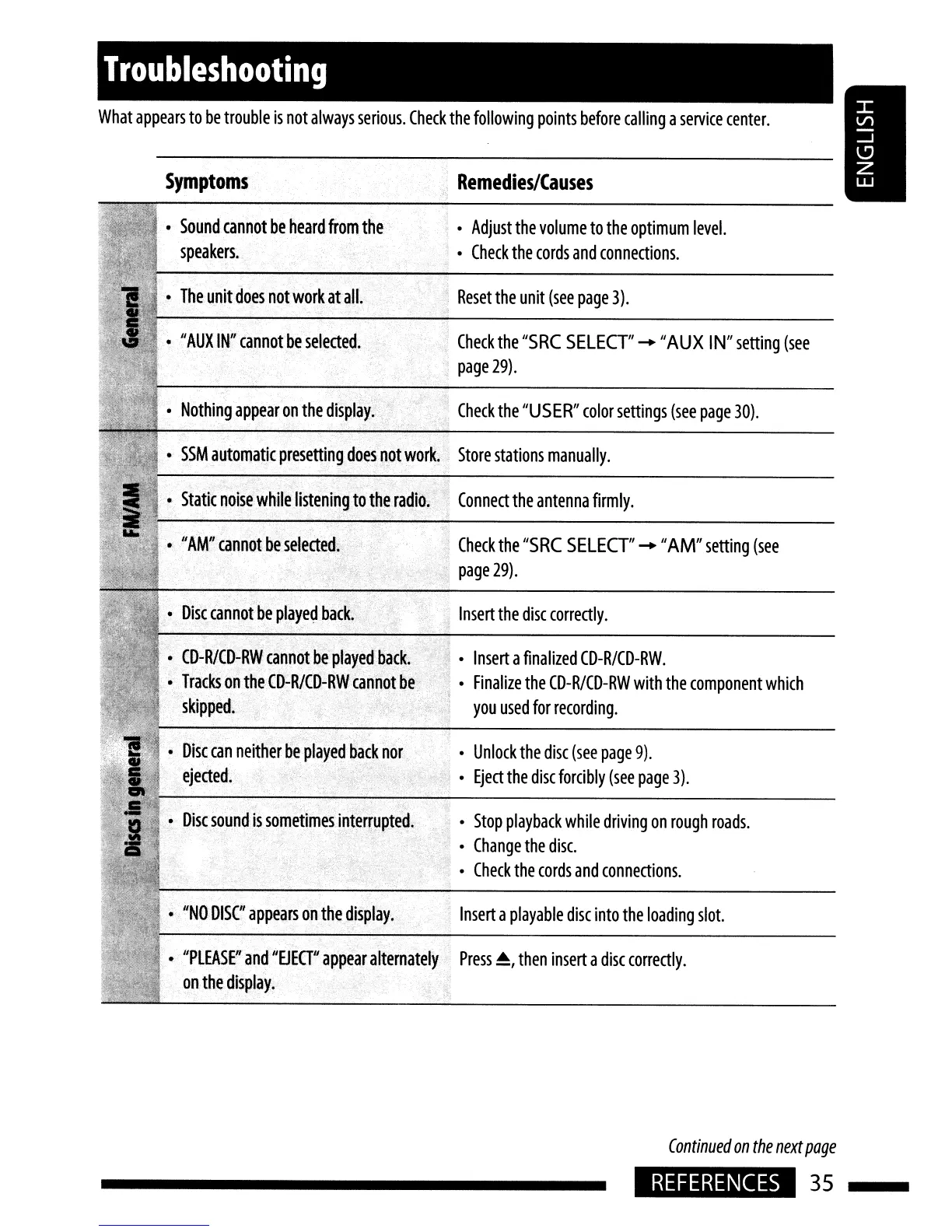
What
appears
to
be
trouble
is
not
always
serious.
Check
the
following
points
before
calling
a
service
center.
Troubleshooting
Symptoms
Remedies/Causes
SSM
automatic
presetting
does
not
work.
Store
stations
manually.
Insert
a
playable
disc
into
the
loading
slot.
Stop
playback
while
driving
on
rough
roads.
Change
the
disc.
Check
the
cords
and
connections.
Unlock
the
disc
(see
page
9).
Eject
the
disc
forcibly
(see
page
3).
Insert
a
finalized
CD-R/CD-RW.
Finalize
the
CD-R/CD-RW
with
the
component
which
you
used
for
recording.
Reset
the
unit
(see
page
3).
Check
the
"SRC
SELECT"
-
"AUX
IN"
setting
(see
page
29).
Adjust
the
volume
to
the
optimum
level.
Check
the
cords
and
connections.
..
Insert
the
disc
correctly.
.,
Check
the
"USER"
color
settings
(see
page
30).
Check
the
"SRC
SELECT"
- "AM"
setting
(see
,
page
29)
.
"NODISC"
appears
on
the
display·.
"PlEASE"and
"EJEG"
appear
alternately
Press
.,
then
insert
a
disc
correctly.
on
the
display.
Disc
sound
is
sometimes
interrupted.
Disc
can
neither
.6e
played
backhor.
ejected.
CD-RlCD-RW
cannotbe
played
ba(k~
Tracks
on
the
CD-R/CD-RW
cannot
be
skipped.
Static
noise
while
listening
to
the
radio.
..
Connect
the
antenna
firmly.
Nothing
appear
on
the
display.
"AUX
IN"
cannot
be
selected.
The
unit
does
not
work
at
all.
Sound
cannot
be
heard
from
the
speakers.
Continued
on
the
next
page
REFERENCES
35

Related product manuals