EasyManua.ls Logo

JVC KD·A60S - Page 36

JVC KD·A60S
57 pages
Print Icon
To Next Page IconTo Next Page
To Previous Page IconTo Previous Page
Loading...
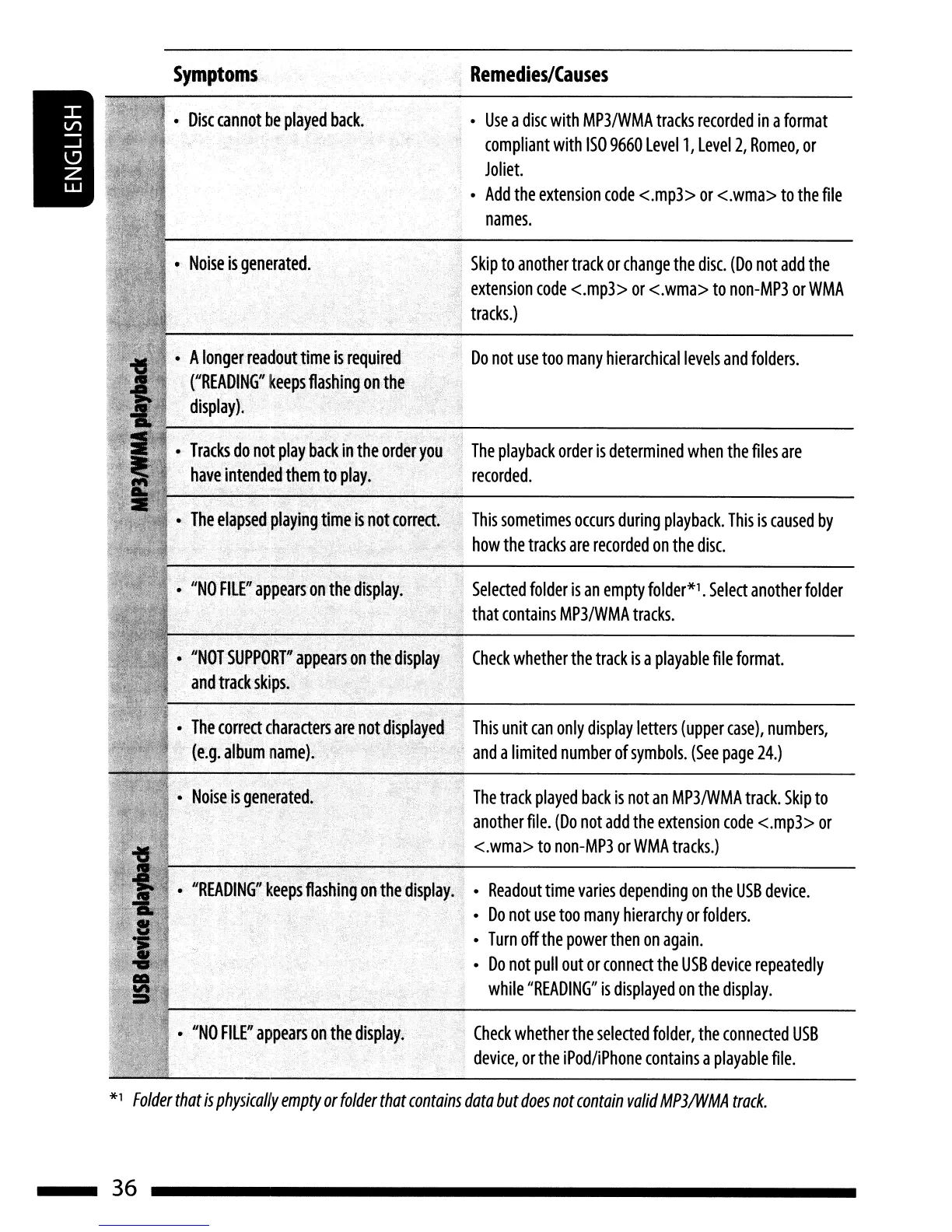
Symptoms
Remedies/Causes
"NO
FILER
appears
on
the
display.
Check
whether
the
selected
folder,
the
connected
USB
device,
or
the
iPod/iPhone
contains
a
playable
file.
The
playback
order
is
determined
when
the
files
are
recorded
.
Do
not
use
too
many
hierarchical
levels
and
folders.
Use
a
disc
with
MP3IWMA
tracks
recorded
in
a
format
compliant
with
ISO
9660
Levell,
Level
2,
Romeo,
or
Joliet.
Add
the
extension
code
<.mp3>
or
<.wma>
to
the
file
names.
,
Check
whether
the
track
is
a
playable
file
format.
This
sometimes
occurs
during
playback.
This
is
caused
by
,
how
the
tracks
are
recorded
on
the
disc.
Selected
folder
is
an
empty
folder*l
.
Select
another
folder
,
that
contains
MP3/WMA
tracks.
,
Skip
to
another
track
or
change
the
disc.
(Do
not
add
the
extension
code
<.mp3>
or
<.wma>
to
non-MP3
or
WMA
;
tracks.)
,
...
~
'}
The
track
played
back
is
not
an
MP3IWMA
track.
Skip
to
,
another
file.
(Do
not
add
the
extension
code
<.mp3>
or
<.wma>
to
non-MP3
or
WMA
tracks.)
"READING"
keeps
flashing
on
the
display.
Readout
time
varies
depending
on
the
USB
device.
Do
not
use
too
many
hierarchy
or
folders.
Turn
off
the
powerthen
on
again.
Do
not
pull
out
or
connect
the
USB
device
repeatedly
while
"READING"
is
displayed
on
the
display.
"NO
FILER
appears
on
the
display.
••
The
elapsed
playing
time
is
not
correct.
Tracks
do
not
play
back
in
the
order
you
have
intended
them
to
play.
A
longer
readout
time
is
required
("BEADIN~"~eepsfIashing
Q,nth~'
display).
Noise
is
generated.
Disc
cannot
be
played
back.
*1
Folder
that
is
physically
empty
or
folder
that
contains
data
but
does
not
contain
valid
MP3IWMA
track.
36

Related product manuals