EasyManua.ls Logo

JVC KD·A60S - Bluetooth Settings

JVC KD·A60S
57 pages
Print Icon
To Next Page IconTo Next Page
To Previous Page IconTo Previous Page
Loading...
MSG
INFO
(message
info)
Only
for
the
device
being
connected
for
"BT
-PHONE."
AUTOMATIC:
The
unit
informs
you
of
the
arrival
of
a
message
by
ringing
and
displaying
"RCV
MESSAGE"
(receiving
message).
The
display
illuminate
in
blue
(see
"RING
COLOR"
on
page
28).
MANUAL:
The
unit
does
not
inform
you
of
the
arrival
of
a
message.
MIC
SETTING
(microphone
setting)
Only
for
the
device
being
connected
for
"BT
-PHONE."
Adjust
the
volume
of
the
microphone
connected
to
the
Bluetooth
adapter.
LEVEL
01/02/03
AUTO
ANSWER
Only
for
the
device
being
connected
for
"BT
-PHONE."
OFF:
The
unit
does
not
answer
the
calls
automatically.
Answer
the
calls
manually.
ON:
The
unit
answers
the
incoming
calls
automatica
lIy.
REJECT:
The
unit
rejects
all
incoming
calls.
Setting
menu
(_:
Initial)
AUTO
CNNCT
(connect)
When
the
unit
is
turned
on,
the
connection
is
established
automatically
with
...
OFF:
No
Bluetooth
device.
LAST:
The
last
connected
Bluetooth
device.
ORDER:
The
available
registered
Bluetooth
device
found
at
first.
*1
Appears
only
when
a
Bluetooth
phone
is
connected.
*3
Appears
only
when
a
Bluetooth
phone
is
connected
and
it
is
compatible
with
text
message
(notified
through
JVC
Bluetooth
adapter).
*2
Bluetooth
Audio:
Shows
only
"Version."
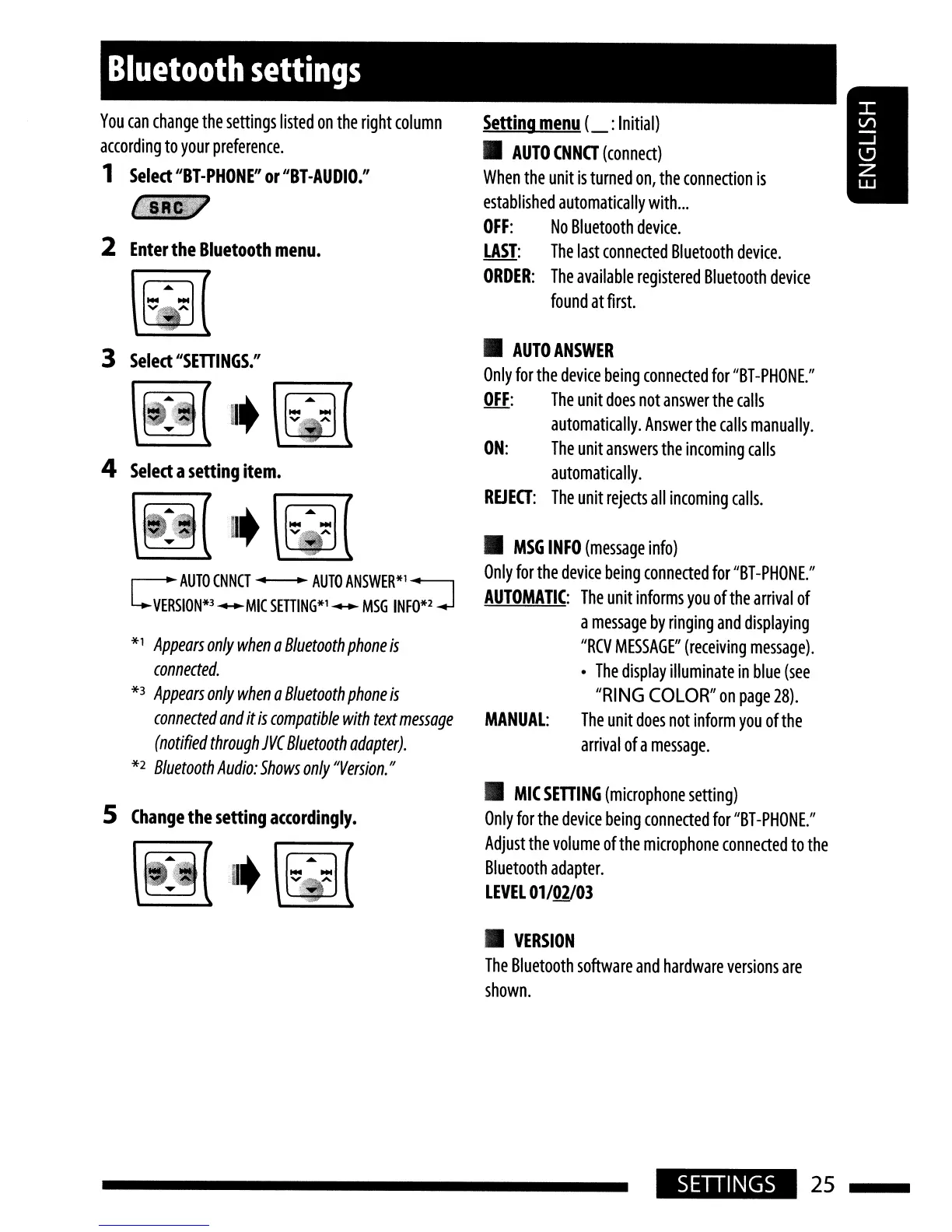
r-
AUTO
CNNCT"
AUTO
ANSWER*'
~
L..VERSION*3-MIC
SETIlNG*l-
MSG
INFO*2-J
Bluetooth
settings
5
Change
the
setting
a((ordingly.
4
Select
a
setting
item.
3
Select
"SETTI
NGS:'
2
Enter
the
Bluetooth
menu.
You
can
change
the
settings
listed
on
the
right
column
according
to
your
preference.
1
Select
"BT-PHONE"
or
"BT
-AUDIO."
..
VERSION
The
Bluetooth
software
and
hardware
versions
are
shown.
SETIINGS
25

Related product manuals