EasyManua.ls Logo

JVC KD·A60S - Selecting a Preset Sound Mode

JVC KD·A60S
57 pages
Print Icon
To Next Page IconTo Next Page
To Previous Page IconTo Previous Page
Loading...
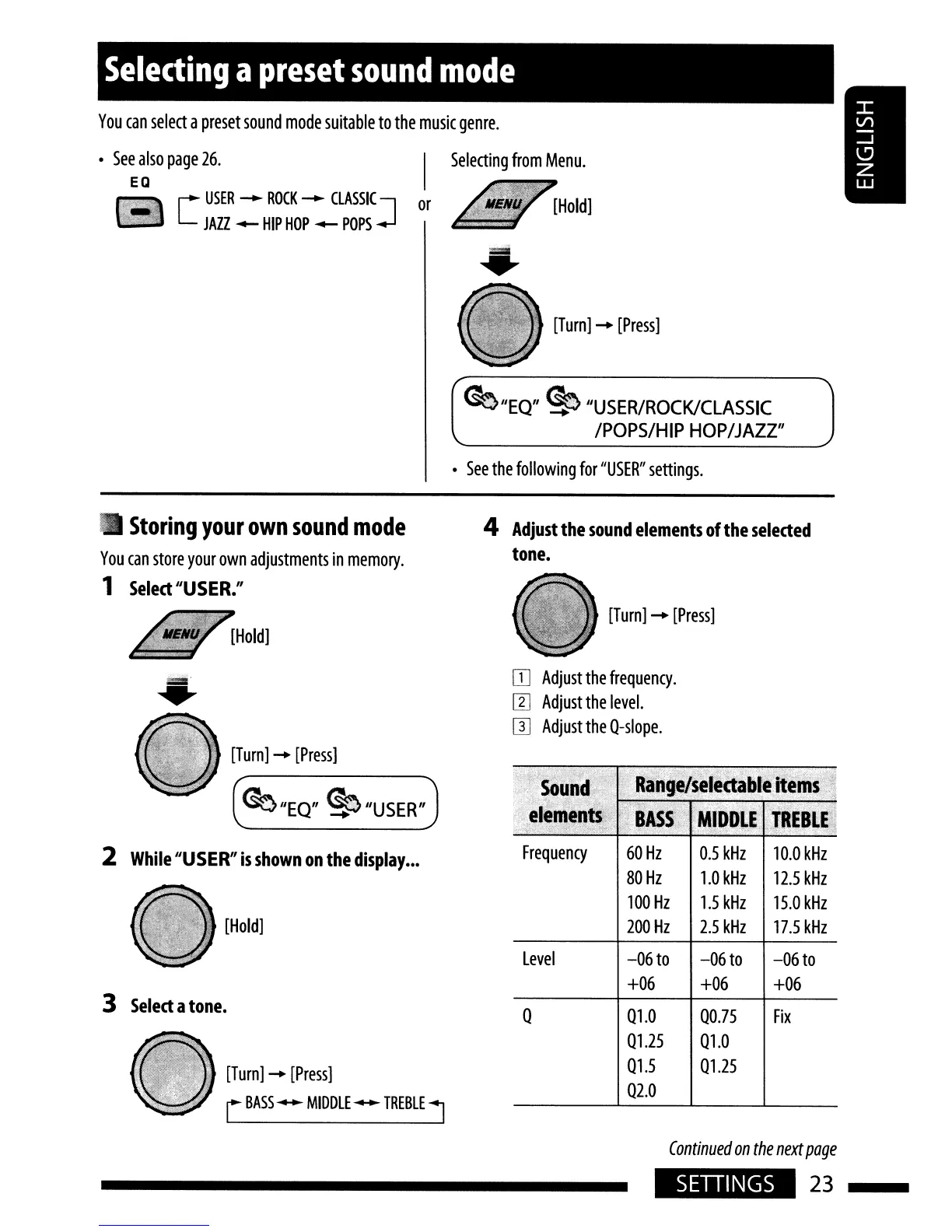
You
can
select
a
preset
sound
mode
suitable
to
the
music
genre.
Selecting
a
preset
sound
mode
Selecting
from
Menu.
[
USER
-
ROCK
-
CLASSIC]
or
JAZZ
-
HIP
HOP
-
POPS
See
also
page
26.
EO
[Turn]
-+
[Press]
~"EQ"
~
"USER/ROCK/CLASSIC
/POPS/HIP
HOP/JAZZ"
See
the
following
for
"USER"
settings.
Storing
your
own
sound
mode
You
can
store
your
own
adjustments
in
memory.
1
Select
IJUSER.
IJ
[Hold]
4
Adjust
the
sound
elements
of
the
selected
tone.
[Turn]
-+
[Press]
3
Select
a
tone.
60Hz
0.5
kHz
10.0
kHz
80Hz
1.0
kHz
12.5
kHz
100
Hz
1.5
kHz
15.0
kHz
200
Hz
2.5
kHz
17.5
kHz
-06
to
-06
to
-06
to
+06
+06
+06
010
00.75
Fix
01.25
010
01.5
0125
02.0
Continued
on
the
next
page
Level
o
Frequency
IT]
Adjust
the
frequency.
I1J
Adjust
the
level.
[l]
Adjust
the
O-slope.
~IJEQ"
~"USERIJ
[Turn]
-+
[Press]
[Turn]
-+
[Press]
r
BASS
--
MIDDLE
--
TREBLE
1
[Hold]
=="
....
2
While
IJUSER
IJ
is
shown
on
the
display
•••
SETIINGS
23

Related product manuals