EasyManua.ls Logo

JVC KD·A60S - Canceling the Display Demonstration and Setting the Clock

JVC KD·A60S
57 pages
Print Icon
To Next Page IconTo Next Page
To Previous Page IconTo Previous Page
Loading...
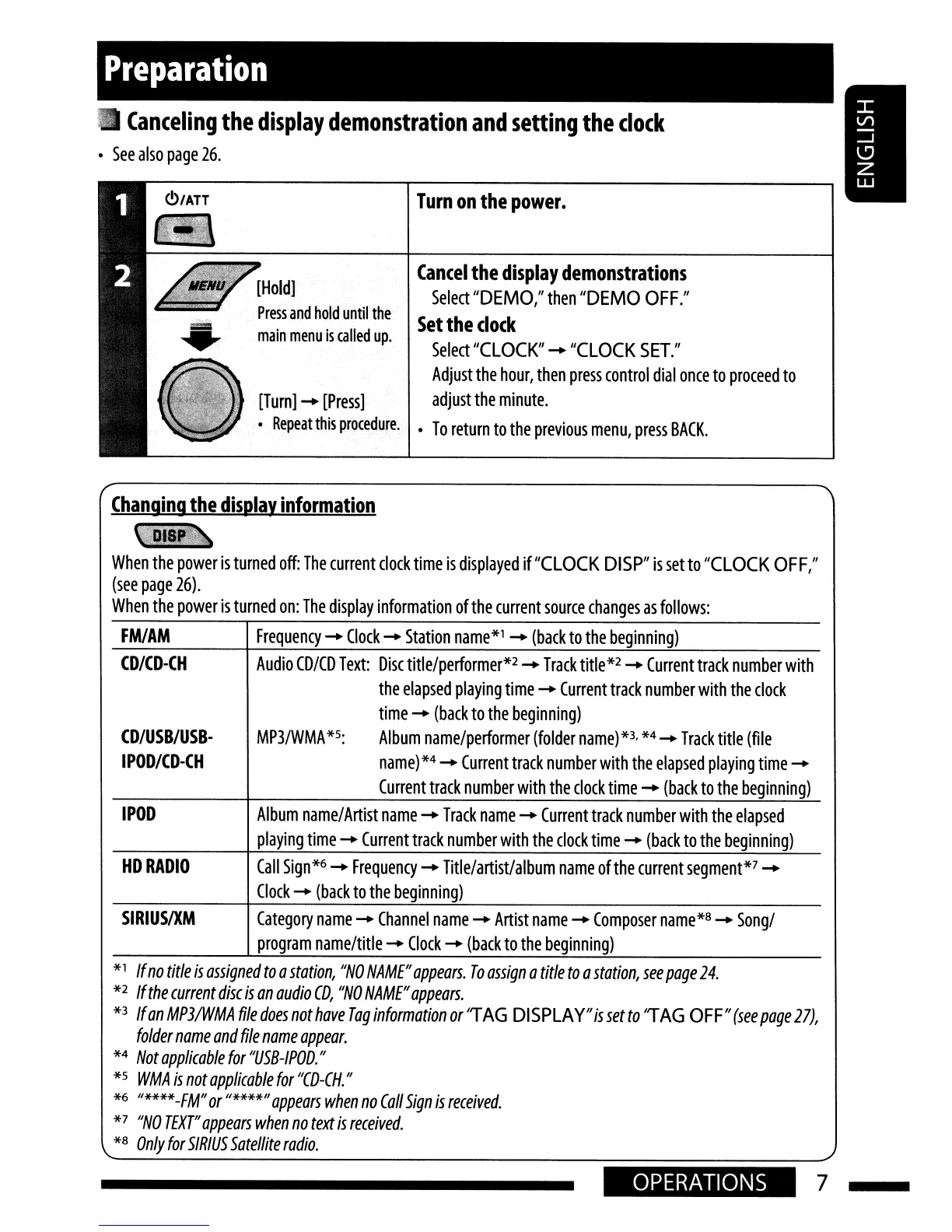
Preparation
Canceling
the
display
demonstration
and
setting
the
clock
See
also
page
26.
Cancel
the
display
demonstrations
Select
"DEMO,"
then
"DEMO
OFF."
Set
the
clock
Select
"CLOCK"
-
"CLOCK
SET."
Adjust
the
hour,
then
press
control
dial
once
to
proceed
to
adjust
the
minute.
To
return
to
the
previous
menu,
press
BACK.
Turn
on
the
power.
[Turn]
-
[Press]
Repeat
this
procedure.
[Hold]
Press
and
hold
until
the
main
menu
is
called
up.
Changing
the
display
information
wa
When
the
power
is
turned
off:
The
current
clock
time
is
displayed
if
"CLOCK
DISP"
is
set
to
"CLOCK
OFF,"
(see
page
26).
When
the
power
is
turned
on:
The
display
information
of
the
current
source
changes
as
follows:
FM/AM
Frequency
-
Clock
-
Station
name*1
-
(back
to
the
beginning)
CD/USB/USB·
IPOD/CD-CH
CD/CD-CH
Audio
CD/CD
Text:
Disc
title/performer*2
-
Track
title
*2
-
Current
track
n
umber
with
the
elapsed
playing
time
-
Current
track
number
with
the
clock
time
-
(back
to
the
beginning)
MP3/WMA
*5:
Album
name/performer
(folder
name)
*3,
*4
-
Track
title
(file
name)
*4
-
Current
track
number
with
the
elapsed
playing
time
-
Current
track
number
with
the
clock
time
-
(back
to
the
beginning)
IPOD
Album
name/Artist
name
-
Track
name
-
Current
track
number
with
the
elapsed
playing
time
-
Current
track
number
with
the
clock
time
-
(back
to
the
beginning)
HDRADIO
Call
Sign*6
-
Frequency
-
Title/artist/album
name
ofthe
current
segment*7
-
Clock
-
(back
to
the
beginning)
SIRIUSIXM
Category
name
-
Channel
name
-
Artist
name
-
Composer
name*8
-
Song/
program
name/title
-
Clock
-
(back
to
the
beginning)
*1
If
no
title
is
assigned
to
a
station,
"NO
NAME"
appears.
To
assign
a
title
to
a
station,
see
page
24.
*2
If
the
current
disc
is
an
audio
CD,
"NO
NAME"
appears.
*3
Ifan
MP3IWMA
file
does
not
have
Tag
information
or
'TAG
DISPLAY"
is
set
to
'TAG
OFF"
(see
page
27),
folder
name
and
file
name
appear.
*4
Not
applicable
for
"USB-IPOD."
*5
WMA
is
not
applicable
for
"CD-CH.
"
*6
"****-FM"
or
"****"
appears
when
no
Call
Sign
is
received.
*7
"NO
TEXT"
appears
when
no
text
is
received.
*8
Only
for
SIRIUS
Satellite
radio.
OPERATIONS
7

Related product manuals