EasyManua.ls Logo

JVC KD·A60S - Using the Bluetooth Devices

JVC KD·A60S
57 pages
Print Icon
To Next Page IconTo Next Page
To Previous Page IconTo Previous Page
Loading...
Using
the
Bluetooth®
devices
For
Bluetooth
operations,
it
is
required
to
connect
the
Bluetooth
adapter
(KS-BTA200)
(not
supplied)
to
the
CD
changer
jack
on
the
rear
of
this
unit.
Refer
also
to
the
instructions
supplied
with
the
Bluetooth
adapter
and
the
Bluetooth
device.
Refer
to
the
list
(included
in
the
box)
to
check
the
countries
where
you
may
use
the
Bluetooth@
function.
Registering
using
"OPEN"
Preparation:
Operate
the
device
to
turn
on
its
Bluetooth
function.
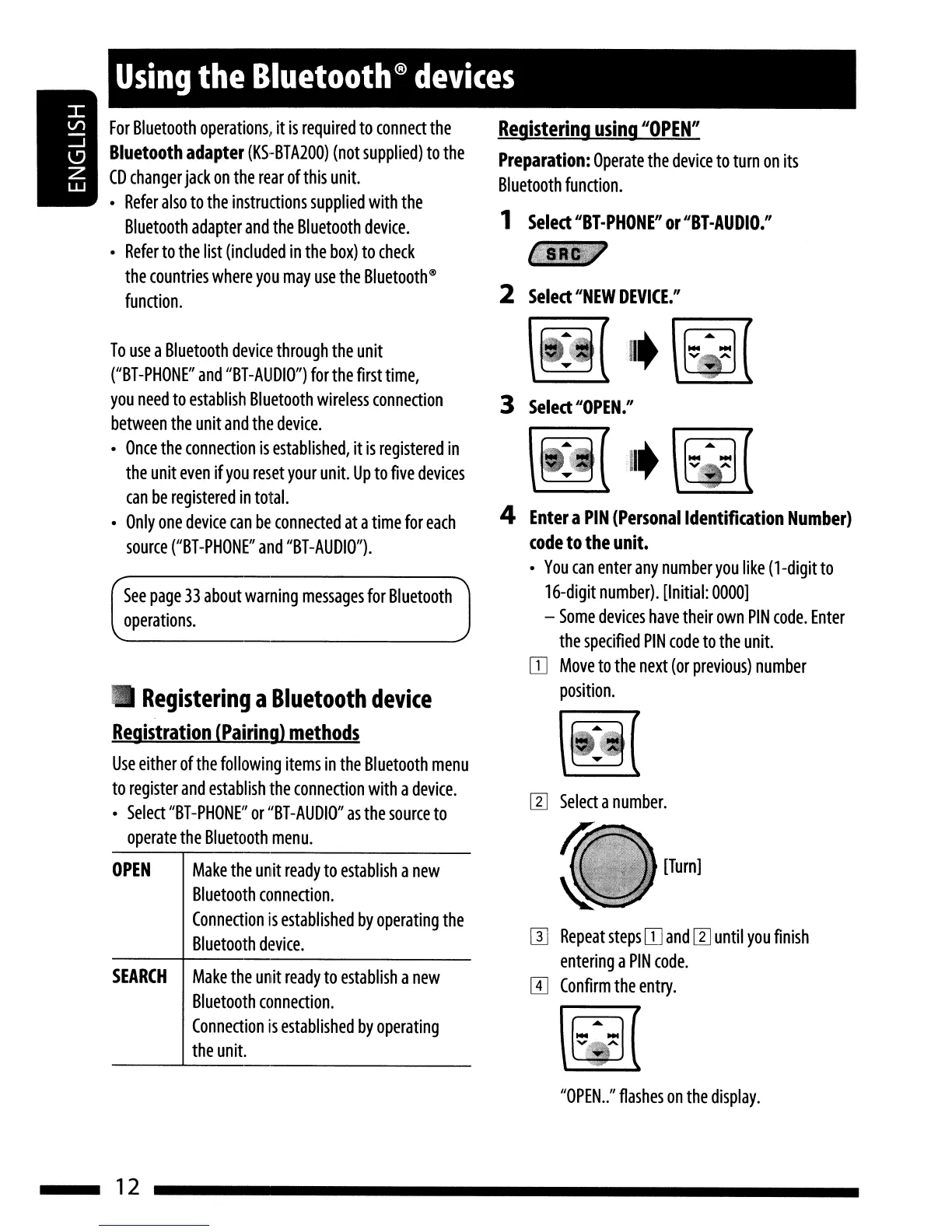
1
Select
"BY-PHONE"
or
"BY-AUDIO."
iii.
2
Select
"NEW
DEVICE."
[l]
Select
a
number.
[Turn]
W
Repeat
steps
IT]
and
[l]
until
you
finish
entering
a
PIN
code.
m
Confirm
the
entry.
4
Enter
a
PIN
(Personal
Identification
Number)
code
to
the
unit.
You
can
enter
any
number
you
like
(1-digit
to
16-digit
number).
[Initial:
0000]
-
Some
devices
have
their
own
PIN
code.
Enter
the
specified
PIN
code
to
the
unit.
IT]
Move
to
the
next
(or
previous)
number
position.
3
Select
"OPEN."
See
page
33
about
warning
messages
for
Bluetooth
operations.
SEARCH
Make
the
unit
ready
to
establish
a
new
Bluetooth
connection.
Connection
is
established
by
operating
the
unit.
OPEN
Make
the
unit
ready
to
establish
a
new
Bluetooth
connection.
Connection
is
established
by
operating
the
Bluetooth
device.
Registering
a
Bluetooth
device
Registration
(Pairing)
methods
Use
either
of
the
following
items
in
the
Bluetooth
menu
to
register
and
establish
the
connection
with
a
device.
Select
"BT
-PHONE"
or
"BT
-AUDIO"
as
the
source
to
operate
the
Bluetooth
menu.
To
use
a
Bluetooth
device
through
the
unit
("BT
-PHONE"
and
"BT
-AUDIO")
for
the
first
time,
you
need
to
establish
Bluetooth
wireless
connection
between
the
unit
and
the
device.
Once
the
connection
is
established,
it
is
registered
in
the
unit
even
if
you
reset
your
unit.
Up
to
five
devices
can
be
registered
in
total.
Only
one
device
can
be
connected
at
a
time
for
each
source
("BT-PHONE"
and
"BT-AUDIO").
"OPEN
..
"
flashes
on
the
display.
12

Related product manuals