EasyManua.ls Logo

JVC KD·A60S - Color Settings

JVC KD·A60S
57 pages
Print Icon
To Next Page IconTo Next Page
To Previous Page IconTo Previous Page
Loading...
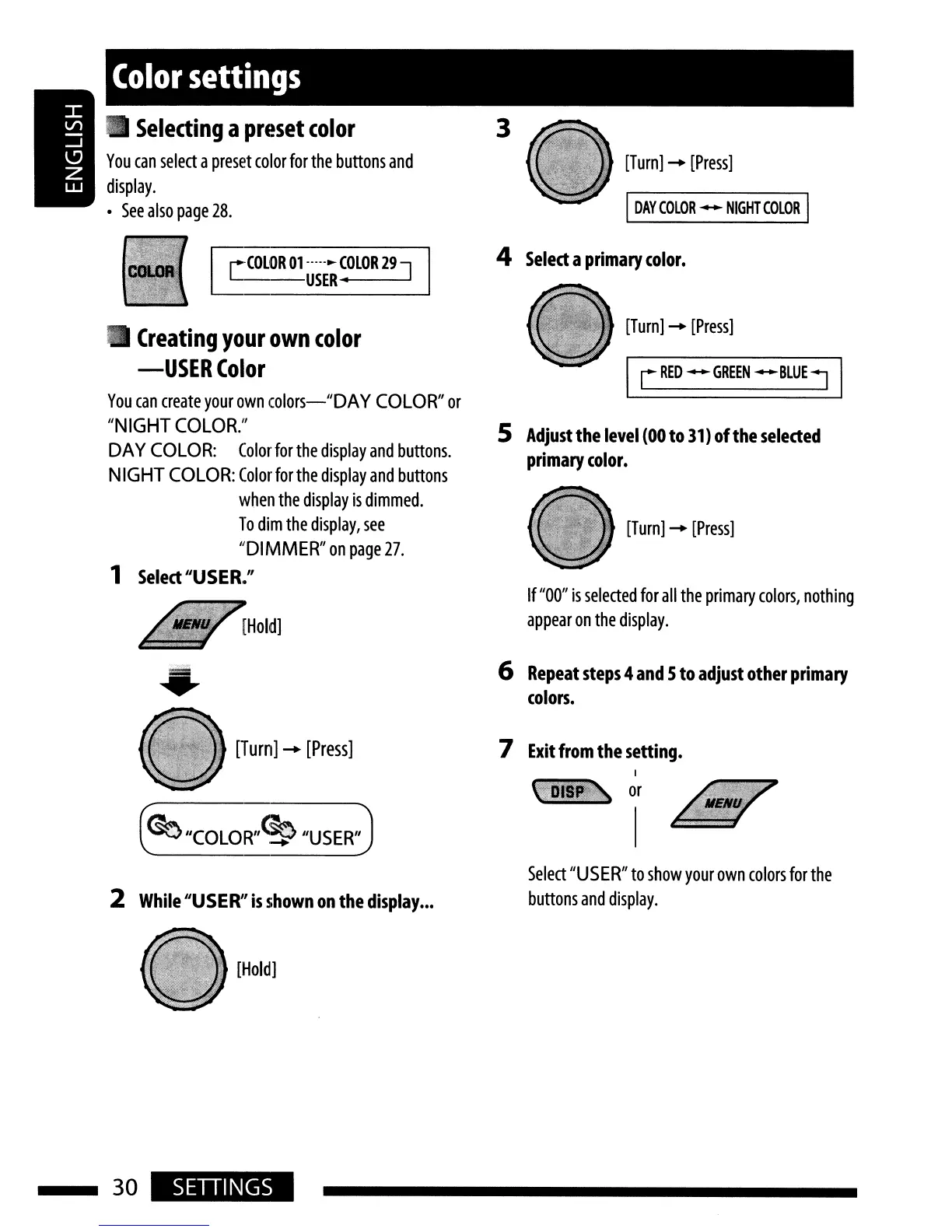
[Turn]
-
[Press]
[Turn]
-
[Press]
[Turn]
-
[Press]
I
rRED-GREEN-BLUE~
I
If
"00"
is
selected
for
all
the
primary
colors,
nothing
appear
on
the
display.
5
Adjust
the
level
(OO
to
31)
of
the
selected
primary
color.
I
DAY
COLOR
-
NIGHT
COLOR
I
4
Select
a
primary
color.
3
r=COLOR
01-----.-
COLOR
29
]
L--USER--'
---
Color
settings
Creating
your
own
color
-USER
Color
You
can
create
your
own
colors-"DAY
COLOR"
or
"NIGHT
COLOR."
DAY
COLOR:
Color
for
the
display
and
buttons.
NIGHT
COLOR:
Colorforthe
display
and
buttons
when
the
display
is
dimmed.
To
dim
the
display,
see
"DIMMER"
on
page
27.
1
Select
"USER."
Selecting
a
preset
color
You
can
select
a
preset
color
for
the
buttons
and
display.
See
also
page
28.
[Turn]
-
[Press]
~
"COLOR"~
"USER"
6
Repeat
steps
4
and
5
to
adjust
other
primary
colors.
7
Exit
from
the setting.
2
While
"USER"
is
shown
on
the
display
.••
Select
"USER"
to
show
your
own
colors
for
the
buttons
and
display.
[Hold]
30
SETIINGS

Related product manuals