EasyManua.ls Logo

JVC KD·A60S - Page 29

JVC KD·A60S
57 pages
Print Icon
To Next Page IconTo Next Page
To Previous Page IconTo Previous Page
Loading...
""
,
','
,
CategOfJ
Menu
items
"
.~I~ablf!settin9s,[referen~e
~ge]
,
:7J{
:"'+\""
'
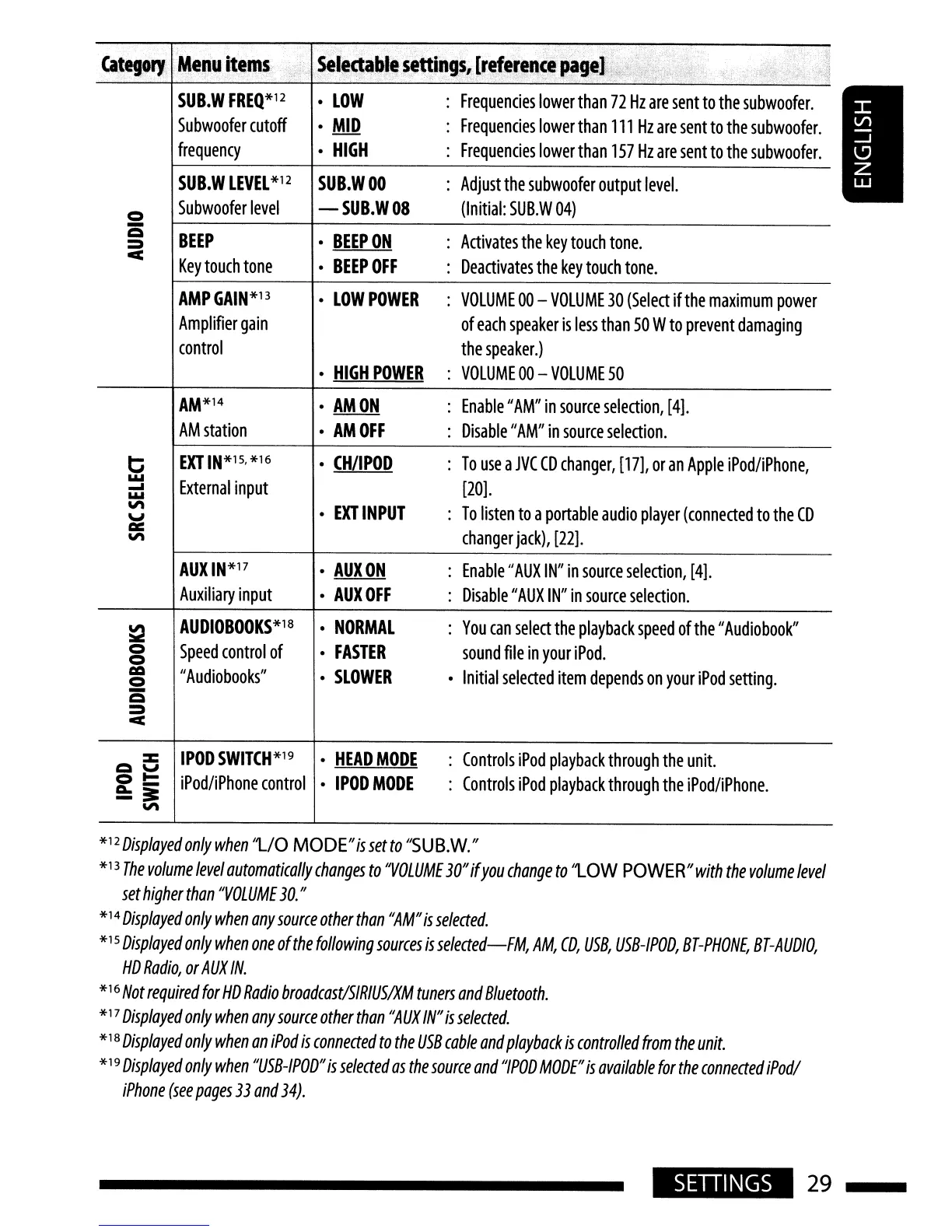
SUB.W
FREQ*12
LOW
Frequencies
lower
than
72
Hz
are
sent
to
the
subwoofer.
Subwoofer
cutoff
MID
Frequencies
lower
than
111
Hz
are
sent
to
the
subwoofer.
frequency
HIGH
Frequencies
lower
than
157
Hz
are
sent
to
the
subwoofer.
SUB.W
LEVEL
*12
SUB.WOO
Adjust
the
subwoofer
output
level.
<=)
Subwoofer
level
-SUB.WOS
(Initial:
SUB.W
04)
Q
BEEP
BEEPON
Activates
the
key
touch
tone.
=
c
Key
touch
tone
BEEPOFF
Deactivates
the
key
touch
tone.
AMPGAIN*13
LOWPOWER
VOLUME
00
-
VOLUME
30
(Select
ifthe
maximum
power
Amplifier
gain
of
each
speaker
is
less
than
50
W
to
prevent
damaging
control
the
speaker.)
HIGH
POWER
:
VOLUME
00
-
VOLUME
50
AM*14
AMON
:
Enable"
AM"
in
source
selection,
[4].
AM
station
AMOFF
:
Disable
"AM"
in
source
selection.
t:;
EXTIN*15.*16
CH/IPOD
:
To
use
a
JVC
CD
changer,
[17],
or
an
Apple
iPod/iPhone,
.....
External
input
[20].
.....
.....
'"
EXT
INPUT
:
To
listen
to
a
portable
audio
player
(connected
to
the
CD
\J
I:Il:
changer
jack),
[22].
'"
AUXIN*17
AUXON
:
Enable
II
AUX
IN"
in
source
selection,
[4].
Auxiliary
input
AUXOFF
:
Disable"
AUX
IN"
in
source
selection.
~
AUDIOBOOKS*18
NORMAL
:
You
can
select
the
playback
speed
of
the"
Audiobook"
<=)
Speed
control
of
FASTER
sound
file
in
your
iPod.
<=)
=
"
Audiobooks"
SLOWER
Initial
selected
item
depends
on
your
iPod
setting.
<=)
-
e
=
c
::z:::
IPOD
SWITCH
*19
HEAD
MODE
Controls
iPod
playback
through
the
unit.
e
\J
<=)~
iPod/iPhone
control
IPODMODE
Controls
iPod
playback
through
the
iPod/iPhone.
a..-
-~
'"
*12
Displayed
only
when
"L/O
MODE"issetto
"SUB.W."
*13
The
volume
level
automatically
changes
to
'VOLUME
30"
if
you
change
to
'lOW
POWER"
with
the
volume
level
set
higher
than
"VOLUME
30."
*14
Displayed
only
when
any
source
other
than
"AM"
is
selected.
*15
Displayed
only
when
one
of
the
follOWing
sources
is
selected-FM,
AM,
CD,
USB,
USB-IPOD,
BT-PHONE,
BT-AUDlO,
HD
Radio,
or
AUX
IN.
*16
Not
required
for
HD
Radio
broadcastlSIRIUSIXM
tuners
and
Bluetooth.
*17
Displayed
only
when
any
source
other
than
"AUX
IN"
is
selected.
*18
Displayed
only
when
an
iPod
is
connected
to
the
USB
cable
and
playback
is
controlled
from
the
unit.
*19
Displayed
only
when
"USB-IPOD"
is
selected
as
the
source
and
"IPOD
MODE"
is
available
for
the
connected
iPodl
iPhone
(see
pages
33
and
34).
SETIINGS
29

Related product manuals