EasyManua.ls Logo

JVC KD·A60S - Page 28

JVC KD·A60S
57 pages
Print Icon
To Next Page IconTo Next Page
To Previous Page IconTo Previous Page
Loading...
••
.·i.e'·
..
'
.,.;
. .'
........
;
'j
Categoay
¥enuitems
.·.'ie.
·.~Ie,~~bl~senings,
[ref.re~(e,pagel·
.
:!o:;;?,
'';'"
~
~
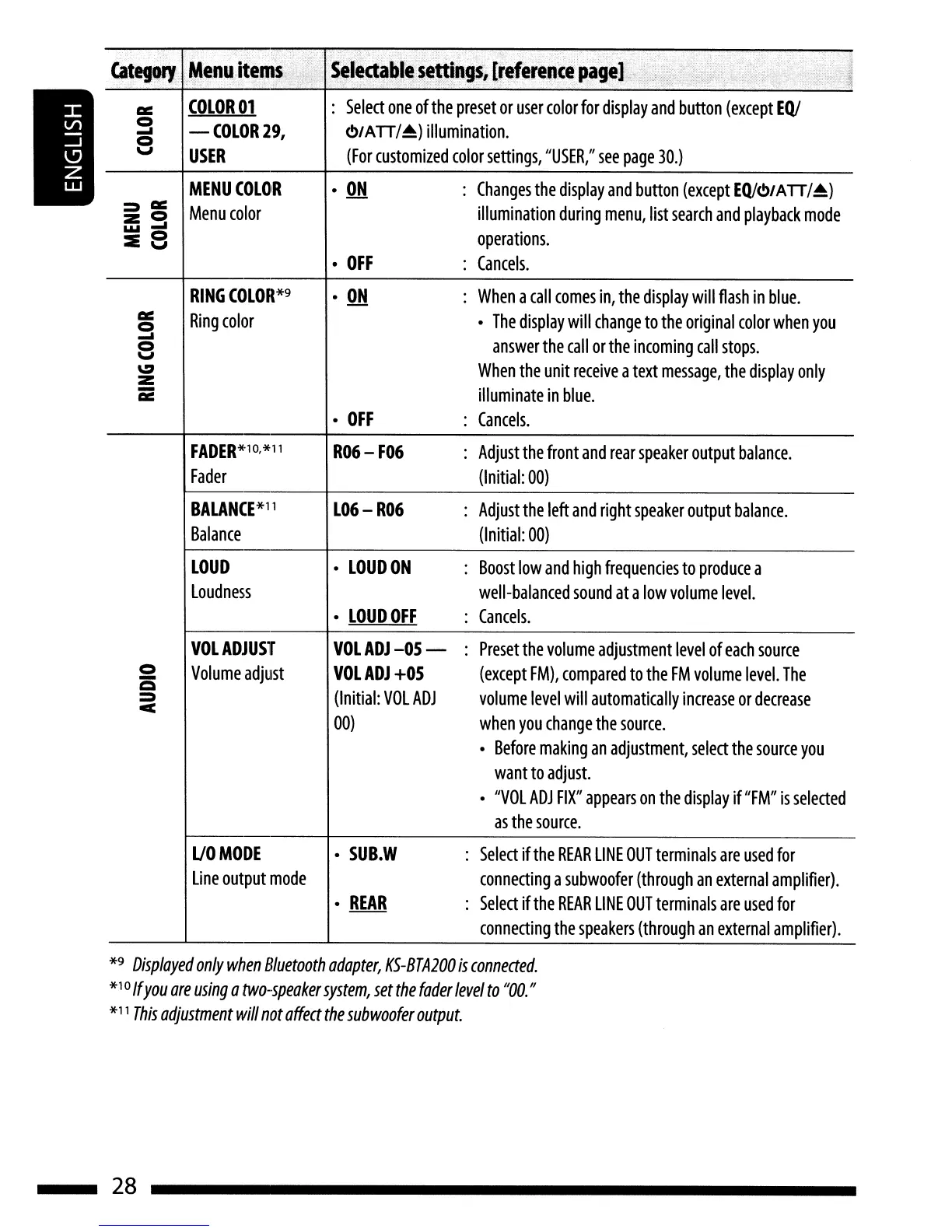
COLOR
01
Select
one
of
the
preset
or
user
color
for
display
and
button
(except
EQ/
0
-(OLOR29, O/ATT/.&)
illumination.
.....
0
v
USER
(For
customized
color
settings,
"USER,"
see
page
30.)
MENU
COLOR
ON
Changes
the
display
and
button
(except
EQ/<!>/ATT/~)
::»~
Menu
color
illumination
during
menu,
list
search
and
playback
mode
20
1oloi
.....
:IE
8
operations.
OFF
Cancels.
RING
COLOR*9
ON
When
a
call
comes
in,
the
display
will
flash
in
blue.
Cl::
Ring
color
The
display
will
change
to
the
original
color
when
you
0
.....
answer
the
call
or
the
incoming
call
stops.
0
v
~
When
the
unit
receive
a
text
message,
the
display
only
2
-
illuminate
in
blue.
~
OFF
Cancels.
FADER*1
0,
*11
R06-
F06
Adjust
the
front
and
rear
speaker
output
balance.
Fader
(Initial:
00)
BALANCE*11
L06-
R06
Adjust
the
left
and
right
speaker
output
balance.
Balance
(Initial:
00)
LOUD
LOUDON
Boost
low
and
high
frequencies
to
produce
a
loudness
well-balanced
sound
at
a
low
volume
level.
LOUD
OFF
Cancels.
VOL
ADJUST
VOLADJ-05-
Preset
the
volume
adjustment
level
of
each
source
0
Volume
adjust
VOLADJ
+05
(except
FM),
compared
to
the
FM
volume
level.
The
-
Q
::»
(Initial:
VOL
ADJ
volume
level
will
automatically
increase
or
decrease
c
00)
when
you
change
the
source.
Before
making
an
adjustment,
select
the
source
you
want
to
adjUSt.
"VOL
ADJ
FIX"
appears
on
the
display
if
"FM"
is
selected
as
the
source.
UOMODE
SUB.W
Select
if
the
REAR
LINE
OUT
terminals
are
used
for
line
output
mode
connecting
a
subwoofer
(through
an
external
amplifier).
REAR
Select
if
the
REAR
LINE
OUT
terminals
are
used
for
connecting
the
speakers
(through
an
external
amplifier).
*9
Displayed
only
when
Bluetooth
adapter,
KS-BTA200
is
conneaed.
*10
If
you
are
using
a
two-speaker
system,
set
the
fader
level
to
"DO.
"
*11
This
adjustment
will
not
affea
the
sub
woofer
output.
28

Related product manuals