EasyManua.ls Logo

JVC KD·A60S - Title Assignment

JVC KD·A60S
57 pages
Print Icon
To Next Page IconTo Next Page
To Previous Page IconTo Previous Page
Loading...
5
Repeat
steps
3
and
4
to
adjust
other
sound
characteristics.
The
adjustment
made
will
be
stored
automatically.
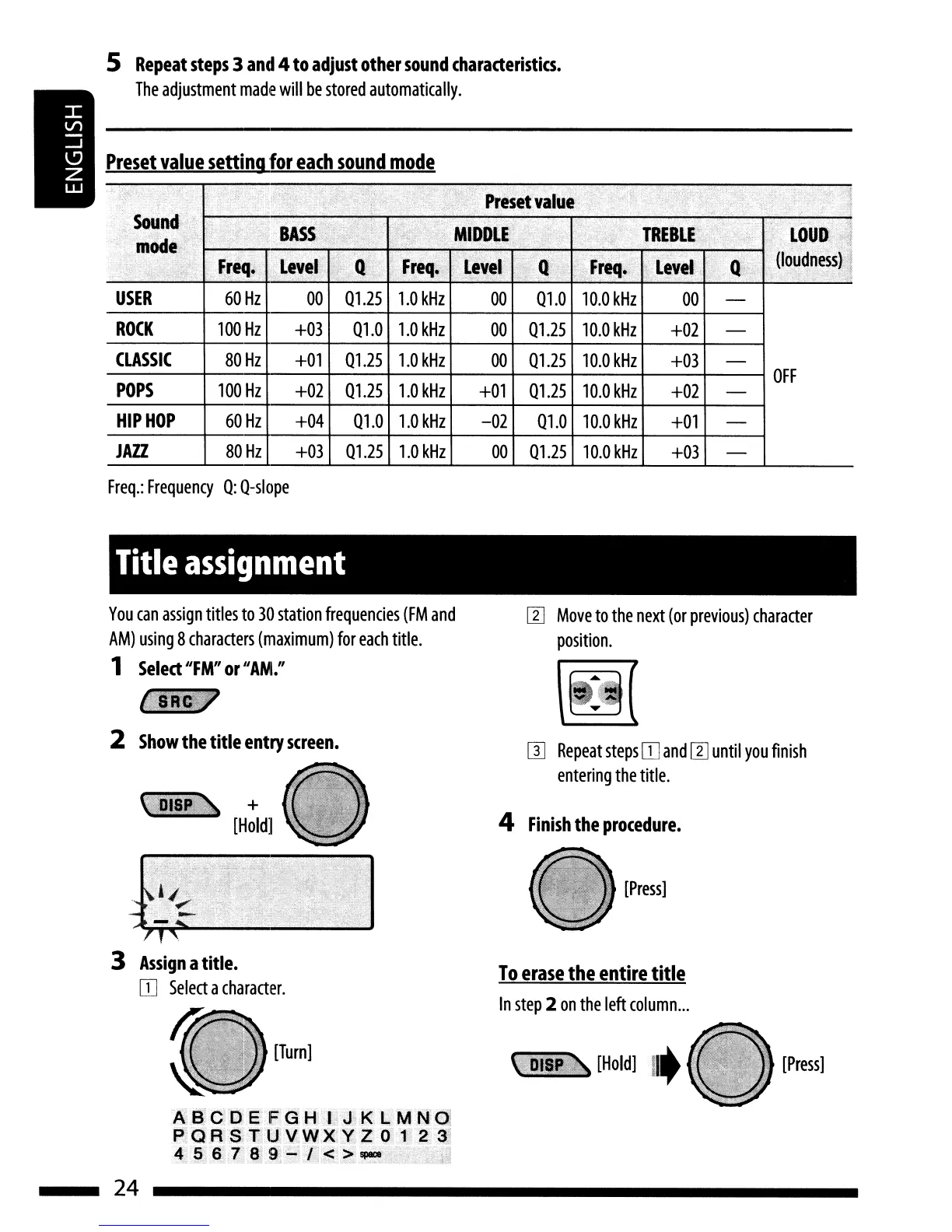
Preset
value
setting
for
each
sound
mode
USER
ROCK
CLASSIC
POPS
HIP
HOP
JAZZ
60
Hz
00
01.25
1.0
kHz
00
01.0
10.0
kHz
00
100
Hz
+03
01.0
1.0
kHz
00
01.25
10.0
kHz
+02
60
Hz
+04
01.0
1.0
kHz
-02
01.0
10.0
kHz
+01
80
Hz
+03
01.25
1.0
kHz
00
01.25
10.0
kHz
+03
Freq.:
Frequency
0:
O-slope
Title
assignment
You
can
assign
titles
to
30
station
frequencies
(FM
and
AM)
using
8
characters
(maximum)
for
each
title.
1
Select
"FM"
or
II
AM:'
2
Show
the
title
entry
screen.
...
+
[Hold]
W
Move
to
the
next
(or
previous)
character
position.
W
Repeat
steps
IJJ
and
W
until
you
finish
entering
the
title
.
4
Finish
the
procedure.
[Press]
3
Assign
a
title.
IJJ
Select
a
character.
[Turn]
A.B.
C 0 E
Fa
HL
J,
K L M
N;
OJ
P"QR
S,T
lJ\lW;X"~;Z·O
J·.2
31
4
,pv
6
l'
8,
9
.:..
l'
~
:>
~
.,.:~.,.·
..
,:::.:.~,~~,:,;;i!
24
To
erase
the
entire
title
In
step
2
on
the
left
column
...
[Press]

Related product manuals