EasyManua.ls Logo

JVC KD·A60S - Page 37

JVC KD·A60S
57 pages
Print Icon
To Next Page IconTo Next Page
To Previous Page IconTo Previous Page
Loading...
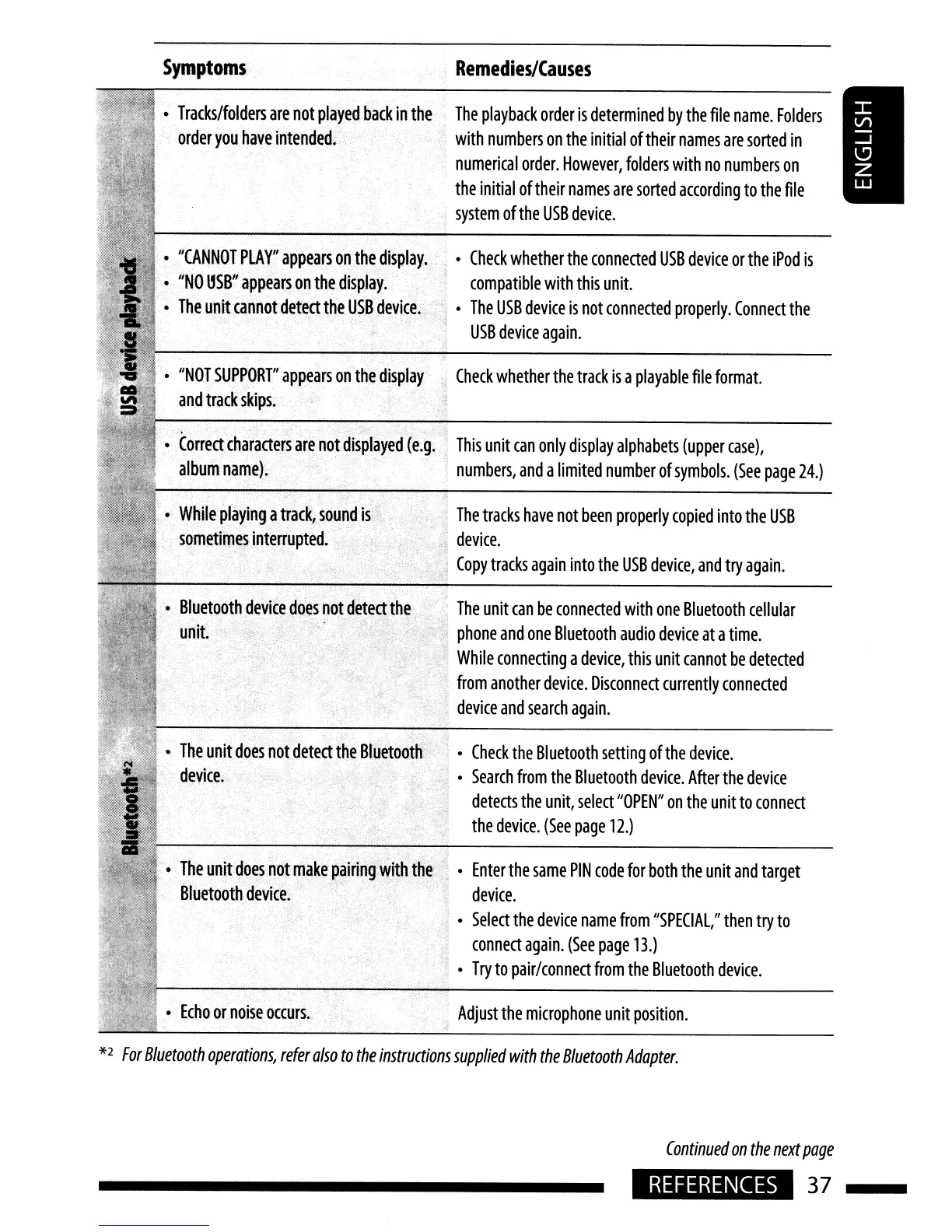
Symptoms
Remedies/Causes
Enter
the
same
PIN
code
for
both
the
unit
and
target
device.
Select
the
device
name
from
"SPECIAL,"
then
try
to
connect
again.
(See
page
13.)
Try
to
pair/connect
from
the
Bluetooth
device.
Adjust
the
microphone
unit
position.
The
tracks
have
not
been
properly
copied
into
the
USB
device.
Copy
tracks
again
into
the
USB
device,
and
try
again.
Check
whether
the
track
is
a
playable
file
format.
Check
whether
the
connected
USB
device
or
the
iPod
is
compatible
with
this
unit.
The
USB
device
is
not
connected
properly.
Connect
the
USB
device
again.
The
playback
order
is
determined
by
the
file
name.
Folders
with
numbers
on
the
initial
oftheir
names
are
sorted
in
numerical
order.
However,
folders
with
no
numbers
on
the
initial
of
their
names
are
sorted
according
to
the
file
system
of
the
USB
device.
.
Check
the
Bluetooth
setting
of
the
device.
Search
from
the
Bluetooth
device.
After
the
device
detects
the
unit,
select
"OPEN"
on
the
unit
to
connect
the
device.
(See
page
12.)
The
unit
can
be
connected
with
one
Bluetooth
cellular
'.
phone
and
one
Bluetooth
audio
device
at
a
time.
While
connecting
a
device,
this
unit
cannot
be
detected
from
another
device.
Disconnect
currently
connected
,
device
and
search
again.
Echo
or
noise
occurs.
The
unit
does
not
make
pairing
with
the
Bluetooth
device.
-
The
unit
does
not
detect
the
Bluetooth
device.·
While
playing
a
track,
sound
is
.
sometimes
interrupted.
Correct
characters
are
not
displayed
(e.g.
This
unit
can
only
display
alphabets
(upper
case),
album
name).
numbers,
and
a
limited
number
of
symbols.
(See
page
24.)
"NOT
SUPPORT"
appears
on
the
display
and
track
skips.
"CANNOT
PLAY"
appears
on
the
display.
"NO
OSB"
appears
on
the
display.
The
unit
cannot
detect
the
USB
device.
Tracks/folders
are
not
played
back
in
the
order
you
have
intended.
.•
Bluetooth
device
does
not
detect
the
...
"
....
.
y,
..
,
unit
*2
For
Bluetooth
operations,
refer
also
to
the
instructions
supplied
with
the
Bluetooth
Adapter.
Continued
on
the
next
page
REFERENCES
37

Related product manuals