EasyManua.ls Logo

JVC KD·A60S - Page 38

JVC KD·A60S
57 pages
Print Icon
To Next Page IconTo Next Page
To Previous Page IconTo Previous Page
Loading...
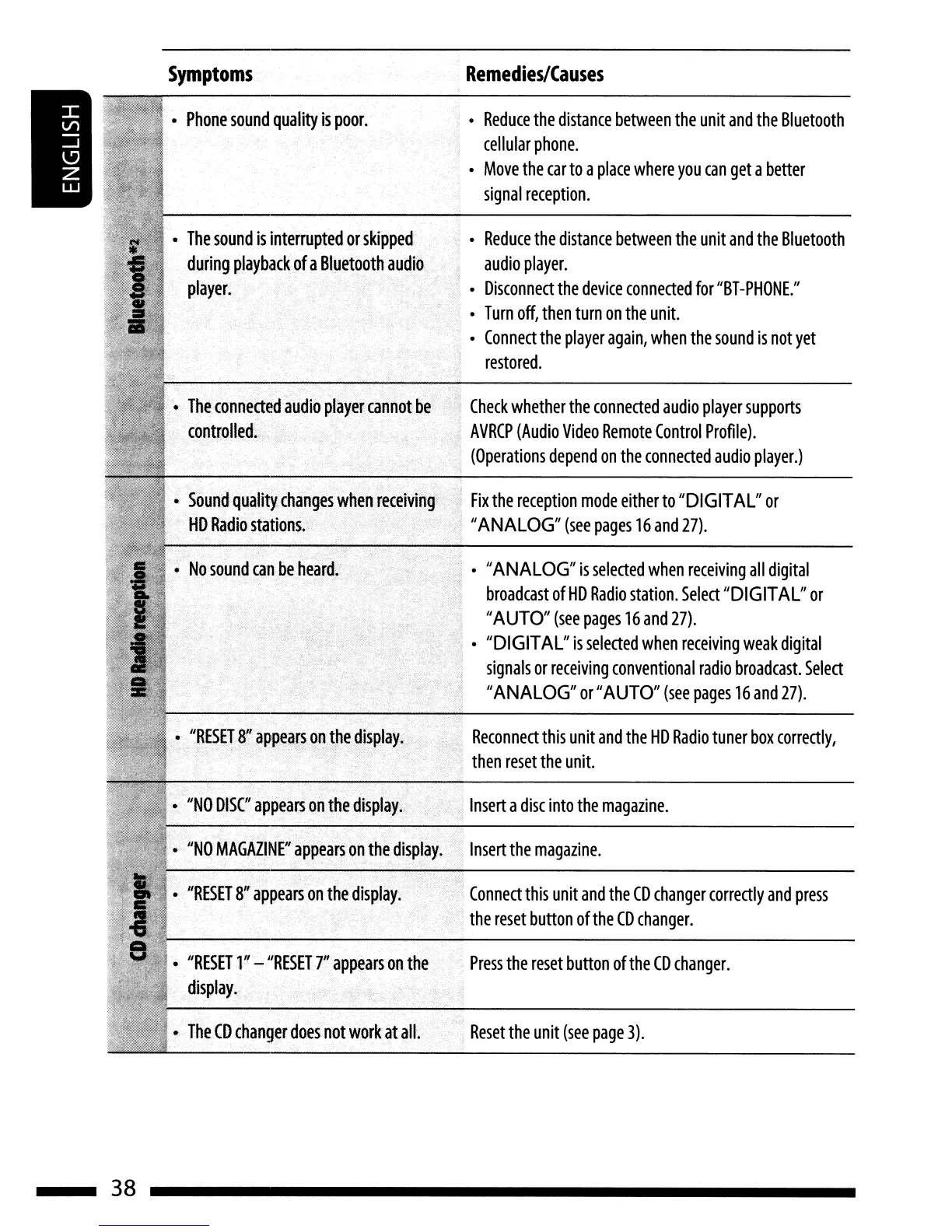
Symptoms
Remedies/Causes
Check
whether
the
connected
audio
player
supports
AVRCP
(Audio
Video
Remote
Control
Profile).
(Operations
depend
on
the
connected
audio
player.)
Reconnect
this
unit
and
the
HD
Radio
tuner
box
correctly,
then
reset
the
unit.
o "ANALOG"
is
selected
when
receiving
all
digital
broadcast
of
HD
Radio
station.
Select
"DIGITAL"
or
"AUTO"
(see
pages
16
and
27).
o "DIGITAL"
is
selected
when
receiving
weak
digital
signals
or
receiving
conventional
radio
broadcast.
Select
"ANALOG"
or
"AUTO"
(see
pages
16
and
27).
o
Reduce
the
distance
between
the
unit
and
the
Bluetooth
audio
player.
o
Disconnect
the
device
connected
for
"BT-PHONE."
o
Turn
off,
then
turn
on
the
unit.
o
Connect
the
player
again,
when
the
sound
is
not
yet
restored.
o
Reduce
the
distance
between
the
unit
and
the
Bluetooth
cellular
phone.
o
Move
the
car
to
a
place
where
you
can
get
a
better
signal
reception.
.:
Fix
the
reception
mode
either
to
"DIGITAL"
or
,1
"ANALOG"
(see
pages
16
and
27).
The
CD
changer
does
not
work
at
all.
"',
Reset
the
unit
(see
page
3).
"RESET
l~'-
"RESET
7
11
appears
on
the
Press
the
reset
button
of
the
CD
changer.
display.,
o
"RESET
81/appears
onth~
display.
Connect
this
unit
and
the
CD
changer
correctly
and
press
the
reset
button
of
the
CD
changer.
The
sound
is
interrupted
or
skipped
during
playback
of
a
Bluetooth
player.
"NO
MAGAZINE"
appear~on
thedisplay;
Insert
the
magazine.
".-;.,.,
,
,."
,.,-;::."'j"".
ollNO
DISC"appeal'S
on
the
display.
.'
i
Insert
a
disc
into
the
magazine.
Phone
sound
quality
is
poor.
38

Related product manuals