EasyManua.ls Logo

JVC KD·A60S - Page 39

JVC KD·A60S
57 pages
Print Icon
To Next Page IconTo Next Page
To Previous Page IconTo Previous Page
Loading...
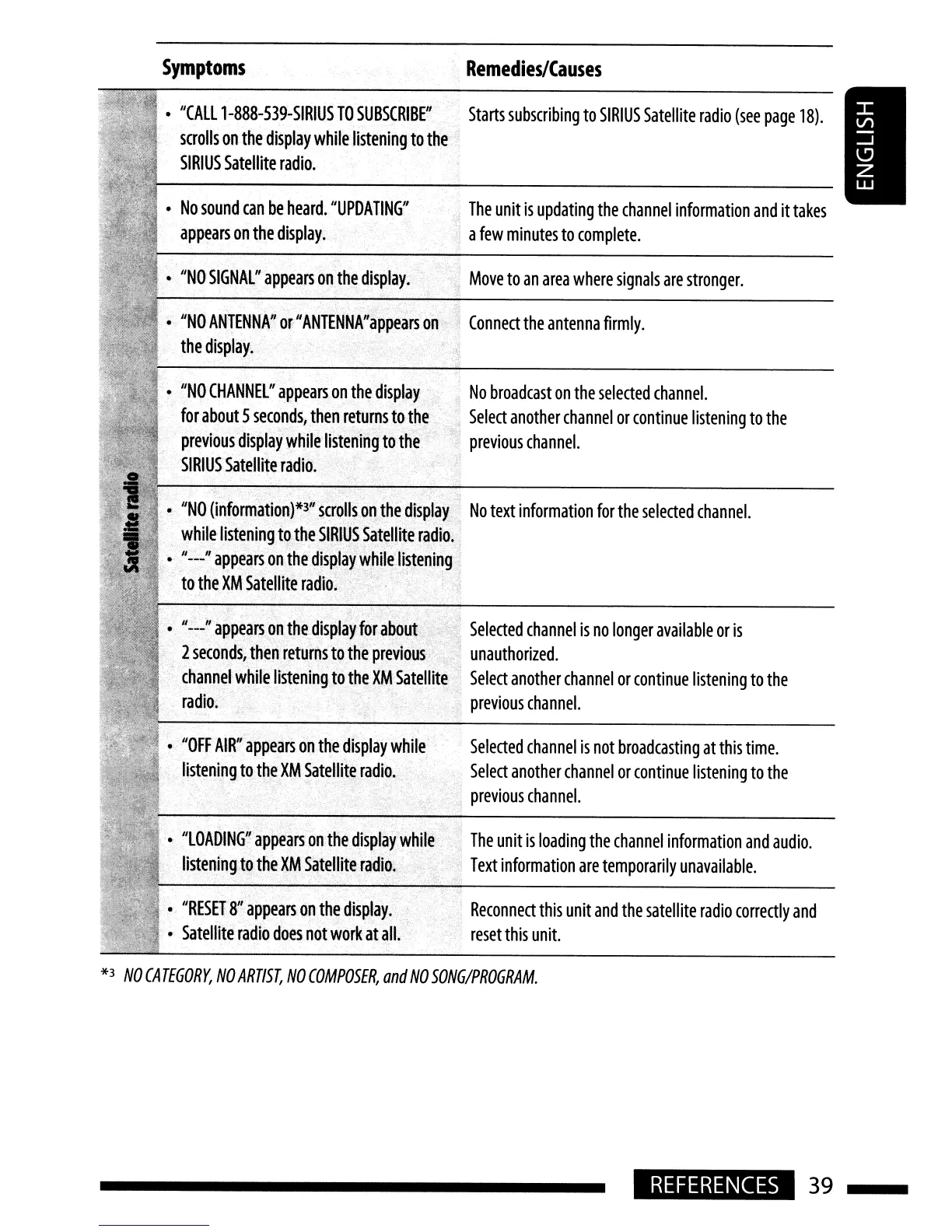
Symptoms
Remedies/Causes
Reconnect
this
unit
and
the
satellite
radio
correctly
and
reset
this
unit.
The
unit
is
loading
the
channel
information
and
audio.
Text
information
are
temporarily
unavailable
.
Selected
channel
is
not
broadcasting
at
this
time.
Select
another
channel
or
continue
listening
to
the
previous
channel.
Move
to
an
area
where
signals
are
stronger.
Connect
the
antenna
firmly.
The
unit
is
updating
the
channel
information
and
it
takes
a
few
minutes
to
complete.
Starts
subscribing
to
SIRIUS
Satellite
radio
(see
page
18).
,
Selected
channel
is
no
longer
available
or
is
.
unauthorized.
Select
another
channel
or
continue
listening
to
the
previous
channel.
No
broadcast
on
the
selected
channel.
"
Select
another
channel
or
continue
listening
to
the
previous
channel.
"
"RESET
8
/
'
appears
on
the
display.
Satellite
radio
does
not
work
at
all.
IIl0ADING"
appears
on
the
display
while
listening
to
the
XM
Satellite
radio.
112
__
'1
appears
on
thedisplay
for
about
2
seconds
l
then
returns
to
the
previous
channel
while
listening
to
the
XM
Satellite
radio.
1I0FF
AIR"
appears
on
the
display
while
listening
to
theXM
Satellite
radio.
•,
IINO
(information)*~/'
scrolls
o~thedisplay
No
text
information
for
the
selected
channel.
.
while
Iisteningto
the
SIRI4S
S~t~llite
radio;
11::_"
appears
onthe
display'W~ileJistening,
tothe
XM
Satellite
radiO.
' ,t
'.
I'NO
ANTENNA
J
'
or
II
ANTENNA"
appears
on
the
display.
"NO
CHANNEL"
appears
on
th~
display
for
about
5
seconds,
then
returns
to
the
previous
display
while
listening
to
the
SIRIUS
Satellite
radio
.
"NO
SIGNAL"
appears
on
the
display:
No
sound
can
be
heard.
"UPDATING"
appears
on
the
display.
"CALll-888-539-SIRIUS
TO
SUBSCRIBF'
scrolls
on
the
display
while
listening
to
the
SIRIUS
Satellite
radio.
*3
NO
CATEGORY,
NO
ARTIST,
NO
COMPOSER
I
and
NO
SONG/PROGRAM.
REFERENCES
39

Related product manuals