EasyManua.ls Logo

JVC KD·A60S - Page 40

JVC KD·A60S
57 pages
Print Icon
To Next Page IconTo Next Page
To Previous Page IconTo Previous Page
Loading...
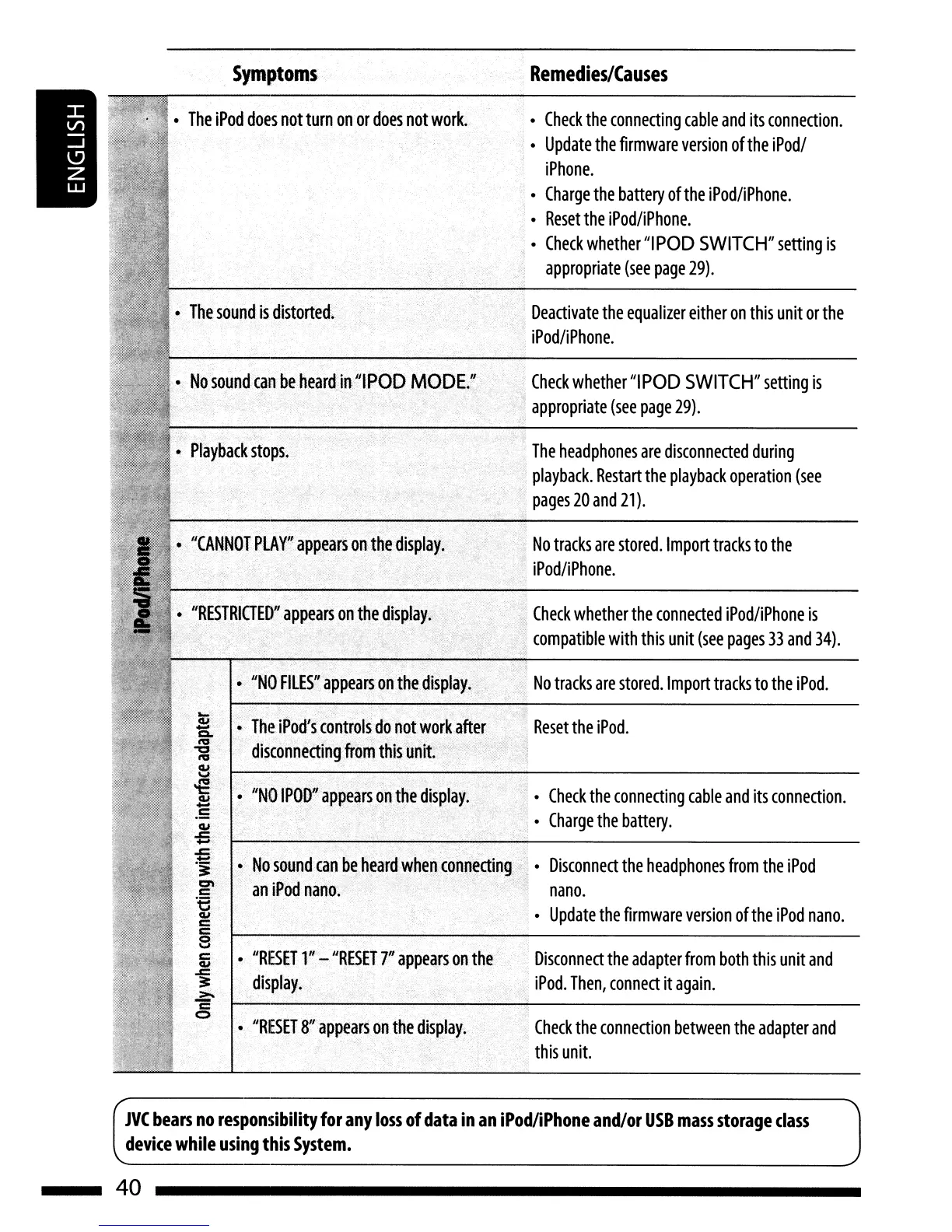
Symptoms
Remedies/Causes
No
tracks
are
stored.
Import
tracks
to
the
iPod
.
Check
the
connection
between
the
adapter
and
this
unit.
Disconnect
the
adapter
from
both
this
unit
and
iPod.
Then,
connect
it
again.
Check
the
connecting
cable
and
its
connection.
Charge
the
battery.
Reset
the
iPod.
Disconnect
the
headphones
from
the
iPod
nano.
Update
the
firmware
version
of
the
iPod
nano.
Check
whether
the
connected
iPod/iPhone
is
compatible
with
this
unit
(see
pages
33
and
34).
No
tracks
are
stored.
Import
tracks
to
the
iPod/iPhone.
The
headphones
are
disconnected
during
playback.
Restart
the
playback
operation
(see
pages
20
and
21).
Check
whether
"I
POD
SWITCH"
setting
is
appropriate
(see
page
29).
Deactivate
the
equalizer
either
on
this
unit
or
the
iPod/iPhone.
Check
the
connecting
cable
and
its
connection.
Update
the
firmware
version
of
the
iPodl
iPhone.
Charge
the
battery
of
the
iPod/iPhone.
Reset
the
iPod/iPhone.
Check
whether
"IPOD
SWITCH"
setting
is
appropriate
(see
page
29).
"RESET
8"
appears
on
the
display.
"RESET
1"
-
IIRESET
r
appears
on
the
display.
No
sound
can
be
heard
when
conn~cting
an
iPod
nano.
."', .':,.
",
"NO
IPOD"cappe.
ars
on
the
display
..
-c
..
",
','
...
The
iPod's
controls
do
not
work
after
di~connectingJr()m
this
unit
"NO
FILES"
appears
onthe
display.
Nosoundcanbe
heard
in
III
POD
MODE."
,
,'.
"RESTRIGED"
appears
on
the
display.
"CANNOT
PLAY"
appears
on
the
display.
The
iPod
does
not
turn
on
or
does
not
work.
JVC
bears
no
responsibility
for
any
loss
of
data
in
an
iPod/iPhone
and/or
USB
mass
storage
class
device
while
using
this
System.
40

Related product manuals