EasyManua.ls Logo

JVC KD·A60S - Page 21

JVC KD·A60S
57 pages
Print Icon
To Next Page IconTo Next Page
To Previous Page IconTo Previous Page
Loading...
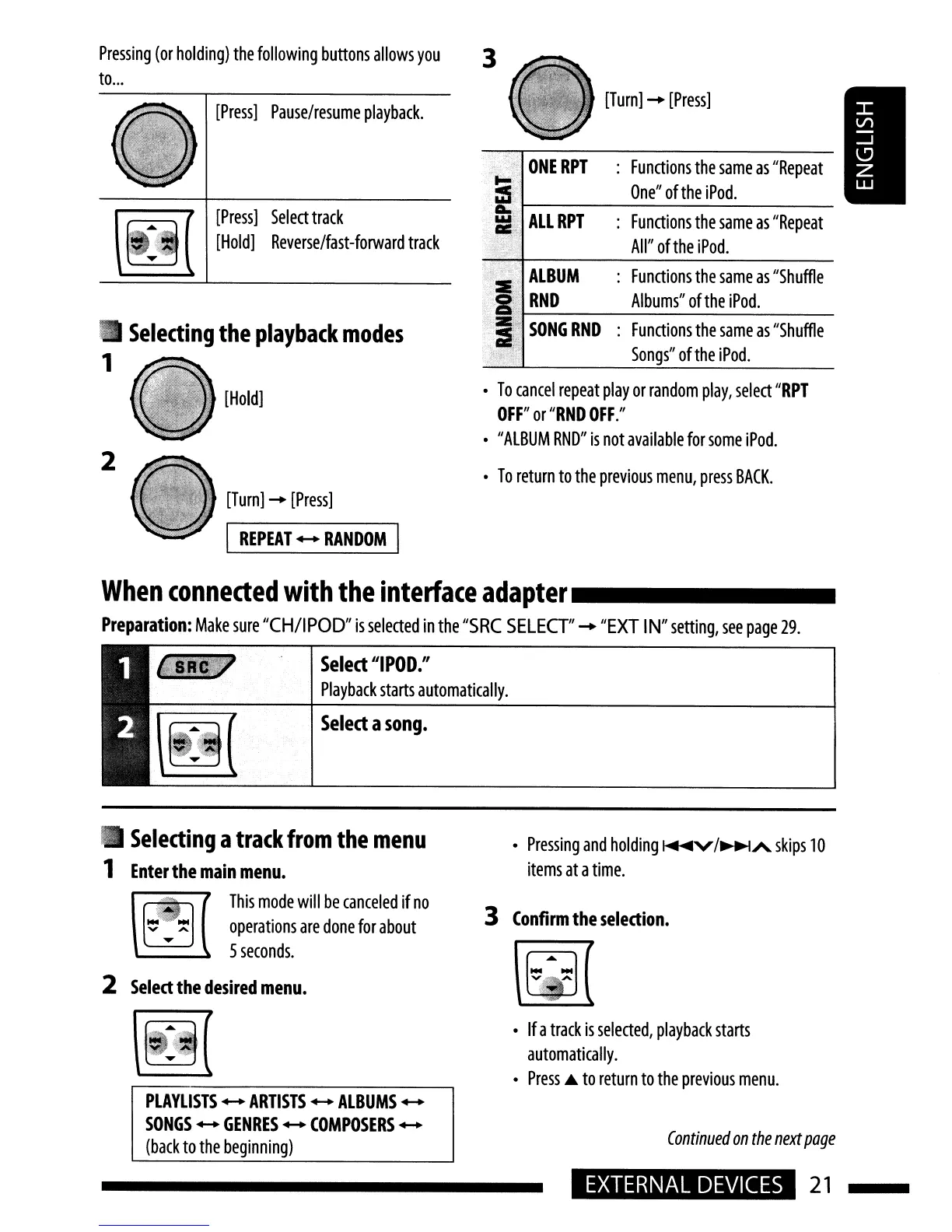
[Turn]
-
[Press]
~;;,
ONE
RPT
:
Functions
the
same
as
"Repeat
;l'
One"
of
the
iPod.
w;j
ALL
RPT
:
Functions
the
same
as
"Repeat
a:i,
1>'
All"
of
the
iPod.
•
To
cancel
repeat
play
or
random
play,
select
"RPT
OFF"
or
"RND
OFF."
•
"ALBUM
RND"
is
not
available
for
some
iPod.
•
To
return
to
the
previous
menu,
press
BACK.
3
,,\,
ALBUM
:
Functions
the
same
as
"Shuffle
2:
Z '
RND
Albums"
ofthe
iPod.
,z.'
SONG
RND
:
Functions
the
same
as
"Shuffle
~~;
i'N'F'
,
Songs"
ofthe
iPod.
Select
a
song
•
[Turn]
-
[Press]
[Hold]
[Press]
Pause/resume
playback.
~
[Press]
Select
track
~
[Hold]
Reverse/fast-forward
tra,k
I
REPEAT
....
RANDOM
I
When
conneded
with
the
interface
adapter
_
Preparation:
Make
sure
"CH/IPOD"
is
selected
in
the
"SRC
SELECT"
-
"EXT
IN"
setting,
see
page
29.
Select
"I
POD."
Playback
starts
automatically.
2
•
Selecting
the
playback
modes
1
Pressing
(or
holding)
the
folloWing
buttons
allows
you
to
...
•
Selecting
a
track
from
the
menu
1
Enter
the
main
menu.
\[ill(
This
mode
will
be
,anceled
if
no
~ ~
operations
are
done
for
about
.....
5
seconds.
2
Select
the
desired
menu.
•
Pressing
and
holding
~V/~A
skips
10
items
at
a
time.
3
Confirm
the
selection.
•
If
a
track
is
selected,
playback
starts
automatically.
•
Press
..
to
return
to
the
previous
menu.
PLAYLISTS
....
ARTISTS
....
ALBUMS
....
SONGS
....
GENRES
....
COMPOSERS
....
(back
to
the
beginning)
Continued
on
the
next
page
EXTERNAL
DEVICES
21