1-6 (No.MB080)
SECTION 3
DISASSEMBLY
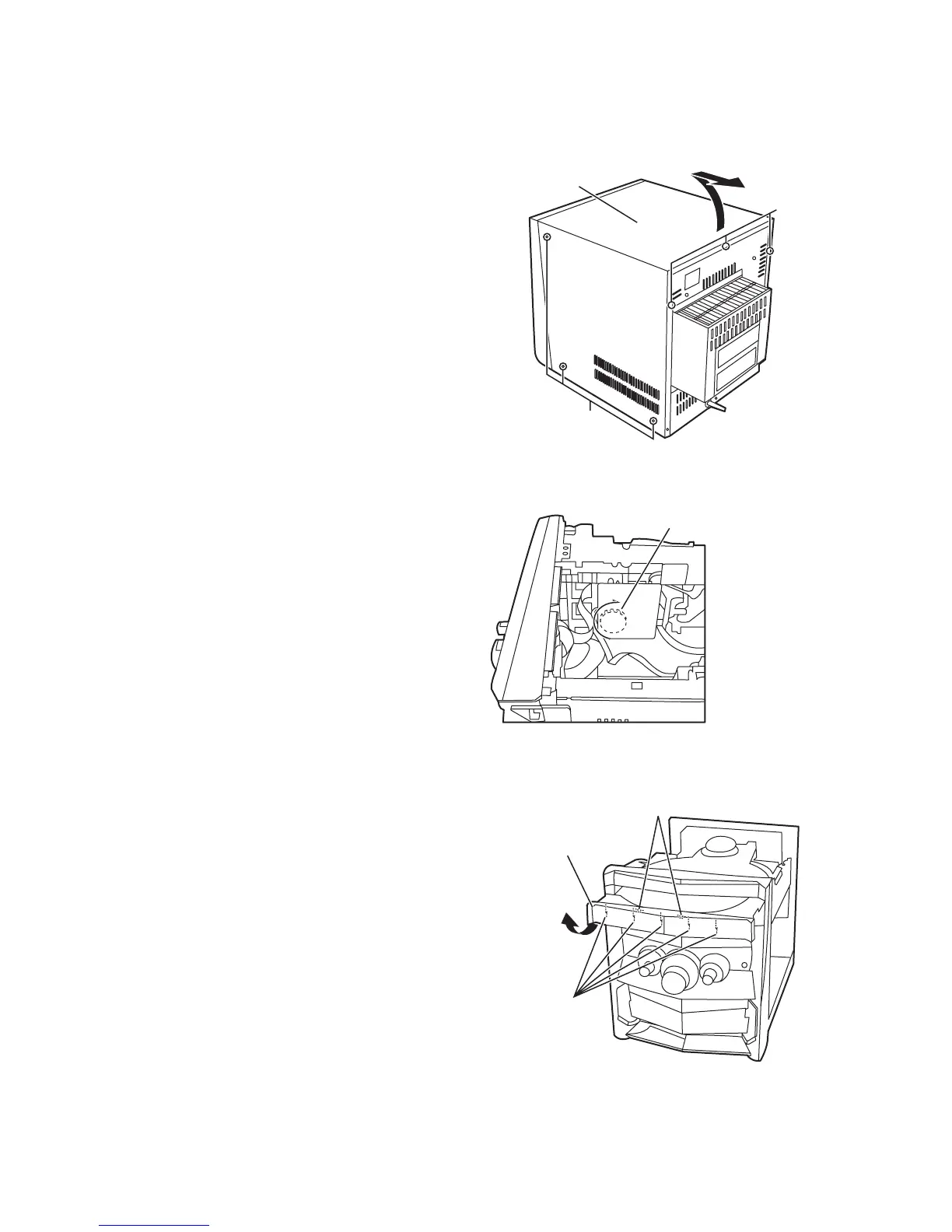
3.1 Main body
3.1.1 Removing the metal cover
(See Fig. 1)
(1) Remove the three screws A attaching the metal cover on
the back of the body.
(2) Remove the six screws B attaching the metal cover on both
sides of the body.
(3) Remove the metal cover from the body by lifting the rear
part of the cover.
ONE POINT
How to eject the CD tray manually (see fig. 2)
Turn the loading pulley gear at the bottom of the CD changer
unit as shown in Fig.2 and draw the CD tray toward the front.
Fig.1
Fig.2
3.1.2 Removing the CD tray fitting
(See Fig. 3)
• Prior to performing the following procedure, eject the CD tray.
(1) After drawing the lower part of the tray fitting toward the
front, remove the five claws. Then, while moving the tray fit-
ting upward, remove it.
Fig.3
Metal cover
B
(both sides)
Loading pulley gear
(See <CD changer unit>fig.1)
Joint
Claw
CD tray fitting


 To Next Page