1-8 (No.MB080)
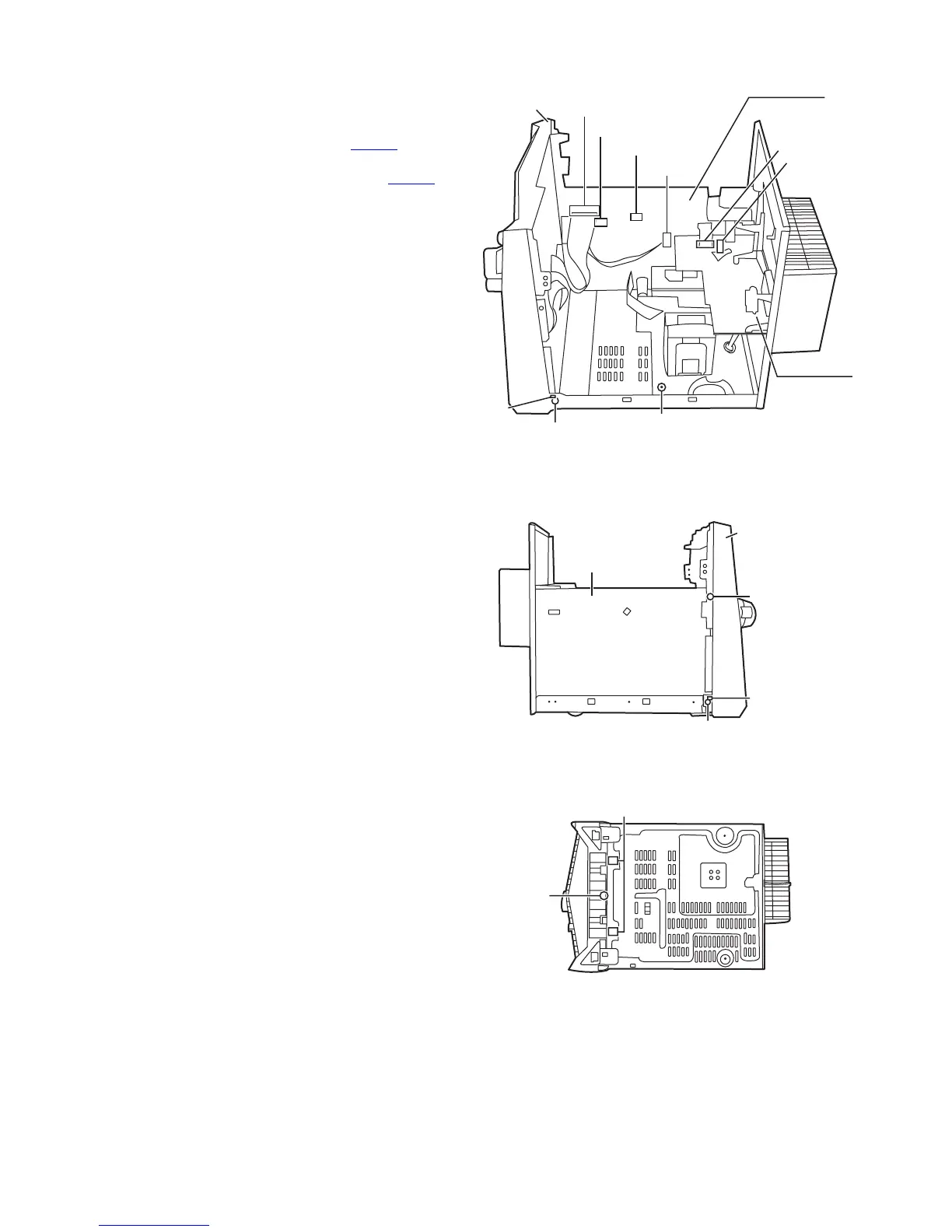
3.1.4 Removing the front panel assembly
(See Fig. 8 to 10)
• Prior to performing the following procedure, remove the metal
cover and CD changer unit.
(1) Disconnect the card wire from the connector CW101 on the
main board.
(2) Disconnect the harness from the connector CW108
,
CW109 and CW110 on the main board.
(3) Remove the screw E fixiing the lug wire.
(4) Remove the two screws F attaching the front panel assem-
bly to both sides of the body.
(5) Remove the screw G attaching the main board to the front
panel assembly.
(6) Remove the screw H attaching the front panel assembly to
bottom of the body.
(7) Release the two joints1 and two joints2, and detach the
front panel assembly toward the front.
Fig.8
Fig.9
Fig.10
Main board
Amp. board
CW101
CW109
CW110
CW108
ACW1
ACW2
Front panel
assembly
Joint1
(both sides)
F
(both sides)
E
(fixing the lug wire)
Joint1
(both sides)
F
(both sides)
Front panel
assembly
G
Main board
H
Joint2


 To Next Page