Filename [SR-VS30E_1-EN.fm]
Masterpage:Left
10
EN
Page 10 February 19, 2002 6:59 pm
INSTALLING YOUR NEW RECORDER
Basic Connections
It’s essential that your video recorder be properly
connected.
A
Check the contents.
Make sure the package contains all of the accessories
listed in “SPECIFICATIONS” on page 88.
B
Situate the recorder.
Place the recorder on a stable, horizontal surface.
C
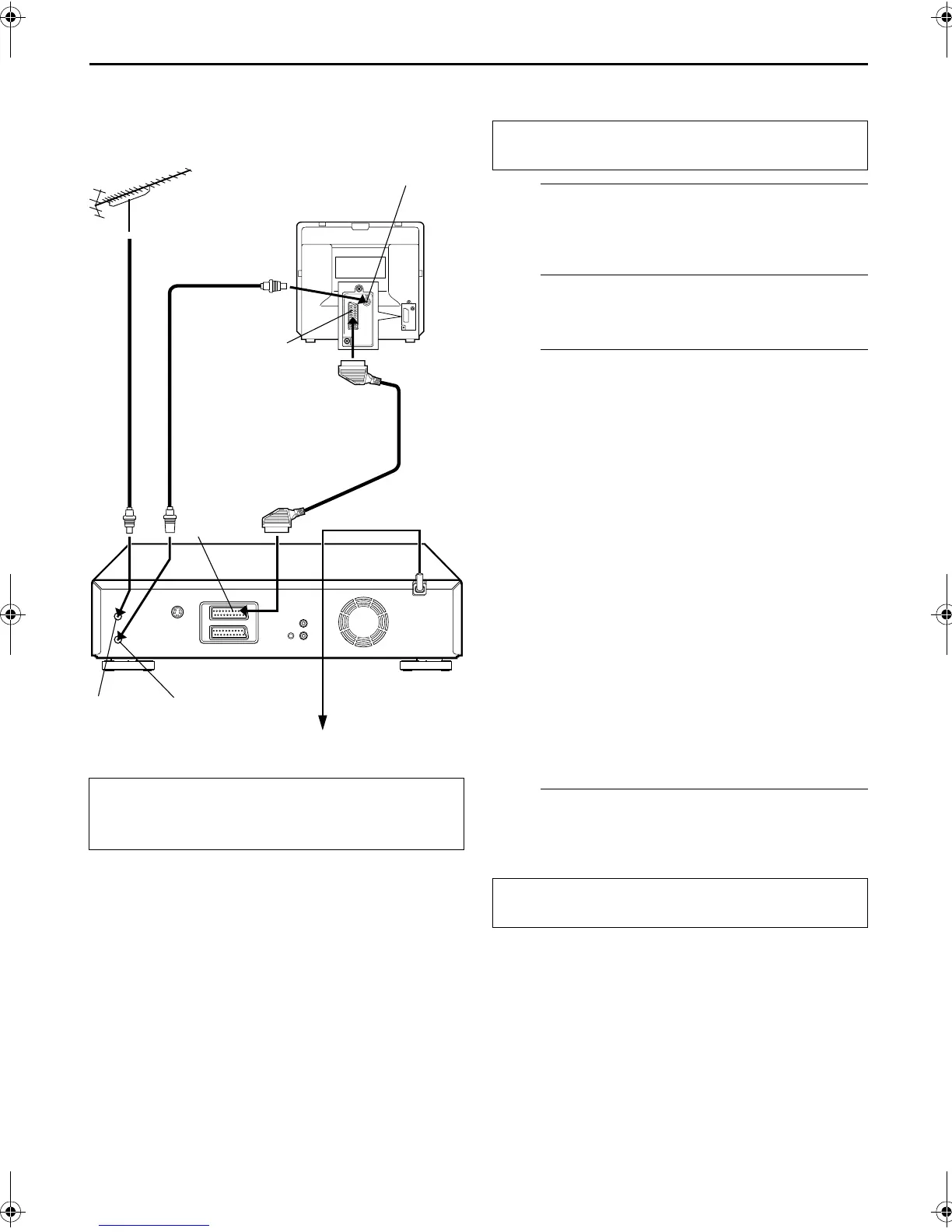
Connect the recorder to TV.
A
Disconnect the TV aerial cable from the TV.
B
Connect the TV aerial cable to the ANTENNA IN
connector on the rear panel of the recorder.
C
Connect the provided RF cable between the
ANTENNA OUT connector on the rear panel of the
recorder and the TV’s aerial connector.
D
Connect the 21-pin SCART cable between the AV1
(L-1) IN/OUT connector on the rear panel of the
recorder and the TV’s 21-pin SCART connector.
● The AV1 (L-1) IN/OUT connector accepts and delivers either a
composite signal (regular video signal) or a Y/C signal (a signal
in which the luminance and chrominance signals are
separated). If your TV’s 21-pin AV input connector (SCART) is
compatible with the Y/C signal, set “L-1 OUTPUT” to
“S-VIDEO” after the connection and the initial settings are
completed (
墌
pg. 52). You can obtain high-quality S-VHS
pictures. (For connection, be sure to use a 21-pin SCART cable
that is compatible with the Y/C signal.)
● Set your TV to the VIDEO (or AV), Y/C, or RGB mode
according to the type of your TV’s SCART connector.
● For switching the TV’s mode, refer to the instruction manual of
your television.
● To obtain high-quality S-VHS pictures, you can also use the
S-VIDEO connection described on page 11.
D
Connect the recorder to mains.
Plug the end of the mains power cord into a mains outlet.
ATTENTION:
Your TV must have a 21-pin AV input connector
(SCART) for the connection to the recorder.
Aerial connector
Back of TV
21-pin SCART
connector
TV aerial cable
RF cable
(provided)
21-pin SCART
cable
(not provided)
Mains power cord
Mains outlet
Back of recorder
AV1 (L-1)
IN/OUT
ANTENNA
IN
ANTENNA
OUT
THESE STEPS MUST BE COMPLETED BEFORE ANY
VIDEO OPERATION CAN BE PERFORMED.
After the connection is completed, perform “Auto Set
Up” on page 12.
SR-VS30E_1-EN.fm Page 10 Tuesday, February 19, 2002 6:59 PM



 To Next Page