Filename [SR-VS30E_3-EN.fm]
Masterpage:Left
66
EN
Page 66 February 1, 2002 3:27 pm
SYSTEM CONNECTIONS (cont.)
Connecting/Using
A Decoder
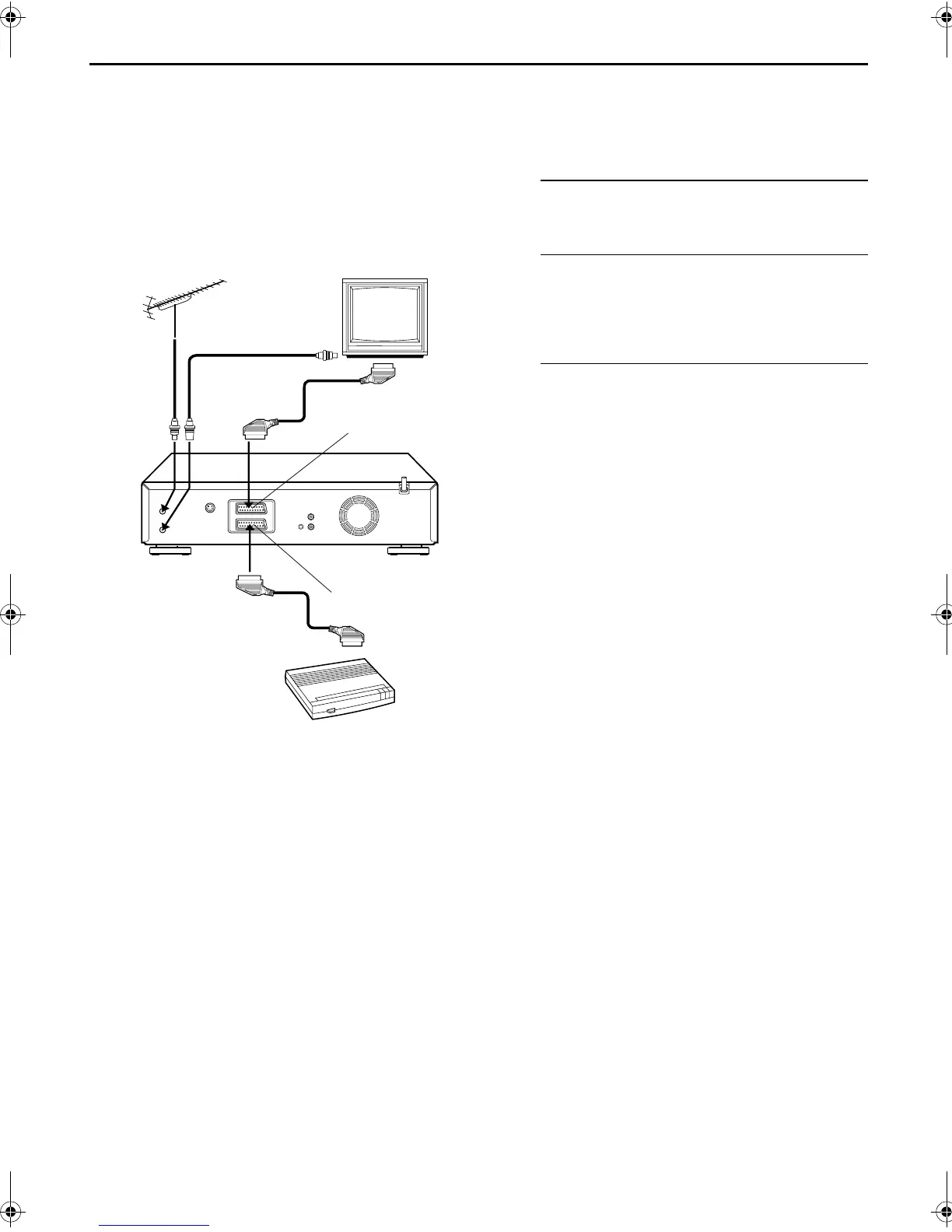
The AV2 (L-2) IN/DECODER connector can be used as an
input connector for an external decoder (descrambler).
Simply connect a decoder and you can enjoy the variety
of programming that is available through scrambled
channels.
A
Select the input mode.
Set “L-2 SELECT” to “DECODER”. (
墌
pg. 53)
B
Connect the decoder.
Connect your recorder’s AV2 (L-2) IN/DECODER
connector to the decoder’s 21-pin SCART connector
using a 21-pin SCART cable.
C
Set the tuner.
Perform the procedure as described in “When Receiving
A Scrambled Broadcast” on page 77.
TV receiver
RF cable
(provided)
TV aerial
cable
AV1 (L-1) IN/OUT
AV2 (L-2) IN/DECODER
Decoder
Back of recorder
SR-VS30E_1-EN.book Page 66 Friday, February 1, 2002 3:35 PM



 To Next Page