Masterpage:Right
EN
63
Filename [SR-VS30E_3-EN.fm]
Page 63 February 1, 2002 3:27 pm
SYSTEM CONNECTIONS
Connecting To A
Printer
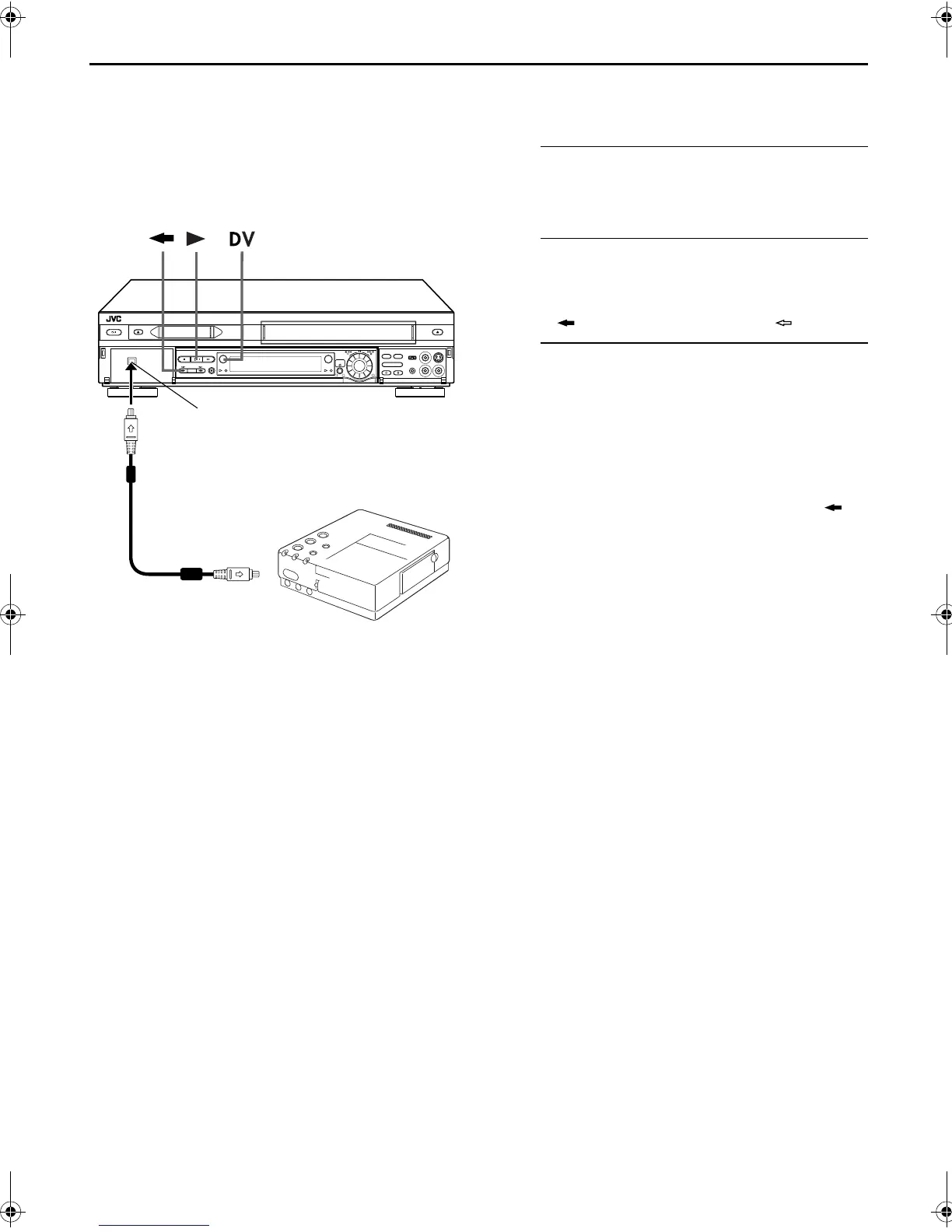
You can make printouts of video images by connecting
the GV-DT1/GV-DT3 Digital Printer (sold separately) to
the DV IN/OUT connector.
A
Make connections.
Connect the printer’s DV IN connector to the recorder’s
DV IN/OUT connector.
B
Select the deck.
Press
DV
.
● When you use the VHS deck ...
... Press . The dubbing direction indicator ( VHS) lights.
C
Start playback.
Press
4
.
● The image being displayed on the TV screen is output to the
digital printer. Any on-screen displays are not output.
NOTES:
About DV IN/OUT connector
●
To output digital signal when dubbing from the VHS deck to
other device through the DV IN/OUT connector, press
,
and then pressing
4
to start playback on the VHS deck.
●
When connecting this recorder to a device equipped with a
DV input connector, be sure to use the optional DV cable
(VC-VDV204).
1
32
Your recorder
DV cable (VC-VDV204)
(not provided)
Digital printer
To DV IN connector
DV IN/OUT
SR-VS30E_1-EN.book Page 63 Friday, February 1, 2002 3:35 PM



 To Next Page