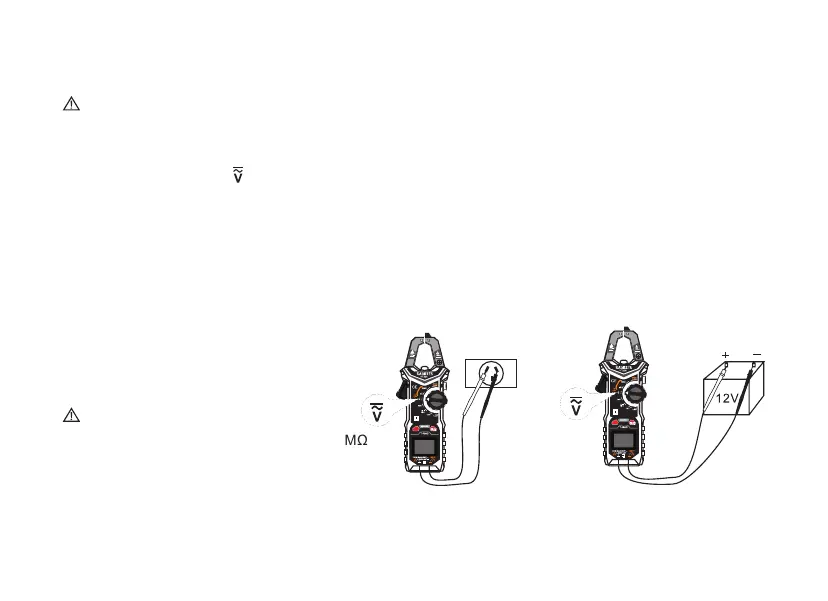
Voltage Measurement V (DC / AC)
Voltage above 600 V cannot be measured! When measuring high voltage, pay special attention to safety
to avoid electric shock or injury.
1. Set the rotary switch to , Press the "FUNC.” key to change the AC or DC voltage measurement.
2. Plug the black test lead into the COM socket and the red test lead into the INPUT socket.
3. Then bring the test probes into contact with the points to be measured.
4. Read the result on the display. If the voltage is> 80 V, the orange display lights up.
5. When measuring the AC voltage, press "FUNC.” to display the frequency result or the result of the LPF function.
6. If you are measuring low impedance, turn the rotary switch to the Low-Z position and press the "FUNC."
button to switch between AC and DC voltage.
Attention
High impedance voltage measurement: 10 MΩ
Low impedance voltage measurement: 300 kΩ
13
B
FUNC.
AC CLAMP METER
B
FUNC.
AC CLAMP METER
6/
6/
Red
Black



 To Next Page