1.When machine in READY state, press rotary
for 3 seconds to enter in the program menu,
rotate the rotary to MAINTAINCE.
2. Press the rotaryl to enter the coffee
machine maintenance menu, jog shuttle dial to "
clean brew unit " page.
3. Press the rinse button to confirm wash into "
clean brew unit " .
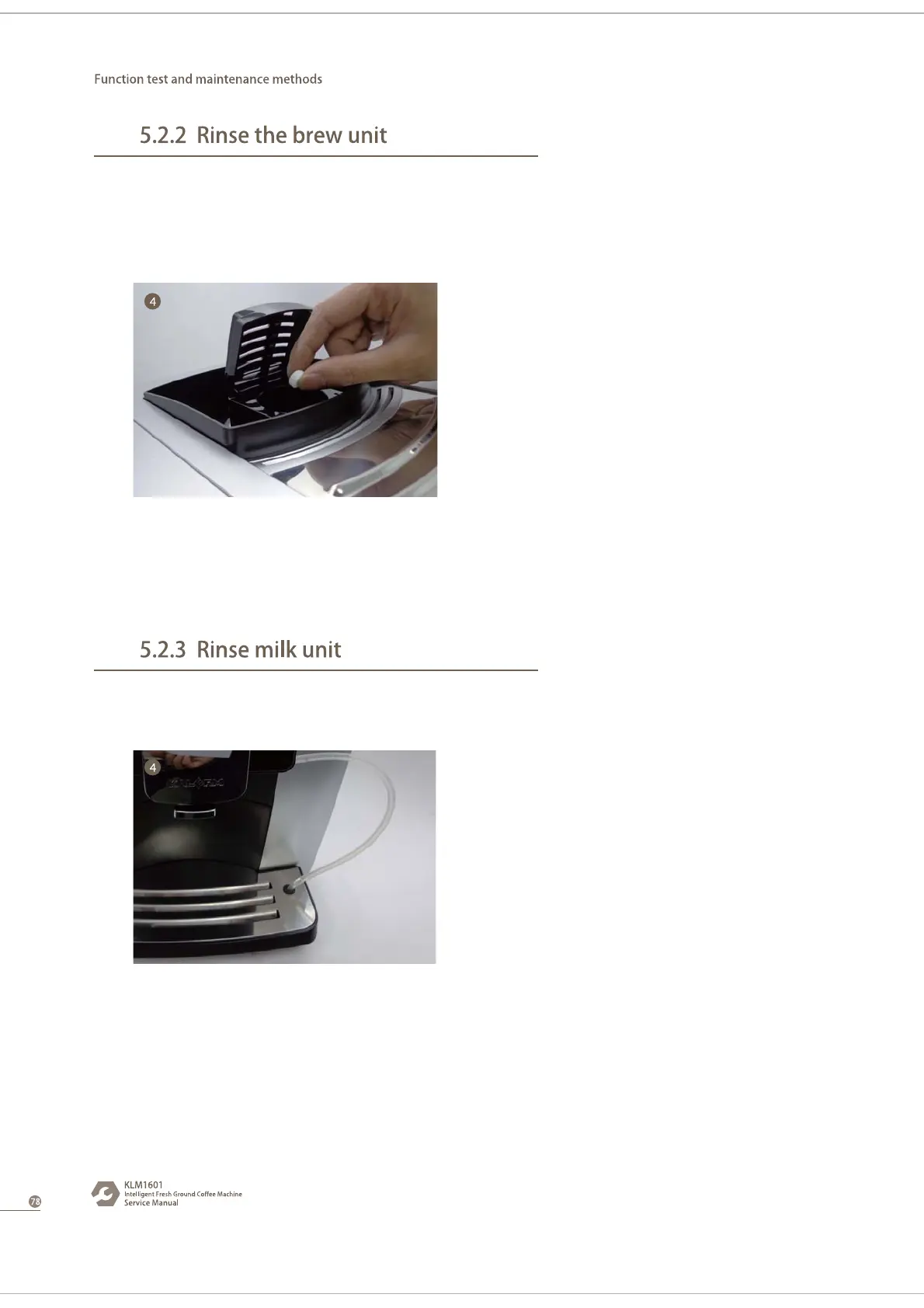
4. Follow screen prompts to clean brew unit,
cleaning brew unit process, it needs to open the
power cover, add cleaning tablets.
5. After cleaning, coffee machine enter the
Ready state.
cleaning agent
The whole process costs about 2 minutes.
1.When machine in READY state, press rotary
for 3 seconds to enter in the program menu,
rotate the rotary to MAINTAINCE.
2. Press the rotaryl to enter the coffee
machine maintenance menu, jog shuttle dial to
" rinse milk unit " page.
3. Press the rinse button to confirm wash into
" rinse milk unit " .
4. Follow the screen prompts to put the milk
tube into the hole , press the button to start
cleaning the milk unit.
5. After cleaning, coffee machine enter the
Ready state.
Use Kalerm cleaning agent only. It may damage machine if use other cleaning agent.
The whole process costs about 10 minutes.



 To Next Page