27
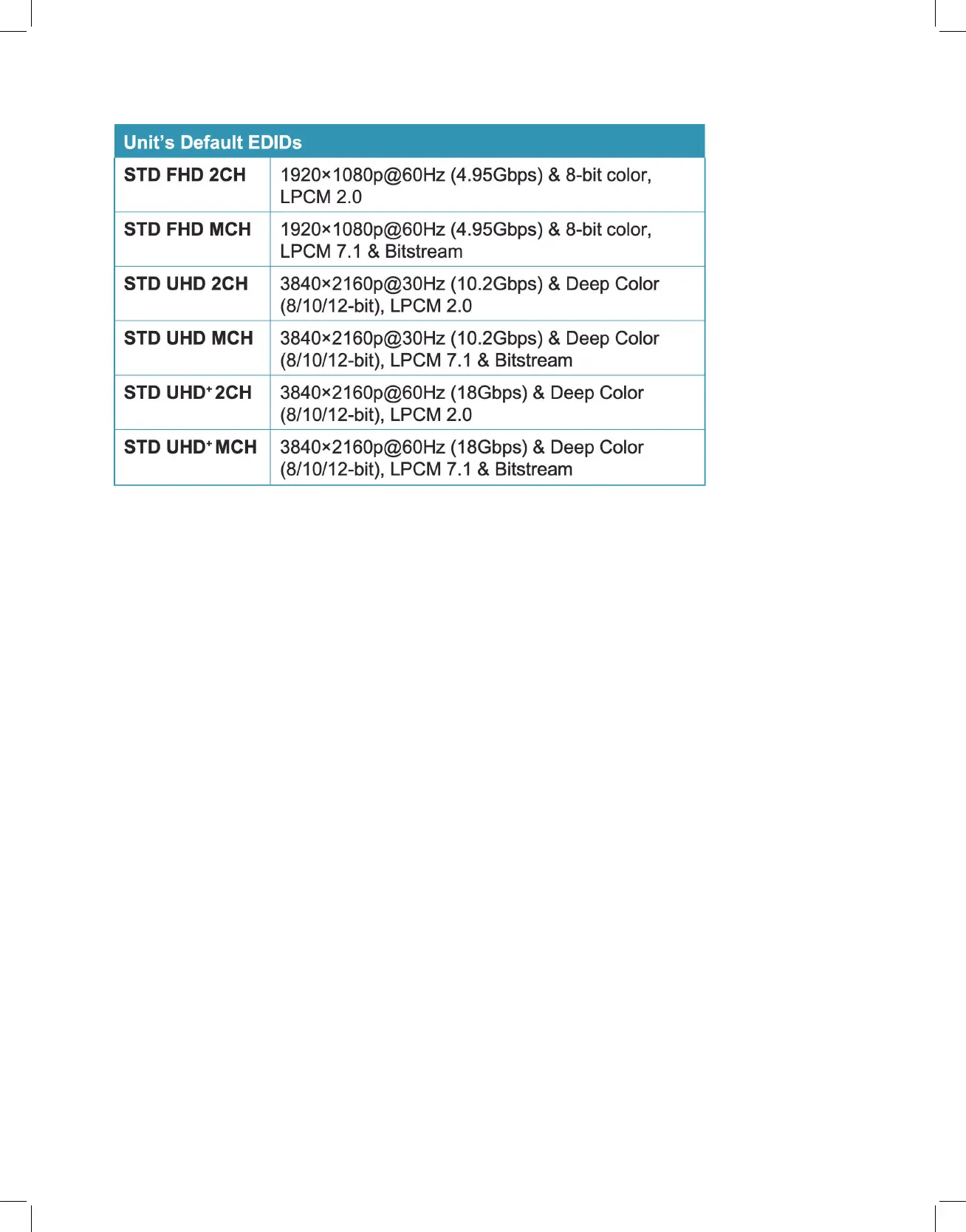
This unit provides the following 6 default EDIDs:
Note: In some rare cases it is possible for custom or external EDIDs to cause compatibility issues
with certain sources. If this happens, it is recommended to switch to one of the 7 default EDIDs for
maximum compatibility.
- Transmitter EDID: Lists all available transmitters. To copy the EDID from one of these
transmitters to one or more additional transmitters, select the preferred transmitter’s EDID
from this list and then select the transmitter(s) in the window on the left to copy the EDID
to. Click the “Execute” button in the bottom right window to finalize the assignment.
- Receiver EDID: Lists all available receivers. To copy the EDID from the display attached to
one of these receivers to one or more transmitters, select the preferred receiver’s EDID from
this list and then select the transmitter(s) in the window on the left to copy the EDID to.
Click the “Execute” button in the bottom right window to finalize the assignment.
Note: Selecting any EDID source from the EDID Options section will display the current details in
the Information window.
• Information: This window shows basic detail information about the currently
selected EDID.
• Execute: Click this button to assign the EDID currently displayed in the
Information window to all currently selected transmitters.



 To Next Page