4K/60 2x1 Wall Plate Switcher & Extender Set
6
3. Panel Description
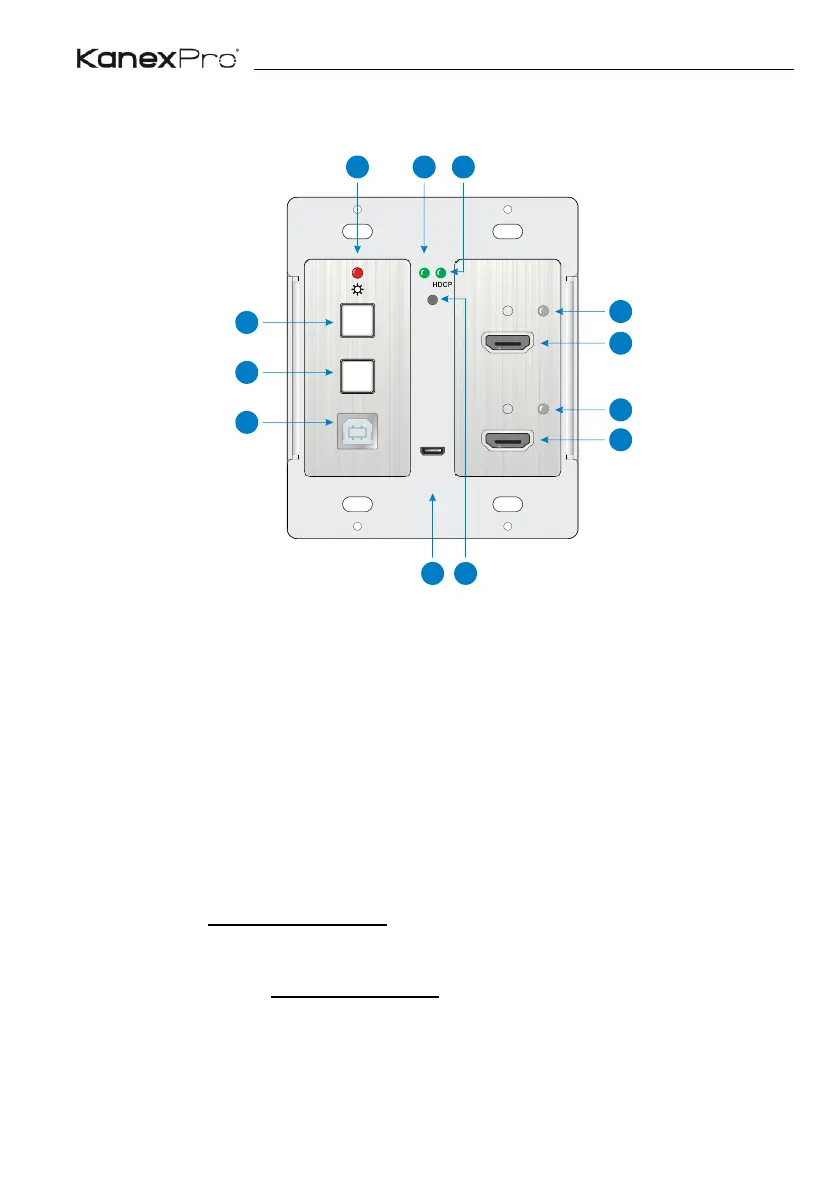
3.1 Transmitter Front Panel
① POWER LED: The LED illuminates red when power is applied.
② LINK LED: The LED illuminates green when the transmitter is successfully
connected to the receiver are by a CATx cable.
③ HDCP LED:
⚫ The LED illuminates green when the HDMI signal is transmitted with HDCP.
⚫ The LED blinks green when the HDMI signal is transmitted without HDCP.
⚫ The LED turns off when there is no HDMI signal input.
④ SOURCE SELECT: Press the button to select the next input source, or press and
hold it at least 3 seconds to enable auto-switching mode. For more details, please
refer to the 5.1 Signal Switching on the page 10.
⑤ DISPLAY ON/OFF: Press the button to turn on/off the display. For more details,
please refer to the 5.2 Display Control on the page 10.
⑥ TO PC: Type-B USB port to connect a PC or other device needs to be controlled.
⑦ HDMI IN 1 LED: The LED illuminates orange when the HDMI IN 1 port is
connected to a source device, and it will turn green once the device is selected as


 To Next Page