EasyManua.ls Logo

KanexPro WP-HDBTKVM3 - HDCP Command; Button Control User-Defined

KanexPro WP-HDBTKVM3
25 pages
Print Icon
To Next Page IconTo Next Page
To Previous Page IconTo Previous Page
Loading...
4K/60 2x1 Wall Plate Switcher & Extender Set
17
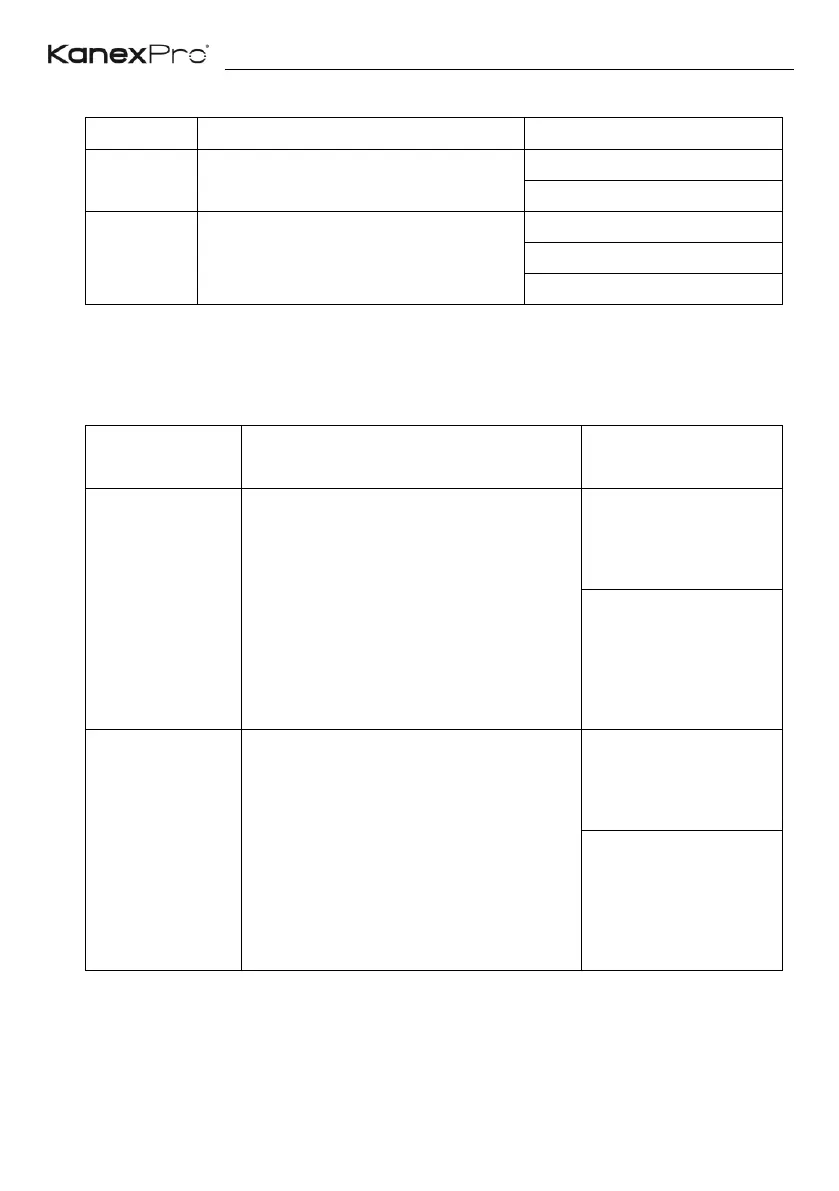
6.3.3 HDCP Command
Command
Function
Feedback Example
50709%
Get the HDCP mode
HDCP: ON
HDCP: OFF
50713%
Get the HDCP status
HDCP1.4
HDCP2.2
NO HDCP
6.3.4 Button Control User-defined
When the display is incompatible with the extender, the DISPLAY ON/OFF button can
be defined to send control characters by following command format.
Command
Format
Function
Command Example
/+kb: xxxx
k=0, Set the DISPLAY ON
k=1, Set the DISPLAY OFF
xxxx: ASCII characters
b=0, Baud rate is 2400
b=1, Baud rate is 4800
b=2, Baud rate is 9600
b=3, Baud rate is 19200
b=4, Baud rate is 38400
b=5, Baud rate is 57600
b=6, Baud rate is 115200
/+02:abc123
Set the DISPLAY ON
to send the ASCII
characters abc123.
/-kb:xx xx xx xx
k=0, Set the DISPLAY ON
k=1, Set the DISPLAY OFF
xx xx xx xx: HEX characters
b=0, Baud rate is 2400
b=1, Baud rate is 4800
b=2, Baud rate is 9600
b=3, Baud rate is 19200
b=4, Baud rate is 38400
b=5, Baud rate is 57600
b=6, Baud rate is 115200
/-12:30 31 32 33
Set the DISPLAY
OFF to send the HEX
characters 30 31 32
33.

Related product manuals