29
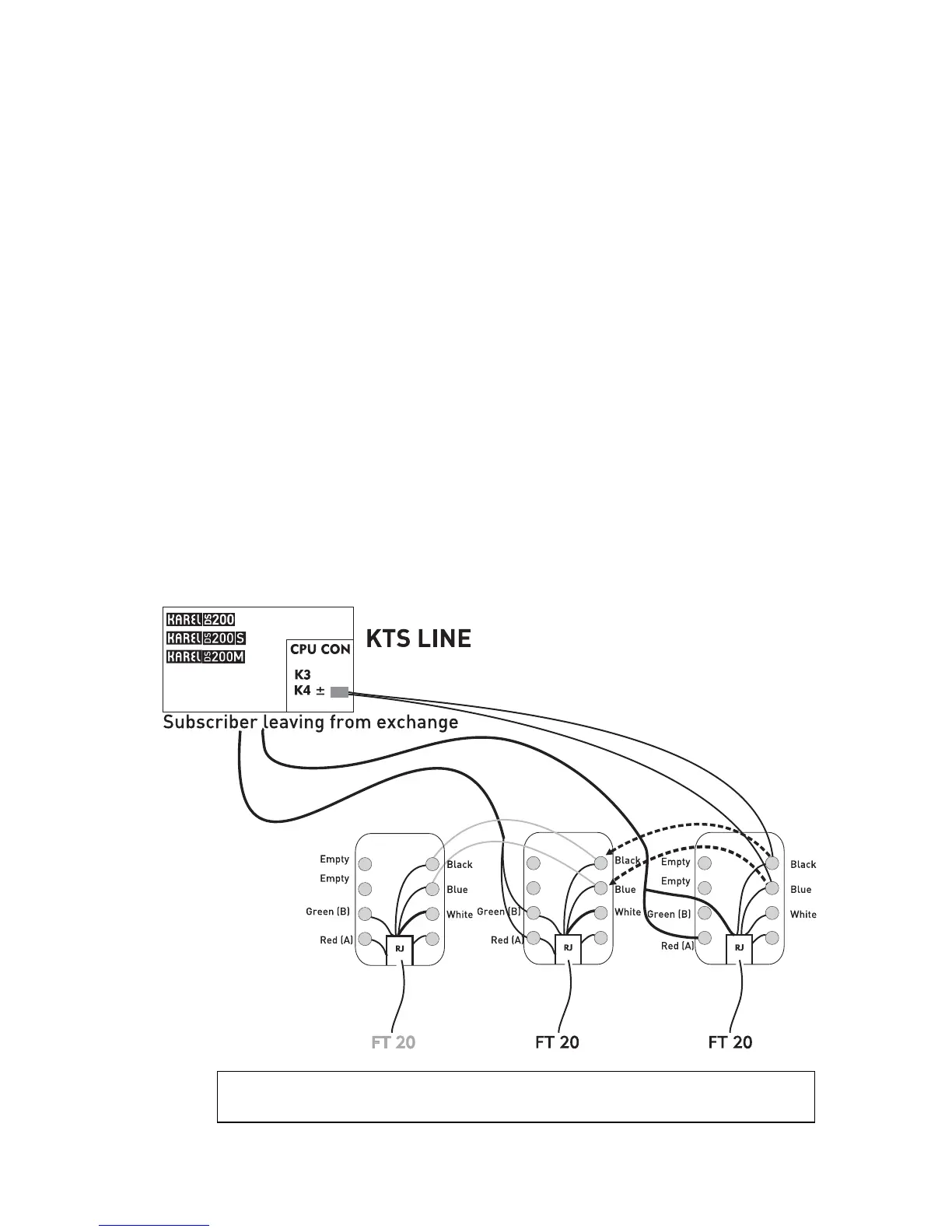
Cabling of the telephone while there is another device connected to the
KTS line of the exchange:
1) Parallel connection should be made from the connection box of the device that has
previously been connected to the KTS line to the wires that carry ground and data
(blue) and -48 VDC (black) signals and this connection should be made in the same
order to the connection box of the FT20 that is newly to be connected to the exchange.
NOTE: Short circuit or wrong order of the wires during the installation may result in
improper operation or malfunction of the exchange or the other devices that have been
connected to the KTS line.
2) Then, extension connection to FT20 should be made. In order to do that, two wires
taken from the corresponding extension connector of the exchange should be attached
to the red and green points on the connection box of FT20.
3) After the telephone has been connected, the extension settings should be done, as
will be explained in the next section.
IMPORTANT NOTE: If FT20 is to be connected over a distance longer than 5 meters,
then A-B (ring-tip) and serial data (KTS) wires should be carried over separate cables,
one should especially pay attention to employ shielded cables for long-distance
installations of serial data wires.
The illustration below shows the connection of FT20 to the exchange.
WARNING!
Check if there is any short circuit among connections.



 To Next Page